
הקדמה
א דאנק פארן קויפןasing the Optimus F-1760 16-inch Wave Oscillating Stand Fan. This manual provides important information regarding the safe operation, assembly, maintenance, and troubleshooting of your fan. Please read these instructions thoroughly before use and retain them for future reference.

Image: The Optimus F-1760 stand fan positioned in a bedroom, showcasing its design and size relative to furniture.
וויכטיק סאַפעטי אינסטרוקציעס
ווען ניצן עלעקטריקאַל אַפּפּליאַנסעס, יקערדיק פּריקאָשאַנז זאָל שטענדיק זיין נאכגעגאנגען צו רעדוצירן די ריזיקירן פון פייַער, עלעקטריש קלאַפּ און שאָדן צו מענטשן, אַרייַנגערעכנט די פאלגענדע:
- לייענען אַלע ינסטראַקשאַנז איידער איר נוצן דעם פאָכער.
- Use this fan only as described in this manual. Other uses not recommended may cause fire, electric shock, or injury to persons.
- To protect against electrical shock, do not place fan in window, immerse unit, plug or cord in water or spray with liquids.
- נאָענט השגחה איז נייטיק ווען קיין אַפּפּליאַנסע איז געניצט דורך אָדער לעבן קינדער.
- Unplug fan from outlet when not in use, when moving fan from one location to another, and before cleaning.
- Do not operate fan in the presence of explosive and/or flammable fumes.
- דו זאלסט נישט שטעלן פאָכער אָדער טיילן לעבן אַ עפענען פלאַם, קוקינג אָדער אנדערע באַהיצונג אַפּפּליאַנסעס.
- Do not operate fan with a damaged cord or plug, or after the fan malfunctions or has been dropped or damaged in any manner.
- ויסמיידן קאָנטאַקט מיט מאָווינג טיילן.
- צו דיסקאַנעקט, כאַפּן די צאַפּן און ציען פון די וואַנט ווענטיל. קיינמאָל שעפּן אויף שנור.
- שטענדיק נוצן אויף אַ טרוקן, גלייַך ייבערפלאַך.
- צי ניט הענגען אָדער אָנקלאַפּן פאָכער אויף אַ וואַנט אָדער סופיט.
- דו זאלסט נישט אַרבעטן אָן פאָכער גרילז רעכט אין פּלאַץ.
- This product employs overload protection (fuse). A blown fuse indicates an overload or short-circuit situation. If the fuse blows, unplug the product from the outlet. Replace the fuse as per the servicing instructions (follow product marking for proper fuse rating) and check the product. If the replacement fuse blows, a short-circuit may be present and the product should be discarded or returned to an authorized service facility for examination and/or repair.
סעטאַפּ און אַסעמבלי
The Optimus F-1760 fan requires minimal assembly. Ensure all components are present and undamaged before proceeding.
- באַזע אַסעמבלי: Attach the weighted base legs to the main pole. Ensure they are securely fastened to provide stability. The base is designed to be sturdy, with weights at the ends of the feet.
- הייך אַדזשאַסטמאַנט: The fan's height can be adjusted. Loosen the height adjustment knob on the pole, extend or retract the pole to the desired height, and then securely tighten the knob.
- פאָכער קאָפּ אַטאַטשמאַנט: Ensure the fan head is securely attached to the top of the pole. The motor housing and fan blade are plastic, while the grill is metal.
- אָרט: Place the fan on a dry, level surface. Ensure there is adequate space around the fan for proper air circulation and oscillation.
אַפּערייטינג ינסטראַקשאַנז
The Optimus F-1760 fan offers multiple control options and features for customized comfort.
קאָנטראָל פּאַנעל
The fan features a 4-position push-button switch on the pole for basic operation.
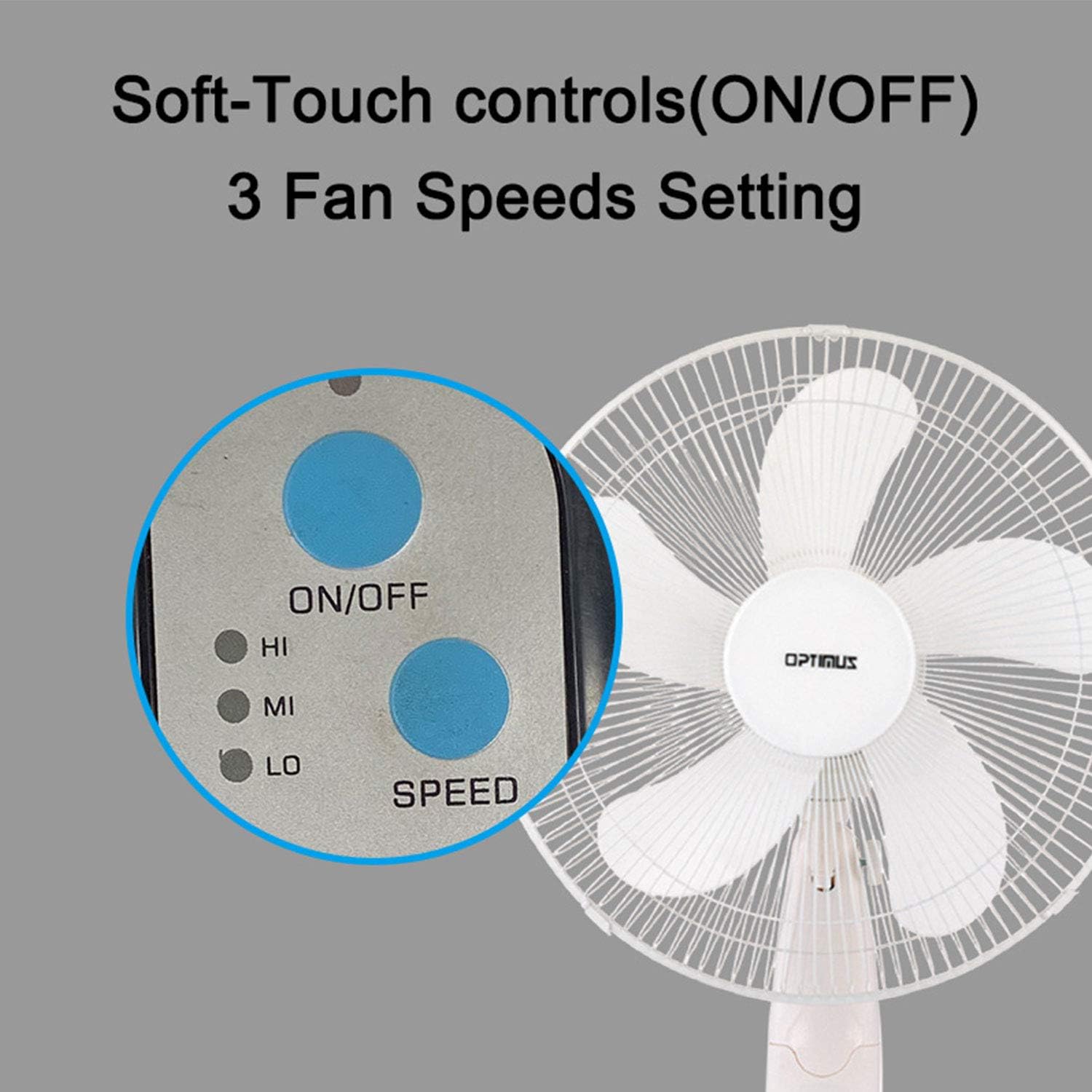
Image: The fan's soft-touch control panel, showing buttons for ON/OFF and SPEED, with indicators for High (HI), Medium (MI), and Low (LO) fan speeds.
- ON/OFF: דרוק צו קער די פאָכער אויף אָדער אַוועק.
- גיכקייַט סעטטינגס: Select from Low, Medium, or High speeds. The 3-speed, energy-saving, whisper-quiet operation motor provides efficient airflow.
ווייַט קאָנטראָל
The fan comes with a remote control for convenient operation from a distance. (Batteries not included).

Image: The remote control for the fan, featuring buttons for Mode, Time, Speed, and ON/OFF functions.
- ON/OFF: טורנס די פאָכער אויף אָדער אַוועק.
- SPEED: Cycles through the three fan speeds (Low, Medium, High).
- DIRECTIONS: Selects between different wind modes.
- צייט: Activates and sets the shut-off timer.
ווינט מאָדע
The fan offers three distinct wind modes to suit your preference:

Image: The fan's control panel highlighting the MODE button and indicators for Normal, Natural, and Sleep wind modes.
- נאָרמאַל מאָדע: The fan blows at a constant speed based on your selected setting.
- נאַטירלעך מאָדע: The fan speed fluctuates to mimic a natural breeze.
- שלאָפן מאָדע: The fan operates at a lower, quieter speed, ideal for sleeping, with gentle speed variations.
אַסאַליישאַן
The F-1760 features unique wave oscillation for comprehensive air distribution.

Image: A diagram illustrating the fan's capability for both vertical (up/down) and horizontal (left/right) wave oscillation, providing wider air coverage.
- Up/Down & Left/Right Wave Oscillating: Activates a unique oscillation pattern that moves the fan head both horizontally and vertically, distributing air throughout the room.
- To stop oscillation, press the oscillation button again.
טייַמער פֿונקציע
שטעלט דעם ווענטילאַטאָר זיך אויטאָמאַטיש אויסצושאַלטן נאָך אַ באַשטימטער צייט.

Image: The fan's control panel showing the TIME button and indicators for 1 hour (1H), 2 hours (2H), and 4 hours (4H) timer settings. The fan can be programmed for up to 7 hours.
- The timer can be set for 1, 2, 4, or up to 7 hours. Press the TIME button repeatedly to cycle through the desired duration.
וישאַלט און רייניקונג
רעגולערע רייניקונג העלפט אויפהאלטן די פען'ס פאָרשטעלונג און פארלענגערט זיין לעבנסדויער.
- איידער רייניקונג: Always unplug the fan from the electrical outlet before cleaning.
- עקסטעריאָר רייניקונג: ניצן אַ ווייך, דamp א שטאָף צו ווישן די אויסערלעכע ייבערפלאַכן פון דעם ווענטילאַטאָר. ניצט נישט קיין שרײַבנדיקע רייניגער אָדער סאָלווענטן.
- Grill Cleaning: The metal grill can be cleaned with a soft brush or vacuum cleaner to remove dust. For thorough cleaning, the grill may need to be carefully removed.
- בלייד רייניקונג: If necessary, the fan blades can be cleaned. Ensure the fan is completely off and unplugged. The care instructions specify "Hand Wash" for components.
- סטאָרידזש: ווען נישט אין באַנוץ פֿאַר לענגערע פּעריאָדן, זאָל מען האַלטן דעם ווענטילאַטאָר אין אַ קיל, טרוקן אָרט, בעסער אין זיין אָריגינעלער פּאַקאַדזשינג.
טראָובלעשאָאָטינג
| פּראָבלעם | מעגלעך סיבה | לייזונג |
|---|---|---|
| דער ווענטילאַטאָר צינדט זיך נישט אָן. | No power supply. Blown fuse. | Ensure the fan is plugged into a working outlet. Check the fuse in the plug and replace if necessary (refer to safety instructions for fuse replacement). |
| Fan operates but air movement is weak. | Low speed setting. Dust accumulation on blades/grill. | Increase the fan speed. Clean the fan blades and grills as per maintenance instructions. |
| ווייַט קאָנטראָל איז נישט ארבעטן. | Dead batteries. Obstruction between remote and fan. | Replace batteries in the remote control. Ensure a clear line of sight between the remote and the fan's receiver. |
| Fan changes speed automatically or unexpectedly. | Interference from other remote controls (e.g., TV remote). | This fan may respond to frequencies from other remote controls. Try operating the fan manually or repositioning the fan/other devices to minimize interference. |
| Fan makes clicking noises during oscillation. | Normal operation of oscillation gears. | A slight clicking noise from the oscillation gears can occur during normal operation. If the noise is excessive or new, ensure the fan head is securely attached. |
| Fan feels unstable. | Base not properly assembled or tightened. Uneven surface. | Ensure all base components are securely fastened and the fan is placed on a firm, level surface. |
ספּעסאַפאַקיישאַנז
- מאָדעל נאָמען: F-1760
- סאָרט: Optimus
- פאַן דיאַמעטער: 16 אינטשעס
- עלעקטריק פאַן פּלאַן: פלאָר פאַן
- מאַכט מקור: קאָרדעד עלעקטריק
- וואָסtage: 60 וואטס
- Voltage: 6 וואלטס
- נומער פון בלאַדעס: 3
- גיכקייַט סעטטינגס: 3 רפּם (נידעריק, מיטל, הויך)
- קאָנטראָל אופֿן: ווייַט, פּוש קנעפּל
- ספּעציעלע פֿעיִקייטן: Up/Down & Left/Right Wave Oscillating, Adjustable Height, Timer Function (up to 7 hours), Wind Modes (Normal, Natural, Sleep)
- דרינענדיק / דרויסנדיק באַניץ: דרינענדיק
- נומער וואָג: 9.9 פונט
- אַרייַנגערעכנט קאַמפּאָונאַנץ: פּראָדוקט, מאַנואַל
וואָראַנטי אינפֿאָרמאַציע
This Optimus F-1760 fan comes with a 1-יאָר לימיטעד וואָראַנטי from the date of purchase. This warranty covers defects in materials and workmanship under normal use. It does not cover damage resulting from misuse, accident, alteration, or unauthorized repair. Please retain your proof of purchase for warranty claims.
קונה שטיצן
For technical assistance, warranty claims, or questions regarding your Optimus F-1760 fan, please contact Optimus customer service. Refer to the product packaging or the official Optimus webזייטל פֿאַר די מערסט אַקטועלע קאָנטאַקט אינפֿאָרמאַציע.