
OSD Audio SVC205
OSD Audio SVC205 In-Wall Volume Control User Manual
Model: SVC205 | Brand: OSD Audio
הקדמה
This manual provides detailed instructions for the installation, operation, and maintenance of your OSD Audio SVC205 In-Wall Volume Control. Please read this manual thoroughly before installation and use to ensure proper function and safety.
The OSD Audio SVC205 is a high-quality in-wall volume control designed to manage audio levels for a pair of speakers in a multi-room audio system. It features a 12-step linear rotary knob for precise volume adjustment and an integrated on/off switch for complete audio control.
זיכערקייַט אינפֿאָרמאַציע
- Always disconnect power before installation or servicing.
- זיכער מאַכן אַז אַלע וויירינג קאַנעקשאַנז זענען זיכער און אין לויט מיט די לאָקאַלע עלעקטרישע קאָודז.
- Do not exceed the maximum power rating of 100 Watts per channel.
- דער מיטל איז דיזיינד בלויז פֿאַר דרינענדיק נוצן.
- Consult a qualified electrician if you are unsure about any installation steps.
פּראָדוקט פֿעיִקייטן
- מאַכט האַנדלינג: Rated at 100 Watts per channel with minimal bass roll-off.
- באַנד קאָנטראָל: 12-step linear rotary-style knob for precise volume adjustment.
- אָנ / אַוועק באַשטימען: Integrated switch for completely turning off audio.
- Impedance Protection: Assists in stabilizing the ohm load to prevent amplifier damage when multiple speakers are connected.
- Adjustable Jumpers: Front-mounted adjustable jumpers for easy impedance adjustment.
- פּלאַן: Décor plates designed for easy installation into a standard single gang box (2.9” depth).
- וויירינג: Accepts up to 14 gauge wiring.
פּעקל אינהאַלט
- OSD Audio SVC205 In-Wall Volume Control Unit
- Matching Wall Plate
- מאַונטינג סקרוז
סעטאַפּ און ינסטאַלירונג
Proper installation is crucial for optimal performance and safety. If you are not comfortable with electrical wiring, please consult a professional installer.
מכשירים פארלאנגט:
- שרויפנ - ציער (פיליפּס און פלאַטהעאַד)
- דראָט סטריפּערז
- עלעקטרישע טייפּ (אפציאָנעל)
- Voltage טעסטער (רעקאָמענדירט)
Wiring Diagram and Connections:
The SVC205 features screw terminals for secure wire connections. Ensure proper polarity (positive to positive, negative to negative) for all connections.
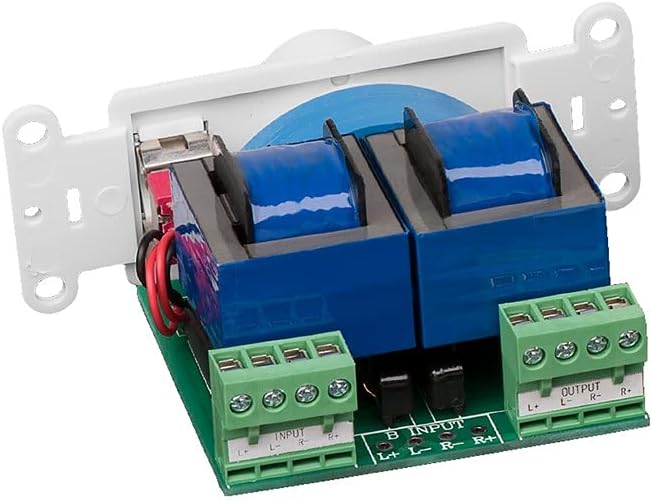
בילד: הינטערשטע view of the SVC205 showing the input and output screw terminals for speaker wire connections. The green terminal blocks are clearly labeled for Left and Right channels, and positive (+) and negative (-) connections.

Image: A visual representation of speaker wire (red and black) being connected to the input terminals of the SVC205 volume control. This illustrates the type of wiring accepted by the unit.
- קער אַוועק מאַכט: Before beginning any wiring, ensure that the power to the audio system and the circuit where you are installing the volume control is completely turned off at the main breaker.
- צוגרייטן ווירעס: Strip approximately 1/2 inch of insulation from the ends of your speaker wires. The SVC205 accepts up to 14 gauge wiring.
- פֿאַרבינדן די אַרייַנגאַנג דראָטן: פאַרבינדן די רעדנער ווירעס פֿון דיין amplifier or receiver to the "INPUT" terminals on the SVC205. Match the positive (+) and negative (-) terminals for both Left (L) and Right (R) channels.
- פֿאַרבינדן די אַרויסגאַנג דראָטן: Connect the speaker wires leading to your speakers to the "OUTPUT" terminals on the SVC205. Again, ensure correct polarity for Left (L) and Right (R) channels.
- Adjust Impedance Jumpers (if applicable): The SVC205 includes front-mounted adjustable jumpers for impedance matching. Refer to the diagram below for typical settings. Adjust these jumpers based on the total impedance of your connected speakers to prevent overheating and damage to your ampליפער.
- מאָונטינג: Carefully push the wired SVC205 unit into a standard single gang electrical box. The unit requires a minimum depth of 2.9 inches. Secure the unit to the electrical box using the provided mounting screws.
- ינסטאַלירן וואנט פּלאַטע: Attach the matching wall plate over the installed volume control unit.
- ומקערן מאַכט: Once all connections are secure and the unit is mounted, restore power to the circuit.

Image: A close-up diagram illustrating the location and configuration of the impedance protection jumpers on the SVC205 circuit board. These jumpers allow for adjustment to match the impedance of connected speakers.
אַפּערייטינג ינסטראַקשאַנז
The OSD Audio SVC205 is simple to operate:

בילד: פראָנט view of the OSD Audio SVC205 In-Wall Volume Control, showing the prominent rotary volume knob and the smaller on/off toggle switch located below it.
- מאַכט אויף / אַוועק: Use the small toggle switch located below the rotary knob to turn the audio on or off. Flipping the switch will completely mute or unmute the sound.
- באַנד אַדזשאַסטמאַנט: Rotate the large knob clockwise to increase the volume and counter-clockwise to decrease it. The 12-step linear design provides precise control over the audio level.

Image: A graphic illustrating the 12-step linear rotary action of the volume knob, indicating the range of precise volume control available.
וישאַלט
The OSD Audio SVC205 requires minimal maintenance.
- רייניקונג: Use a soft, dry cloth to clean the surface of the wall plate and knob. Do not use abrasive cleaners or solvents.
- דורכקוק: Periodically check the wall plate for any signs of damage or loose connections. If any issues are found, disconnect power and address them promptly.
- קיין באַניצער סערוויסאַבלע פּאַרץ: The internal components of the SVC205 are not user-serviceable. Do not attempt to open or repair the unit.
טראָובלעשאָאָטינג
| פּראָבלעם | מעגלעך סיבה | לייזונג |
|---|---|---|
| קיין געזונט פון ספּיקערז. |
|
|
| Distorted or low-quality sound. |
|
|
| Unit does not fit in electrical box. |
|
|
ספּעסאַפאַקיישאַנז
| מאָדעל נאָמען | SVC205 |
| מאַכט האַנדלינג | 100 Watts per channel (300 Watts total) |
| Volume Control Type | 12-step linear rotary |
| Impedance Protection | Yes, with adjustable jumpers |
| וויירינג קאַמפּאַטאַבילאַטי | Up to 14 gauge |
| מאַונטינג טיפּ | In-Wall (fits standard single gang box) |
| מינימום קעסטל טיפקייַט | 2.9 אינטשעס |
| קאָליר | ווייַס |
| דימענשאַנז (פּראָדוקט) | 6 X 3 X 3 אינטשעס (בעערעך) |
| פּונקט וואָג | 0.01 אונסעס |
| דרינענדיק / דרויסנדיק באַניץ | דרינענדיק |
וואָראַנטי און שטיצן
OSD Audio products are designed for reliability and performance. For warranty information and technical support, please visit the official OSD Audio webפּלאַץ אָדער קאָנטאַקט זייער קונה סערוויס אָפּטיילונג.
פאַבריקאַנט: OSD אַודיאָ
Webפּלאַץ: www.osdaudio.com
For further assistance, refer to the contact information provided on the manufacturer's webפּלאַץ.
Ask a question about this manual
Ask about setup, troubleshooting, compatibility, parts, safety, or missing instructions. Manuals+ will review the question and use this page’s manual context to help answer it.