
1. הקדמה
Thank you for choosing the SHARP KC850U Air Purifier and Humidifier. This appliance is designed to improve indoor air quality and maintain optimal humidity levels in medium-sized rooms. It combines a multi-stage filtration system with Plasmacluster Ion Technology to effectively reduce airborne particles, odors, and maintain a comfortable environment.
Please read this manual thoroughly before operating the unit to ensure safe and efficient use. Keep this manual for future reference.
2. זיכערקייַט אינפֿאָרמאַציע
To reduce the risk of electric shock, fire, or injury, always follow basic safety precautions when using electrical appliances:
- דו זאלסט נישט אַרבעטן די אַפּאַראַט מיט אַ דאַמידזשד שנור אָדער צאַפּן.
- שטעלט נישט דעם אַפּאַראַט לעבן היץ־קוואַלן אדער אין דירעקטער זון.
- מאַכן זיכער אַז די אַפּאַראַט איז געשטעלט אויף אַ סטאַביל, גלייַך ייבערפלאַך.
- דו זאלסט נישט פאַרשפּאַרן לופט ינלעץ אָדער אַוטלעץ.
- נעמט ארויס דעם אַפּאַראַט איידער איר רייניגט אדער פירט אויס קיין שום אויפהאלטונג.
- ייַנטונקען די אַפּאַראַט נישט אין וואַסער אָדער אנדערע ליקווידס.
- האַלטן אויס פון דערגרייכן פון קינדער און פּעץ.
- Use only genuine SHARP replacement parts and filters.
3. פּראָדוקט איבערview
The SHARP KC850U integrates air purification and humidification functions into a single unit. Key components include the air intake, air outlet, control panel, dust and humidity sensors, and water tank.

פיגורע 3.1: פראָנט view of the SHARP KC850U Air Purifier and Humidifier, showing the control panel and display.
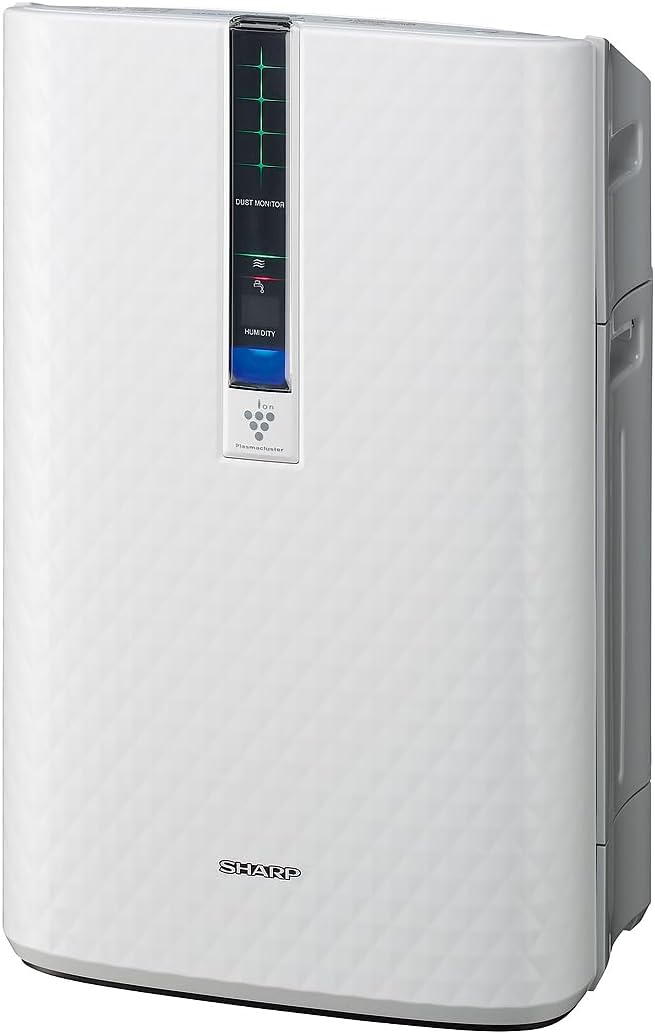
פיגורע 3.2: זייַט view of the SHARP KC850U, illustrating its compact design.
קאָנטראָל פּאַנעל און ווייַז
The unit features an intuitive control panel and a display that provides real-time information on air quality and humidity levels.

פיגורע 3.3: Top view of the control panel, showing buttons for power, fan speed, modes, and light control.
- מאַכט קנעפּל: טורנס די אַפּאַראַט אויף אָדער אַוועק.
- פאָכער ספּיד קנעפּל: Cycles through Max, Med, and Low fan speeds.
- מאָדע קנעפּל: Selects operating modes including Auto, Pollen, and Quick Clean.
- ליגהץ קנעפּל: Adjusts the brightness of the display lights (Bright, Dim, Off).
- Dust Monitor: Visual indicator of air impurity levels (e.g., green for clean, red for high impurity).
- הומידיטי ווייַז: Shows the current relative humidity percentage.
4. סעטאַפּ
4.1 אַנפּאַקינג
- קערפאַלי אַראָפּנעמען די אַפּאַראַט פון זייַן פּאַקקאַגינג.
- Remove all protective materials and plastic bags.
- Ensure all filters are properly installed before first use. Refer to the Maintenance section for filter installation details.
4.2 פּלייסמאַנט
For optimal performance, place the air purifier in a location where air can circulate freely. Avoid placing it directly against a wall or furniture that might obstruct air intake or output.
- Recommended for use in bedrooms, living rooms, studies, or exercise rooms.
- Ensure at least 12 inches (30 cm) of clear space around the unit.
- Place on a firm, level surface.
4.3 אָנפֿילן דעם וואַסער טאַנק (פֿאַר פֿײַכטונג)
If you intend to use the humidification function, fill the water tank:
- Remove the water tank from the side of the unit.
- Open the tank cap and fill with clean tap water.
- מאַכט זיכער צו דעם דעקל און שטעלט צוריק דעם וואַסער טאַנק אין דעם אַפּאַראַט.
5. אַפּערייטינג ינסטרוקטיאָנס
5.1 מאַכט אויף / אַוועק
דרוק די מאַכט קנעפּל צו קער די אַפּאַראַט אויף אָדער אַוועק.
5.2 אויסוואל פון פען גיכקייט
דרוק די פאַן ספּיד button repeatedly to cycle through the available fan speeds:
- מאַקס: Highest air purification and humidification.
- מעד: Moderate operation.
- נידעריק: Quiet operation, suitable for sleeping (as quiet as 23 dBA).
5.3 מאָדע סעלעקציע
דרוק די מאָדע button repeatedly to select an operating mode:
- אַוטאָ מאָדע: The unit automatically adjusts fan speed and humidification based on sensor readings for air quality and humidity.
- שטויב מאָדע: אָפּטימיזירט פֿאַר פּאָלען באַזייַטיקונג.
- שנעל רייניקונג מאָדע: Releases high-density Plasmacluster ions for rapid air purification.
5.4 פּלאַזמאַקלאַסטער יאָן טעכנאָלאָגיע
The Plasmacluster Ion Technology actively disperses positive and negative ions into the air to help reduce microscopic pollutants. This function operates automatically with the unit. A slight clicking sound may be audible during operation, which is normal.
5.5 ווייַז ליכט קאָנטראָל
דרוק די לייץ button to adjust the brightness of the display indicators:
- ליכטיק: Full illumination.
- טונקל: Reduced illumination.
- אויסגעלאשן: Display lights are off, suitable for dark rooms.

פיגורע 5.1: Display showing 'Lo' for low humidity and green dust monitor indicators.

פיגורע 5.2: Display showing 'Hi' for high humidity and red dust monitor indicators, indicating higher impurity levels.
6. וישאַלט
Regular maintenance ensures optimal performance and extends the lifespan of your SHARP KC850U. Always unplug the unit before cleaning or replacing filters.
6.1 Filter System Overview
The KC850U utilizes a triple filtration system:
- וואַשעוודיק פאַר-פילטער: Traps large airborne particles like dust and pet dander.
- Activated Carbon Deodorizing Filter: Helps reduce common household odors.
- אמת HEPA פילטער: Captures 99.97% of particles 0.3 microns and larger.
- Humidifying Filter: Used for the humidification function.

פיגורע 6.1: Diagram showing the air purification process through the humidifying filter, True HEPA filter, carbon filter, and pre-filter.
6.2 פילטער רייניקונג און אויסטויש
- פאַר-פילטער: Clean regularly by vacuuming or washing with water. Allow to dry completely before reinstallation.
- Activated Carbon Deodorizing Filter: May be washed. Refer to the filter's specific instructions for cleaning frequency and method. Replace as needed, typically every 2-5 years depending on usage and environment.
- אמת HEPA פילטער: This filter is not washable. Replace typically every 2-5 years, depending on usage and environment. The unit will indicate when replacement is due.
- Humidifying Filter: Clean regularly to prevent mineral buildup. Replace as needed, typically every 2-5 years depending on water quality and usage.
Actual filter life may vary significantly based on air quality, usage frequency, and environmental conditions.
6.3 אַלגעמיינע רייניקונג
- ווישן די יקסטיריער פון די אַפּאַראַט מיט אַ ווייך, דamp שטאָף.
- Clean the dust and humidity sensors periodically to ensure accurate readings.
- Clean the water tank and humidifying tray regularly to prevent mold or bacteria growth.
7. טראָובלעשאָאָטינג
If you encounter issues with your SHARP KC850U, refer to the following common problems and solutions:
| פּראָבלעם | מעגלעך סיבה | לייזונג |
|---|---|---|
| אַפּאַראַט טוט נישט קער אויף. | Power cord not properly plugged in; no power at outlet. | Check power connection; test outlet with another device. |
| Air purification/humidification is ineffective. | Filters are dirty or clogged; water tank is empty (for humidification). | Clean or replace filters as per Maintenance section; refill water tank. |
| Unusual noise (e.g., clicking). | Normal operation of Plasmacluster Ion generator; foreign object in fan. | A slight clicking is normal. If noise is excessive, unplug and check for obstructions. |
| Odor persists or unit emits strange smell. | Carbon filter saturated; new unit odor; mold in water tank. | Replace carbon filter; new unit odor will dissipate; clean water tank and humidifying filter. |
| Humidity level not increasing. | Water tank empty; humidifying filter dirty or damaged. | Refill water tank; clean or replace humidifying filter. |
אויב די פראבלעם בלייבט נאך פרובירן די לייזונגען, ביטע קאנטאקטירט SHARP קאסטומער סופארט.
8. ספּעסאַפאַקיישאַנז
| שטריך | באַשרייַבונג |
|---|---|
| מאָדעל נומער | KC850U |
| סאָרט | שאַרף |
| קאָליר | ווייַס |
| פּראָדוקט דימענשאַנז (ד רענטגענ וו רענטגענ ה) | 10.5" x 14.87" x 23.11" |
| פּונקט וואָג | 20.5 פונט |
| רעקאָמענדירטע שטאָק שטח | 254 Square Feet (4.8 air changes/hour) |
| ראַש מדרגה | 23 dBA (Quiet Sleep setting) to 36 dB (typical) |
| פּאַרטאַקאַל ריטענשאַן גרייס | 0.3 Micrometer (HEPA filter) |
| קאָנטראָללער טיפּ | קנעפּל קאָנטראָל |
| וואָסtage | 50 וואטס |
| CADR (Smoke / Dust / Pollen) | 164 / 164 / 174 |
| סערטיפיקאַטיאָנס | ENERGY STAR ראַטעד, AHAM וועריפייד טעסטעד, CARB סערטיפיצירט |

פיגורע 8.1: Dimensions of the SHARP KC850U unit.

פיגורע 8.2: Room coverage diagram, showing 254 sq. ft. for 4.8 air changes per hour.
9. וואָראַנטי און שטיצן
9.1 וואָראַנטי אינפֿאָרמאַציע
The SHARP KC850U Air Purifier and Humidifier comes with a 1-יאָר לימיטעד וואָראַנטי. Please retain your proof of purchase for warranty claims. For detailed terms and conditions, refer to the warranty card included with your product or visit the official SHARP webפּלאַץ.
9.2 קונה שטיצן
For technical assistance, troubleshooting beyond this manual, or to inquire about replacement parts and filters, please contact SHARP customer support. Contact information can typically be found on the SHARP official webוועבזייטל אדער אויף דער פּראָדוקט פּאַקאַדזשינג.