
1. הקדמה
The Antec TruePower TPQ-1200 is a high-performance 1200-watt power supply designed for demanding computer systems. It features an 80 PLUS Silver certification, indicating high energy efficiency, and provides stable power delivery through its six +12V rails. This manual provides essential information for the safe installation, operation, and maintenance of your TPQ-1200 power supply.
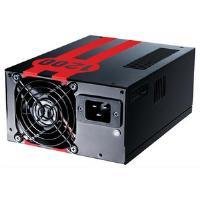
Image 1.1: The Antec TruePower TPQ-1200 Power Supply unit, showcasing its design and modular connectors.
2. זיכערקייַט אינפֿאָרמאַציע
Please read and understand all safety instructions before installing or operating the power supply. Failure to do so may result in personal injury or damage to your equipment.
- Always disconnect the power cord from the wall outlet before installing, removing, or cleaning the power supply.
- די מאַכט צושטעל איז דיזיינד פֿאַר נוצן בלויז אין פּערזענלעכע קאָמפּיוטערס. ניצט עס נישט פֿאַר קיין אַנדער צוועק.
- עפֿנט נישט די מאַכט־צושטעל casinז. הויך באַנדtages are present inside, and there are no user-serviceable parts. Opening the casing וועט בטל מאַכן די וואָראַנטי.
- זיכער מאַכן אַז אייער קאָמפּיוטער סיסטעם איז געהעריק גראַונדינג.
- Avoid operating the power supply in high humidity or extreme temperature environments.
- Keep the power supply away from liquids and sources of heat.
3. פּעקל אינהאַלט
באַשטעטיקן אַז דיין פּעקל כּולל די פאלגענדע זאכן:
- Antec TruePower TPQ-1200 Power Supply Unit
- Modular Cable Set (PCIe, SATA, Molex, Floppy)
- אַק מאַכט שנור
- מאַונטינג סקרוז
- באַניצער מאַנואַל (דעם דאָקומענט)
If any items are missing or damaged, please contact your retailer or Antec customer support.
4. פֿעיִקייטן
The Antec TruePower TPQ-1200 power supply offers advanced features for reliable and efficient performance:
- 1200 וואטס קאנטינעווער מאַכט: גיט ample power for high-end gaming and workstation systems.
- 80 PLUS Silver Certified: דערגרייכט ביז 88% עפעקטיווקייט, רעדוצירט היץ דזשענעריישאַן און אַפּערייטינג קאָס.
- Six +12V Rails: Delivers stable and clean power to critical components.
- Advanced Cable Management: Semi-modular design allows for cleaner builds and improved airflow.
- PowerCache High Performance Capacitors: Enhances stability and transient response.
- Ultra-Quiet Pulse Width Modulation (PWM) Fan: Provides efficient cooling with minimal noise.
- Industrial Grade Protection Circuitry: Includes Over Current Protection (OCP), Over VoltagE פּראַטעקשאַן (אָוופּ), אונטער חלקtage Protection (UVP), Short Circuit Protection (SCP), Over Power Protection (OPP), and Over Temperature Protection (OTP).
5. סעטאַפּ און ייַנמאָנטירונג
Follow these steps carefully to install your Antec TruePower TPQ-1200 power supply.
5.1 פאַר-ינסטאַללאַטיאָן טשעקליסט
- Ensure your computer case supports an ATX power supply.
- זאַמלען די נויטיקע מכשירים: אַ פיליפּס קאָפּ שרויפנציער.
- Unplug your computer from the wall outlet and discharge any residual power by pressing the power button.
5.2 מאָונטינג די מאַכט צושטעלן
- Carefully place the power supply into the designated PSU bay in your computer case. Ensure the fan is oriented correctly (typically facing down for bottom-mounted PSUs, or according to case design for top-mounted).
- Align the screw holes on the power supply with those on the case.
- Secure the power supply using the provided mounting screws. Do not overtighten.
5.3 קאַנעקטינג מאַכט קאַבלעס
Connect the necessary cables to your motherboard and components. The TPQ-1200 features both fixed and modular cables.
- 24-Pin ATX Motherboard Power: Connect the main 24-pin connector to the corresponding port on your motherboard. Ensure it clicks into place.
- 8-Pin EPS12V (CPU) Power: Connect the 8-pin (or 4+4 pin) EPS12V connector to the CPU power port on your motherboard.
- PCIe (Graphics Card) Power: For graphics cards requiring additional power, connect the appropriate 6-pin or 6+2 pin PCIe modular cables from the power supply to your graphics card(s).
- SATA מאַכט: Connect SATA modular cables to your SATA hard drives, SSDs, and optical drives.
- Molex (Peripheral) Power: Use Molex modular cables for older peripherals or case fans that require this connector type.
- קאַבלע פאַרוואַלטונג: Route cables neatly behind the motherboard tray or in other designated areas of your case to improve airflow and aesthetics.
5.4 ערשט מאַכט-אויף
- מאַכן זיכער אַז אַלע קאַנעקשאַנז זענען זיכער.
- פֿאַרבינדט דעם AC מאַכט שנור צום מאַכט צושטעל און דערנאָך צו אַ געערדטע וואַנט ווענטיל.
- דרייט דעם מאַכט קנעפּל אויף דער צוריק פון דער מאַכט צושטעלן צו דער 'ON' (I) פּאָזיציע.
- מאַכט אויף דיין קאָמפּיוטער.
6. אַפּערייטינג ינסטרוקטיאָנס
The Antec TruePower TPQ-1200 is designed for continuous operation within its specified limits. Ensure adequate ventilation around your computer case to prevent overheating. The intelligent PWM fan will adjust its speed based on the power supply's temperature to maintain optimal cooling and noise levels.
Always shut down your computer properly through the operating system before turning off the power supply switch or unplugging the AC cord.
7. וישאַלט
Regular maintenance helps ensure the longevity and optimal performance of your power supply.
- שטויב רייניקונג: Periodically (e.g., every 6-12 months), disconnect the power supply from the wall outlet and use compressed air to gently clean dust from the fan grille and ventilation openings. Do not open the power supply casing.
- קאַבלע דורכקוק: Occasionally check all power cable connections to ensure they are secure and free from damage.
8. טראָובלעשאָאָטינג
If you encounter issues with your power supply, refer to the following troubleshooting guide:
| פּראָבלעם | מעגלעך סיבה | לייזונג |
|---|---|---|
| דער קאָמפּיוטער גייט נישט אָן. | AC power cord not connected or loose. Power supply switch is OFF. Faulty power supply. | Ensure AC cord is firmly connected. Flip PSU switch to 'ON' (I). Test with another power supply if possible. |
| סיסטעם צינדט זיך אן אבער שליסט זיך אפ גלייך. | Overload, short circuit, or overheating. | Check for short circuits (e.g., loose screws). Ensure adequate ventilation. Disconnect non-essential components to check for overload. |
| System instability or random reboots. | Insufficient power, faulty component, or power supply issue. | Verify all power connectors are secure. Ensure total system wattage does not exceed PSU capacity. Test components individually if possible. |
| הויך פען ראַש פון PSU. | Dust accumulation, fan malfunction, or high load. | Clean dust from the fan grille. If noise persists and is excessive, contact support. |
If troubleshooting steps do not resolve the issue, contact Antec customer support for further assistance.
9. ספּעסאַפאַקיישאַנז
Detailed technical specifications for the Antec TruePower TPQ-1200 power supply:
- מאָדעל נאָמען: TruePower TPQ-1200
- רעזולטאַט וואָסtage: 1200 וואטס
- פאָרם פאַקטאָר: ATX12V
- קאַנעקטער טיפּ: אַטקס
- עפעקטיווקייַט: 80 PLUS Silver Certified
- קאָאָלינג אופֿן: Air (PWM Fan)
- פאַנס נומער: 1
- קאַמפּאַטאַבאַל דעוויסעס: פערזענלעכע קאָמפּיוטער
- נומער וואָג: 4.96 פונט (2.25 קג)
- פּעקל דימענשאַנז: 12.91 X 9.84 X 5.59 אינטשעס (32.8 X 25 X 14.2 סענטימעטער)
- ערשטער דאַטע בנימצא: 17 אפריל 2012
10. וואָראַנטי און שטיצן
For warranty information and technical support, please refer to the official Antec website or contact their customer service directly. Warranty terms and conditions may vary by region and purchase date.
Antec Official Webפּלאַץ: www.antec.com