
1. פּראָדוקט איבערview
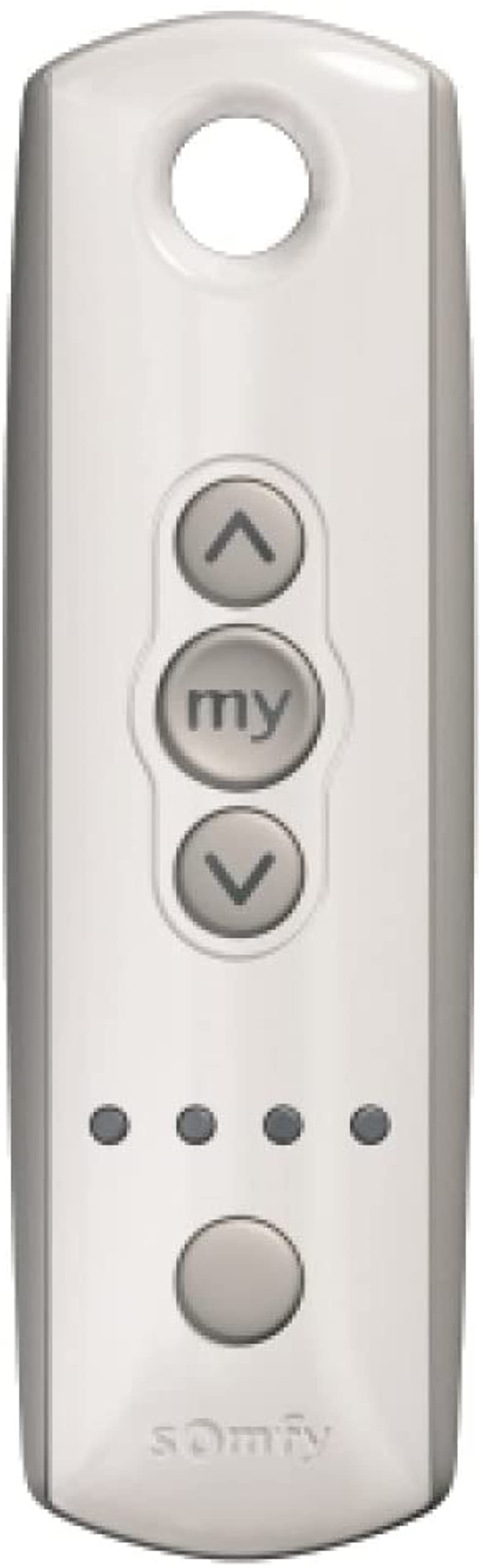
The Somfy Telis 4 RTS Pure Remote is a 5-channel radio remote control designed for operating Somfy RTS motorized window coverings. It enables individual or group control of up to five window coverings or groups of coverings. This remote also features a 'my' button for memorizing and recalling a favorite position. Its ergonomic design and durable rubber edging ensure comfortable and long-lasting use.
2. סעטאַפּ
2.1 באַטאַרייע ייַנמאָנטירונג
The Telis 4 RTS Pure Remote requires one CR2 battery. To install or replace the battery:
- געפינען די באַטאַרייע אָפּטייל אויף די צוריק פון די ווייַט.
- פֿאָרזיכטיק עפֿנט דעם דעקל פֿון דעם אָפּטייל.
- Insert one CR2 battery, ensuring correct polarity (+/-).
- פאַרמאַכן די באַטאַרייע אָפּטייל דעקן סיקיורלי.
2.2 Pairing with RTS Motors
To pair the Telis 4 RTS Pure Remote with your Somfy RTS motor, follow these general steps. Specific procedures may vary depending on your motor model; refer to your motor's instruction manual for precise details.
- Ensure the Somfy RTS motor is powered on and in programming mode. This often involves a brief power cycle of the motor (unplugging and replugging), or pressing a program button on an existing remote or directly on the motor.
- On the back of the new Telis 4 remote, locate the small program button.
- Press and hold the program button on the new remote until the motor jogs (moves slightly up and down). This indicates successful pairing.
- Test the remote by pressing the 'Up' or 'Down' buttons to confirm control.

3. אַפּערייטינג ינסטרוקטיאָנס
3.1 קאַנאַל סעלעקציע
The Telis 4 RTS Pure Remote can control up to five individual window coverings or groups of coverings. To select a channel:
- Press the channel selection button (the large round button at the bottom front of the remote) repeatedly.
- The indicator lights above the button will illuminate to show the currently active channel (1-5).
- Select the desired channel before sending commands.
3.2 Up/Down Control
אַמאָל אַ קאַנאַל איז אויסגעקליבן:
- דרוק די אַרויף פייַל button to raise the window covering.
- דרוק די אַראָפּ פייַל button to lower the window covering.
- Press either the Up or Down arrow button again to stop the covering at its current position.
3.3 'My' Button Function
The 'my' button serves two primary functions:
- שטאָפּ פונקציע: During movement, press the 'my' button to stop the window covering at its current position.
- באַליבסטע שטעלע: If a favorite position has been programmed, press the 'my' button to move the covering to that pre-set position.
To Set a Favorite Position:
- Move the window covering to your desired favorite position using the Up or Down arrow buttons.
- דריקן און האַלטן די 'my' button until the window covering jogs. This confirms the favorite position has been saved for the selected channel.

4. וישאַלט
4.1 באַטערי פאַרבייַט
If the remote's operational range decreases or it becomes unresponsive, the battery may need replacement. Refer to section 2.1 for battery installation instructions.
4.2 רייניקונג
Clean the remote control with a soft, dry cloth. Avoid using abrasive cleaners, solvents, or excessive moisture, as these can damage the remote's electronics or finish.
5. טראָובלעשאָאָטינג
- ווייַט ניט ריספּאַנדינג:
- Check if the battery is correctly installed and has sufficient charge. Try replacing the CR2 battery.
- Ensure the remote is within the maximum operating range of 65 feet from the Somfy RTS motor.
- באַשטעטיקן אַז דער ריכטיקער קאַנאַל איז אויסגעקליבן אויף דער ווײַטקאָנטראָל.
- Motor not responding to remote commands:
- Check the power supply to your Somfy RTS motor. Ensure it is receiving power.
- Attempt to re-pair the remote with the motor following the instructions in section 2.2.
- If you have multiple remotes, test with another known working remote to isolate the issue.
- Window covering stops unexpectedly or does not reach limits:
- This may indicate an issue with the motor's limit settings. Refer to your specific motor's instruction manual for details on adjusting limit settings.
- Ensure no obstructions are preventing the covering from moving freely.
6. ספּעסאַפאַקיישאַנז
| שטריך | דעטאַל |
|---|---|
| סאָרט | Somfy |
| מאָדעל נאָמען | Telis 4 RTS Pure Remote |
| מאָדעל נומער | 1810633 |
| קאַנעקטיוויטי טעכנאָלאָגיע | Radio Frequency (RTS) |
| נומער פון טשאַנאַלז | 5 |
| באַטערי טיפּ | 1 רענטגענ CR2 באַטאַרייע |
| מאַקסימום קייט | 65 פֿיס (20 מעטער) |
| ספּעציעלע שטריך | ערגאַנאַמיק פּלאַן |
| קאָליר | ריין |
7. וואָראַנטי אינפֿאָרמאַציע
Warranty information for the Somfy Telis 4 RTS Pure Remote (Model 1810633) is typically provided with your purchase documentation or can be found on the official Somfy website. Please retain your proof of purchase for warranty claims. For detailed terms and conditions, refer to the manufacturer's official warranty policy.
8. שטיצן
פֿאַר ווייטערדיקע הילף, טעכנישע שטיצע, אָדער צו פרעגן וועגן נאָך סאָמפי פּראָדוקטן, ביטע באַזוכט די אָפֿיציעלע סאָמפי וועבזייטל. website or contact their customer service department. You can often find helpful resources, FAQs, and contact information on their support pages.
- Somfy Official Webפּלאַץ: www.somfy.com
- קונה סערוויס: אָפּשיקן צו די webוועבזייטל פֿאַר רעגיאָנאַלע קאָנטאַקט אינפֿאָרמאַציע.


