
הקדמה
The Nokia Bluetooth Stereo Headset BH-905 is designed to provide a superior audio experience with active noise cancellation and wide compatibility. This manual provides instructions for setting up, operating, and maintaining your headset to ensure optimal performance.
The headset features 10 microphones: 8 dedicated to capturing ambient noise for cancellation and 2 for capturing speech in noisy environments. It offers versatile connectivity, supporting both wireless Bluetooth and wired connections with various devices.
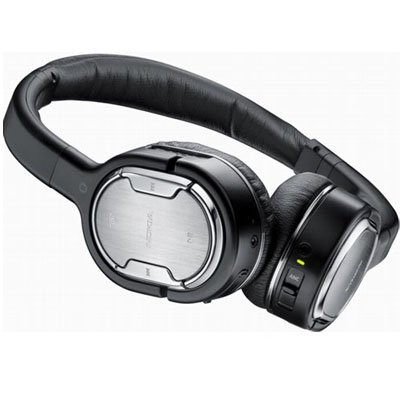
Image: The Nokia Bluetooth Stereo Headset BH-905, showcasinג זײַן גלאַטן דיזײַן און איבער-אויער קאַפּס.
שליסל פֿעיִקייטן
- אַקטיוו ראַש קאַנסאַליישאַן (ANC): Significantly reduces ambient noise for an immersive listening experience.
- 10 Microphones: Utilizes 8 microphones for noise capture and 2 for clear speech transmission in loud surroundings.
- ברייט קאַמפּאַטאַבילאַטי: Connects wirelessly via Bluetooth or wired to a variety of mobile phones, music players, and other audio devices.
- Seamless Control: Intuitive controls allow for easy switching between music and calls without needing to look at the device.
סעטאַפּ
בלועטאָאָטה פּערינג
- Ensure your headset is charged and powered off.
- אַקטאַווייט בלועטאָאָטה אויף דיין רירעוודיק מיטל.
- Press and hold the power button on the headset until the indicator light flashes blue rapidly, indicating pairing mode.
- On your device, search for Bluetooth devices and select "Nokia BH-905" from the list.
- If prompted, enter the passcode (usually "0000").
- Once paired, the indicator light will turn solid blue or flash slowly.
ווייערד קאַנעקשאַן
For devices without Bluetooth or when battery is low, use the provided audio cables. The headset includes plugs for standard audio jacks and airplane adapters for versatile use.
- Connect one end of the audio cable to the headset's audio input port.
- Connect the other end to your audio source (e.g., mobile phone, MP3 player, airplane entertainment system).
אַפּערייטינג ינסטראַקשאַנז
מאַכט אויף / אַוועק
- צו אנצינדן, דריק און האלט דעם מאַכט קנעפּל ביז די אינדיקאַטאָר ליכט צינדט זיך אָן.
- צו אויסלעשן, דריק און האלט דעם מאַכט קנעפּל ביז די אינדיקאַטאָר ליכט גייט אויס.
אַקטיוו ראַש קאַנסאַליישאַן (ANC)
The BH-905 features advanced Active Noise Cancellation technology. With 8 dedicated microphones, it captures ambient low-frequency noise and generates an inverse sound wave, effectively canceling out unwanted sounds. This allows for a clearer audio experience, especially in noisy environments like airplanes or busy streets.
- To activate ANC, locate the ANC switch on the headset and slide it to the 'On' position. A green indicator light will confirm activation.
- To deactivate ANC, slide the switch to the 'Off' position.
רופן פאַרוואַלטונג
The headset is equipped with 2 microphones specifically designed for speech. These microphones not only capture your voice clearly but also work to cancel out ambient noise, ensuring that the person you are speaking with hears you, not your surroundings.
- ענטפֿערן / סאָף רופט: Use the dedicated call button on the headset.
- Switching between Music and Calls: The headset allows for seamless transitions between listening to music and taking calls. When a call comes in, your music will pause, and you can answer the call directly from the headset.
מוזיק פּלייַבאַקק
Control your music directly from the headset using the intuitive buttons. The design supports "blind usage," meaning you can operate the controls by feel without needing to look at them.
- שפּיל / פּויזע: Use the play/pause button.
- האָפּקען טראַקס: Use the forward/backward track buttons.
- באַנד קאָנטראָל: סטרויערן די באַנד מיט די דעדאַקייטאַד באַנד קנעפּלעך.
Video: An official Nokia video demonstrating the features and technology behind the BH-905 headset, including its active noise cancellation and multi-microphone system for clear audio and calls.
וישאַלט
- רייניקט דעם כעדסעט רעגולער מיט אַ ווייכן, טרוקענעם שטאָף.
- פֿאַרמײַדט אויסשטעלן דעם כעדסעט צו עקסטרעמע טעמפּעראַטורן, פֿײַכטקייט, אָדער דירעקטער זון.
- Store the headset in its protective case when not in use to prevent damage.
- פּרוּווט נישט צו צענעמען אָדער מאָדיפֿיצירן דעם כעדסעט, ווײַל דאָס וועט בטל מאַכן די וואָראַנטי.
טראָובלעשאָאָטינג
- קיין מאַכט: מאַכן זיכער אַז די כעדסעט איז גאָר באפוילן.
- קען נישט פארבינדן: Make sure the headset is in pairing mode and within range of your device. Try restarting both devices.
- קיין קלאַנג/שלעכטע קלאַנג קוואַליטעט: Check volume levels on both the headset and your connected device. For wired connections, ensure cables are securely plugged in. For Bluetooth, ensure a stable connection.
- ANC אַרבעט נישט עפֿעקטיוו: Ensure the ANC switch is in the 'On' position.
- Callers Cannot Hear Me Clearly: Ensure the headset's microphones are not obstructed.
If issues persist, refer to the Nokia support webזייטל אדער קאנטאקט קאסטומער סערוויס פאר ווייטערדיגע הילף.
ספּעסאַפאַקיישאַנז
| שטריך | באַשרייַבונג |
|---|---|
| סאָרט | נאָקיאַ |
| מאָדעל נומער | 02716J5 |
| פאָרם פאַקטאָר | Over-ear (two_ear) |
| ראַש קאָנטראָל | אַקטיוו ראַש קאַנסאַליישאַן |
| קאַנעקטיוויטי טעכנאָלאָגיע | בלועטאָאָטה, ווייערד |
| ווירעלעסס קאָמוניקאַציע טעכנאָלאָגיע | בלועטאָאָטה |
| נאָך פֿעיִקייטן | Microphone; Stereo |
| קאָנטראָל טיפּ | מעדיע קאָנטראָל |
| פּונקט וואָג | 0.32 פונט |
| UPC | 758478021477 |
| GTIN | 758478021477 |
וואָראַנטי און שטיצן
The Nokia Bluetooth Stereo Headset BH-905 comes with a 12-חודש וואָראַנטי פֿון דעם קויפֿדאַטום. די וואָראַנטי דעקט פֿאַבריקאַציע־דעפֿעקטן אונטער נאָרמאַלן באַנוץ. ביטע באַהאַלטן אייער קויפֿבאַווײַז פֿאַר וואָראַנטי־קליימז.
For technical support, warranty service, or additional information, please visit the official Nokia support website or contact your local Nokia customer service center.