
HEWLETT PACKARD J9450A
HP Procurve 1810G-24 Switch (J9450A) User Manual
מאָדעל: J9450A
הקדמה
The HP Procurve 1810G-24 Switch (J9450A) is a managed Gigabit Ethernet switch designed for small and medium-sized businesses. It provides reliable network connectivity with advanced features for enhanced performance and security. This manual provides essential information for the setup, operation, maintenance, and troubleshooting of your switch.

Figure 1: HP Procurve 1810G-24 Switch (J9450A) - Front Angled View
This image shows the overall design of the HP Procurve 1810G-24 Switch, highlighting its compact form factor and the arrangement of its ports and indicators.
פּעקל אינהאַלט
באַשטעטיקן אַז אַלע זאכן זענען פאַראַן אין פּעקל:
- HP Procurve 1810G-24 Switch (J9450A)
- מאַכט קאַבלע
- געשטעל-בארג ינווענטאַר
- קאַנסאָול קאַבלע
סעטאַפּ
1. גשמיות ייַנמאָנטירונג
The HP Procurve 1810G-24 Switch can be placed on a desktop or mounted in a standard 19-inch equipment rack using the included rack-mount kit.
- געשטעל מאָונטינג: Attach the rack-mount brackets to the sides of the switch using the provided screws. Secure the switch into the rack.
- דעסקטאַפּ פּלייסמאַנט: Ensure adequate ventilation around the switch. Do not block any ventilation openings.
2. מאַכט קאַנעקשאַן
Connect the provided power cable to the power inlet on the rear of the switch and then to a grounded AC power outlet. The switch will power on automatically.

Figure 2: Rear Panel of the Switch
This image displays the rear panel of the HP Procurve 1810G-24 Switch, showing the power input and product labels.
3. נעץ קאַנעקשאַנז
Connect your network devices (computers, servers, other switches) to the RJ45 ports on the front panel of the switch using standard Ethernet cables. The switch supports 10/100/1000 Mbps connections.

Figure 3: Front Panel of the Switch
דאָס בילד גיט אַ קלאָרע view of the front panel of the HP Procurve 1810G-24 Switch, detailing the 24 Gigabit Ethernet ports and indicator lights.
The switch also features dual-personality ports (ports 23 and 24) which can function as either 10/100/1000 RJ45 ports or mini-GBIC (SFP) slots for optional fiber connectivity (e.g., Gigabit-SX, -LX, -LH, or 100-FX).

Figure 4: Front Panel Indicators and Controls
This close-up image highlights the power indicator, fault locator, LED mode, and speed indicators on the front panel of the HP Procurve 1810G-24 Switch.
אַפּערייטינג די סוויטש
Web צובינד מאַנאַגעמענט
The HP Procurve 1810G-24 Switch features an intuitive web-based management interface for configuration, monitoring, and administration. To access the web צובינד:
- זייט זיכער אז אייער קאמפיוטער איז פארבונדן צום סוויטש.
- עפענען א web browser and enter the default IP address of the switch (refer to the product documentation or sticker for the default IP).
- Log in using the default credentials (if applicable).
- פון די web interface, you can configure various settings, including:
- VLAN Support and Tagנומער: Configure up to 64 port-based VLANs and dynamic IEEE 802.1Q VLAN tagging for network segmentation and security.
- פּאָרט קאַנפיגיעריישאַן: Adjust port speed, duplex settings, and enable/disable ports.
- לינק אַגגרעגאַטיאָן: קאָמבינירן קייפל פּאָרץ פֿאַר געוואקסן באַנדווידט און רעדונדאַנסי.
- קוואַליטעט פון סערוויס (QoS): פּריאָריטיזירן נעץ טראַפיק פֿאַר קריטישע אַפּלאַקיישאַנז.
געפירט ינדיקאַטאָרס
The front panel LEDs provide visual status of the switch and its ports:
- Power LED: ינדיקייץ מאַכט סטאַטוס.
- Fault Locator LED: ווײַזט אויף סיסטעם חסרונות.
- לינק/אַקטיוויטעט LEDs (פּער פּאָרט):
- Solid Green: Link established.
- Flashing Green: Activity on the port.
- Speed LEDs (per port):
- Off: 10 Mbps
- Flash: 100 Mbps
- On: 1000 Mbps (Gigabit)
וישאַלט
The HP Procurve 1810G-24 Switch is designed for low maintenance. It operates without internal fans, contributing to a quiet environment and reduced dust accumulation.
- Firmware דערהייַנטיקונגען: Periodically check the official HP website for firmware updates to ensure optimal performance and security. Follow the instructions provided with the firmware update package.
- רייניקונג: ניצט אַ ווייכע, טרוקענע שטאָף צו רייניקן די אויסערלעכע זייט פון דעם סוויטש. ניצט נישט קיין פליסיקע אדער אַעראָזאָל רייניגער.
- ווענטילאַטיאָן: זיכער מאַכן אַז די ווענטילאַציע עפענונגען זענען נישט פֿאַרשטאָפּט צו פאַרמייַדן איבערהיצונג.
טראָובלעשאָאָטינג
קיין מאַכט
- איבערצייגט אז דער עלעקטרישער קאַבל איז זיכער פארבונדן סיי צום סוויטש און סיי צום עלעקטרישן ווענטיל.
- ענשור אַז די מאַכט ווענטיל איז פאַנגקשאַנאַל דורך טעסטינג עס מיט אן אנדער מיטל.
No Link Light on Port
- Check the Ethernet cable connection at both ends (switch and connected device).
- פּרוּווט אַן אַנדער עטערנעט קאַבל.
- Test the port with a known working device.
- זיכער מאַכן אַז די פֿאַרבונדענע דעוויס איז אנגעצונדן און אַרבעט ריכטיק.
Connectivity Issues After Power Failure
In some rare instances, the switch may not fully restore network connectivity to all ports immediately after a power outage. If this occurs:
- מאַכט ציקל: Disconnect the power cable from the switch, wait for approximately 30 seconds, and then reconnect it.
- Reseat Cables: Physically disconnect and reconnect the Ethernet cables for affected devices.
- פאַבריק באַשטעטיק: If issues persist, a factory reset may be necessary. This will revert all settings to their default values. Consult the detailed product manual for the specific procedure, which often involves using a small pointed object (like a paperclip) to press a reset button.
Web צובינד נישט צוטריטלעך
- באַשטעטיקט אַז אייער קאָמפּיוטער'ס IP אַדרעס איז אין דער זעלבער סובנעט ווי די סוויטש'ס פעליקייַט IP אַדרעס.
- רייניקט אייער בלעטערער'ס קעש און קיכלעך.
- פּרוּווט אַ אַנדערש web בלעטערער.
- Perform a factory reset if you have forgotten the login credentials or if the interface remains unresponsive.
ספּעסאַפאַקיישאַנז
| שטריך | באַשרייַבונג |
|---|---|
| מאָדעל נומער | J9450A |
| באַשטימען טיפּ | געראטן גיגאַביט עטהערנעט סוויטש |
| נומער פון פּאָרץ | 24 (22 x 10/100/1000BASE-T, 2 x Dual-Personality 10/100/1000BASE-T or SFP) |
| דאַטאַ אַריבערפירן קורס | 1000 מעגאַביטן פּער סעקונדע (גיגאַביט) |
| צובינד טיפּ | RJ45, SFP |
| קאַסע מאַטעריאַל | מעטאַל |
| דימענסיעס (L X W X H) | 17 X 7 X 2 אינטשעס (בעערעך) |
| פּונקט וואָג | 5 פונט |
| מאַכט אַרייַנשרייַב | 100-127V ~ 0.75A (0.75A), 200-240V ~ 0.4A (0.4A) |
| אַפּערייטינג טעמפּעראַטור | 0°C צו 40°C (32°F צו 104°F) |
| קאָאָלינג | פאָכערלעסס |
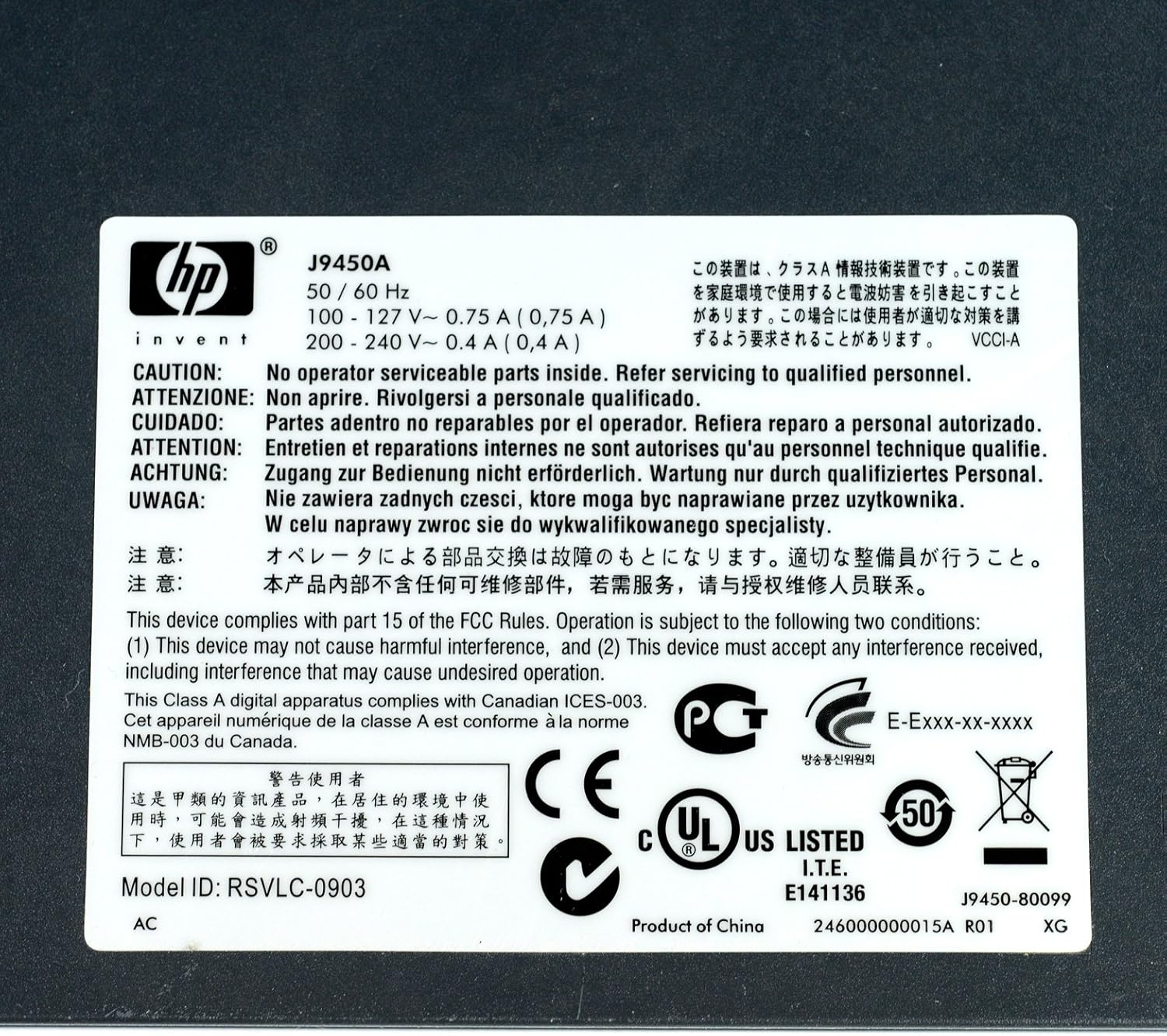
Figure 5: Product Label with Specifications
This image displays the product label, which includes the model number, electrical ratings, and various compliance marks.
וואָראַנטי און שטיצן
וואָראַנטי אינפֿאָרמאַציע
The HP Procurve 1810G-24 Switch typically comes with a ליפעטימע פאַרבייַט וואָראַנטי for the original owner. Please refer to the official HP warranty documentation for complete terms and conditions, as warranty details may vary by region and purchase date.
טעכניש שטיצן
For technical assistance, product registration, or to download the latest drivers and firmware, please visit the official HP support website. Have your product model number (J9450A) and serial number ready when contacting support.
איר קענט טיפּיש געפֿינען שטיצע רעסורסן ביי: www.hp.com/support
Ask a question about this manual
Ask about setup, troubleshooting, compatibility, parts, safety, or missing instructions. Manuals+ will review the question and use this page’s manual context to help answer it.