
1. הקדמה
א דאנק פארן קויפןasing the Karcher KA 350 Compact Stereo System. This versatile audio system combines modern design with a wide range of playback options, including a 3-disc CD changer, dual cassette deck, turntable, USB port, SD card reader, and an integrated radio. This manual provides essential information for safe operation, setup, and maintenance of your device. Please read it thoroughly before use and retain it for future reference.
2. וויכטיק סאַפעטי אינסטרוקציעס
- מאַכט מקור: פאַרזיכערן די מאַכט צושטעלן וואָלtage שטימט מיט דער שאַצונג עטיקעט אויף דער איינהייט.
- ווענטילאַטיאָן: בלאָקירט נישט קיין ווענטילאַציע עפענונגען. לאָזט גענוג פּלאַץ אַרום דעם אַפּאַראַט פֿאַר געהעריקן לופטפלוס.
- וואַסער און נעץ: שטעלט נישט אויס דעם אַפּאַראַט צו רעגן, פייכטקייט, טראָפּן, אדער שפּריצן. שטעלט נישט קיין זאכן אָנגעפילט מיט פליסיקייטן, ווי וואַזעס, אויף דעם אַפּאַראַט.
- היץ: האַלט דעם אַפּאַראַט אַוועק פֿון היץ־קוואַלן ווי ראַדיאַטאָרן, היץ־רעגיסטערס, אויוון, אָדער אַנדערע אַפּאַראַטן (אַרייַנגערעכנט ampליפיערס) וואָס פּראָדוצירן היץ.
- רייניקונג: נעמט ארויס דעם אַפּאַראַט פֿון דער וואַנט־ווענטיל איידער איר רייניקט. ניצט נאָר אַ ווייכן, טרוקענעם שטאָף.
- סערוויס: דו זאלסט נישט פּרווון צו דינען דעם פּראָדוקט זיך. קאָנטאַקט אַלע קוואַלאַפייד סערוויס פּערסאַנעל.
- קינדער: Keep the unit and its accessories out of reach of children.
- לייזער זיכערקייַט: This product uses a laser. Use of controls or adjustments or performance of procedures other than those specified herein may result in hazardous radiation exposure.
3. פּעקל אינהאַלט
ביטע קאָנטראָלירט אַז אַלע זאכן זענען פאַראַן און אין גוטן צושטאַנד:
- Karcher KA 350 Compact Stereo System (Main Unit)
- ווייַט קאָנטראָל
- ינסטראַקשאַנז מאַנואַל
- סטערעאָ רעדנערס (2 איינהייטן)
- מאַכט קאַבלע
- FM אַנטענע (דראָט טיפּ)
4. פּראָדוקט איבערview
4.1 פראָנט פּאַנעל קאָנטראָלס
The front panel provides access to all primary functions and controls for the KA 350 system.

פיגור 4.1: פראָנט פּאַנעל קאָנטראָלס
- אן/סטאַנדביי קנעפּל: מאַכט די אַפּאַראַט אויף אָדער אַוועק.
- פונקציע קנעפּל: Selects between CD, Tuner (Radio), Phono (Turntable), Tape (Cassette), and USB/SD modes.
- VOLUME קנופּ: אַדזשאַסטירט דעם הויפּט באַנד לעוועל.
- סי-די קאנטראלן: Play/Pause, Stop, Skip/Search (Forward/Backward), Open/Close CD tray.
- קאַסעטע דעק קאָנטראָלס: Play, Record, Fast Forward, Rewind, Stop/Eject for Deck 1 and Deck 2.
- USB/SD Controls: Play/Pause, Stop, Skip/Search (Forward/Backward).
- טונער קאָנטראָלס: Band selection (AM/FM), Tuning Up/Down, Memory presets.
- ווייַז: Shows current mode, track information, radio frequency, and time.
4.2 דערציען פּאַנעל קאַנעקשאַנז
The rear panel houses all necessary input and output connections for the system.
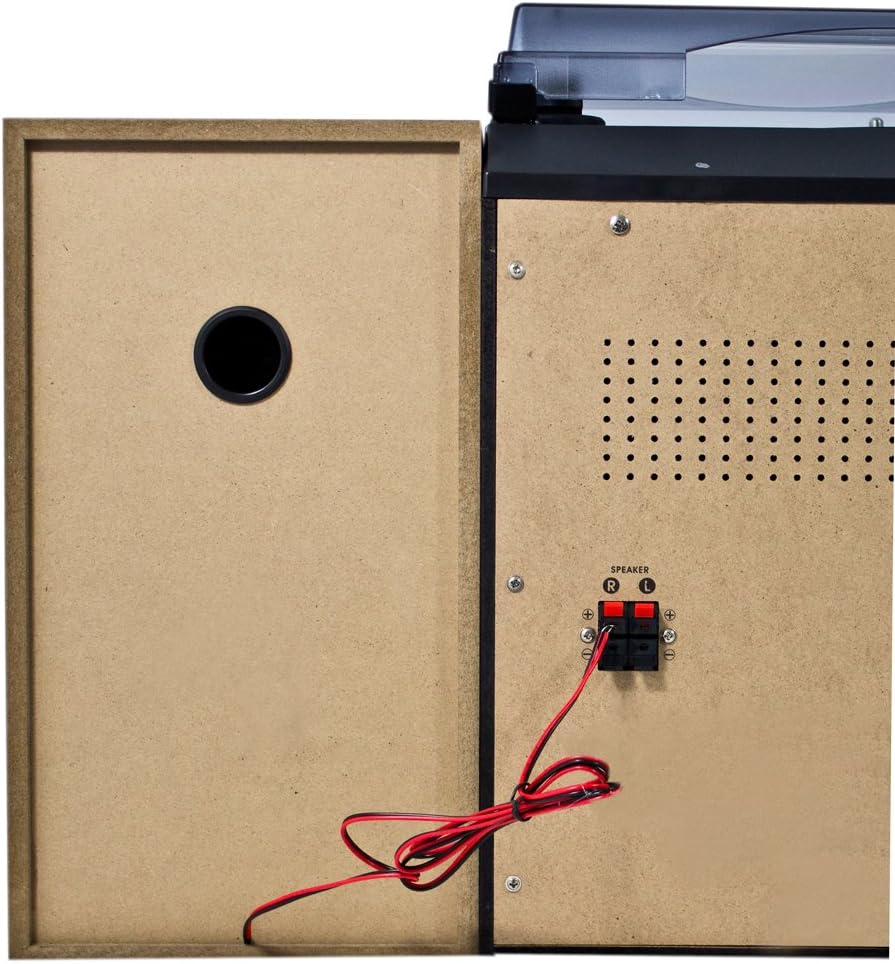
פיגור 4.2: הינטערשטע פּאַנעל קאַנעקשאַנז
- Speaker Terminals (R/L): Connect the included stereo speakers. Ensure correct polarity (+ to + and - to -).
- אַק מאַכט אַרייַנשרייַב: פאַרבינדן די מאַכט קאַבלע דאָ.
- FM אַנטענע טערמינאַל: Connect the supplied FM wire antenna for radio reception.
4.3 הויפּט קאַמפּאָונאַנץ

Figure 4.3: Karcher KA 350 Main Components
- טערנטייבאַל: Located on top, for playing vinyl records.
- 3-Disc CD Changer: Front-loading tray for multiple CDs.
- Dual Cassette Deck: Two cassette compartments for playback and recording.
- וסב פּאָרט: פֿאַר פֿאַרבינדן USB פֿלאַש דרייווז.
- SD Card Slot: פֿאַר אַרײַנשטעלן SD זכּרון קאַרטלעך.
- סטערעאָ ספּיקערז: Two external speakers for audio output.
5. סעטאַפּ
5.1 אַנפּאַקינג און פּלייסמאַנט
- קערפאַלי באַזייַטיקן אַלע קאַמפּאָונאַנץ פון די פּאַקקאַגינג.
- שטעלט די הויפּט איינהייט אויף אַ סטאַבילער, גלאַטער ייבערפלאַך.
- Position the speakers on either side of the main unit, ensuring they are at an equal distance for optimal stereo sound.
- זיכער מאַכן אַז עס איז גענוג ווענטילאַציע אַרום דעם אַפּאַראַט.
5.2 פֿאַרבינדן די רעדנערס
Connect the supplied speakers to the speaker terminals on the rear of the main unit.

Figure 5.1: Speaker Unit
- Identify the speaker wires. Each wire typically has two strands, one marked for positive (+) and one for negative (-).
- Connect the positive (+) terminal of the left speaker to the 'L+' terminal on the main unit's rear panel.
- Connect the negative (-) terminal of the left speaker to the 'L-' terminal on the main unit's rear panel.
- Repeat the process for the right speaker, connecting it to the 'R+' and 'R-' terminals.
- Ensure all connections are secure to prevent sound distortion or damage.
5.3 פֿאַרבינדן די FM אַנטענע
For optimal radio reception, connect the supplied FM wire antenna.
- Insert the FM antenna plug into the FM antenna jack on the rear panel.
- Extend the wire antenna fully and position it for the best possible reception. You may need to experiment with its placement.
5.4 מאַכט קאַנעקשאַן
- Plug the AC power cable into the AC power input on the rear of the main unit.
- Plug the other end of the power cable into a standard wall outlet.
6. אַפּערייטינג ינסטרוקטיאָנס
6.1 מאַכט אויף / אַוועק
דרוק די אויף / סטאַנדביי קנעפּל אויף דער פראָנט פּאַנעל אָדער ווייַט קאָנטראָל צו דרייען די אַפּאַראַט אויף אָדער אויס.
6.2 מאָדע סעלעקציע
דרוק די פונקציע button repeatedly to cycle through the available modes: CD, Tuner (Radio), Phono (Turntable), Tape (Cassette), and USB/SD.
6.3 סי-די שפּילער אָפּעראַציע

Figure 6.1: CD Changer Tray
- דרוק די פונקציע קנעפּל צו אויסקלייַבן קאָמפּאַקטדיסק מאָדע.
- דרוק די עפענען / נאָענט קנעפּל צו עפענען די CD טאַץ.
- Place up to three CDs onto the disc trays, label side up.
- דרוק די עפענען / נאָענט קנעפּל ווידער צו פאַרמאַכן דעם טאַץ.
- דרוק די שפּיל / פּויזע קנעפּל צו אָנהייבן פּלייבאַק.
- ניצן די האָפּקען / זוכן buttons to navigate between tracks or fast forward/rewind.
6.4 קאַסעטע שפּילער/רעקאָרדער אָפּעראַציע
- דרוק די פונקציע קנעפּל צו אויסקלייבן טייפּ מאָדע.
- דרוק די האַלטן / אַרויסוואַרפן button on either Deck 1 or Deck 2 to open the cassette compartment.
- אַרייַנלייגן אַ קאַסעט טייפּ און נאָענט די אָפּטייל.
- דרוק די שפּיל קנעפּל צו אָנהייבן פּלייבאַק.
- To record, insert a blank tape into Deck 2 (for recording from Deck 1 or other sources) or Deck 1 (for recording from external sources if applicable). Press the רעקאָרד קנעפּל.
6.5 דריי-טיש אָפּעראַציע
- דרוק די פונקציע button to select PHONO mode.
- עפענען די שטויב דעקן.
- לייג א וויינאַל רעקאָרד אויף די טאַץ.
- אויסקלייבן די פאסיגע גיכקייט (33, 45, אדער 78 רפּם) ניצנדיק דעם גיכקייט אויסקלייבער קנעפל.
- Carefully lift the tone arm and place the stylus onto the desired groove of the record.
- At the end of the record, manually return the tone arm to its rest.
6.6 USB/SD שפּיל
- דרוק די פונקציע button to select USB/SD mode.
- אַרײַנשטעלן אַ USB פלאַש דרייוו אין דעם USB פּאָרט אָדער אַן SD קאַרטל אין דעם SD קאַרטל שפּאַלט.
- די איינהייט וועט אויטאמאטיש דעטעקטירן און אנהייבן שפילן קאמפאטיבלע אודיא files (MP3, WMA, AAC).
- ניצן די שפּיל / פּויזע און האָפּקען / זוכן קנעפּלעך צו קאָנטראָלירן פּלייבאַק.
6.7 ראַדיאָ אָפּעראַציע
- דרוק די פונקציע button to select TUNER mode.
- דרוק די BAND button to select between FM and AM bands.
- ניצן די טונינג קנעפלעך צו מאַנועל צושטעלן צו אַ סטאַנציע אָדער דריקן און האַלטן פֿאַר אויטאָמאַטיש סקאַנינג.
- צו ראַטעווען אַ סטאַנציע, דריק די זיקאָרן ניצן די האָפּקען / זוכן קנעפּלעך צו אויסקלייבן אַ פאָרגעשטעלטע נומער, און דריקן זיקאָרן ווידער צו באַשטעטיקן.
6.8 רימאָוט קאָנטראָל
The included remote control allows convenient operation of all functions from a distance. Ensure batteries are correctly inserted.
7. וישאַלט
7.1 רייניקונג די אַפּאַראַט
- שטענדיק אָפּשטעקן די אַפּאַראַט פון די מאַכט ווענטיל איידער רייניקונג.
- ניצט אַ ווייכן, טרוקענעם שטאָף צו ווישן די אויסערלעכע ייבערפלאַכן.
- ניצט נישט קיין שרײַבנדיקע רייניגער, וואַקסן אדער סאָלווענטן, ווײַל זיי קענען שאַטן די ענדיקונג.
7.2 Turntable Stylus Care
- Handle the stylus with extreme care. Only touch the tone arm, not the stylus itself.
- רייניקט דעם סטיילוס פון צייט צו צייט מיט אַ ווייכן באַרשט, פונעם הינטן צו פאָרויס.
- Replace the stylus when it shows signs of wear (e.g., distorted sound, skipping).
7.3 Cassette Deck Care
- רעגולער רייניקט די טייפּ קעפּ, קאַפּסטאַן, און פּינטש וואַל מיט אַ וואַטע שטעכל לייכט.ampמיט יסאָפּראָפּיל אַלקאָהאָל.
- Demagnetize the tape heads periodically to maintain sound quality.
8. טראָובלעשאָאָטינג
| פּראָבלעם | מעגלעך סיבה | לייזונג |
|---|---|---|
| קיין מאַכט | שטראָם קאַבל נישט פארבונדן; שטראָם אַוטלעט נישט אַקטיוו | קאָנטראָלירט די פֿאַרבינדונג פֿון עלעקטרישן קאַבל; פּרוּווט אַן אַנדער אַוטלעט |
| קיין געזונט | Volume too low; Speakers not connected correctly; Incorrect function mode selected | Increase volume; Check speaker connections and polarity; Select correct function mode |
| סי-די איבערשפּרינגען אָדער נישט שפּילן | CD is dirty or scratched; CD inserted incorrectly | Clean or replace CD; Insert CD label side up |
| נעבעך ראַדיאָ אָפּטראָג | אַנטענע נישט פארבונדן אָדער שלעכט פּאַזיציאָנירט; שוואַך סיגנאַל | Connect and adjust FM antenna; Try repositioning the unit |
| Turntable speed incorrect | פאַלש גיכקייַט אויסגעקליבן | Adjust the speed selector switch (33/45/78 RPM) |
| USB/SD ווידערשפּיל פּראָבלעמען | ינקאַמפּאַטאַבאַל file פֿאָרמאַט; USB/SD קאַרטל נישט ריכטיק אַרײַנגעשטעלט; פֿאַרדאָרבן files | פאַרזיכערן files are MP3, WMA, or AAC; Reinsert USB/SD card; Try a different USB/SD card |
9. ספּעסאַפאַקיישאַנז
| שטריך | באַשרייַבונג |
|---|---|
| סאָרט | קאַרטשער |
| מאָדעל נומער | KA 350 |
| קאַנעקטיוויטי טעכנאָלאָגיע | FM/MW Tuner, USB, SD |
| קאָליר | שוואַרץ |
| רעדנער טיפּ | Stereo (2 speakers included) |
| נומער דימענשאַנז (L X W X H) | 70.5 X 41 X 37.3 סענטימעטער |
| מאַכט מקור | קאָרדעד עלעקטריק |
| קאַמפּאַטאַבאַל דעוויסעס | Smartphone, Tablet, MP3 Player, Personal Computer |
| פּונקט וואָג | 10.8 קילאָגראַמס |
| מאַכט רעזולטאַט (RMS) | 2 x 5 W (Total 50 W) |
| Supported Media Standards | MP3, CD, Cassette, USB, SD |
| שטיצט אַודיאָ פֿאָרמאַטירונגען | CD-DA, MP3, WMA, AAC |
| בלועטאָאָטה שטיצן | ניין |
| נומער פון ספּיקערז | 2 |
| אַודיאָ רעזולטאַט מאָדע | סטערעאָ |
| אַרומרינגלען סאָונד קאַנפיגיעריישאַן | 2.0 |
| אַרייַנגערעכנט קאַמפּאָונאַנץ | Compact system, Remote control, Instruction manual |
10. וואָראַנטי און שטיצן
For warranty information and technical support, please refer to the warranty card included with your product or visit the official Karcher webזייטל. האַלט דיין קויפן באַווייַז פֿאַר קיין וואָראַנטי קליימז.
פאַבריקאַנט: קאַרטשער