
1. הקדמה
This manual provides detailed instructions for the proper setup, operation, and maintenance of your Veho VMS-004 Discovery Deluxe USB Microscope. Please read this manual thoroughly before using the device to ensure optimal performance and longevity.
The Veho VMS-004 is a versatile USB microscope designed for detailed observation and digital capture of magnified images and videos. It features up to 400x magnification, a 2.0 Megapixel CMOS lens, and adjustable LED illumination, making it suitable for various applications including educational, hobbyist, and professional use.
2. זיכערקייַט אינפֿאָרמאַציע
- צי ניט דיסאַסעמבאַל: Attempting to disassemble or modify the microscope may cause damage and void the warranty.
- ויסמיידן דירעקט זונשייַן: Do not expose the microscope to direct sunlight or high temperatures.
- שעפּן מיט זאָרג: The lens and internal components are delicate. Avoid dropping or subjecting the device to strong impacts.
- האַלטן טרוקן: די דעווייס איז נישט וואַסערפּרוף. פֿאַרמייַדט אויסשטעלונג צו וואַסער אָדער הויכער פֿײַכטקייט.
- מאַכט מקור: Use only the specified USB power source.
- קינדער: Keep out of reach of small children. Adult supervision is recommended during use.
3. פּעקל אינהאַלט
באַשטעטיקן אַז אַלע זאכן זענען פאַראַן אין דיין פּעקל:
- Veho VMS-004 Discovery Deluxe USB Microscope
- Flexi Alloy Stand
- Software CD (for drivers and application)
- באַניצער מאַנואַל (דעם דאָקומענט)
4. פּראָדוקט איבערview
Familiarize yourself with the main components of the Veho VMS-004 microscope.

Figure 4.1: The Veho VMS-004 Discovery Deluxe USB Microscope mounted on its flexi alloy stand.
- Microscope Body: Contains the lens, CMOS sensor, and illumination LEDs.
- פאָקוס ראָד: Located on the microscope body, used to adjust the focus for clear images.
- מאָמענטבילד קנעפּל: A button on the microscope body for capturing still images.
- LED Illumination Control: A small wheel or dial to adjust the brightness of the built-in LEDs.
- וסב קאַבלע: For connecting the microscope to your computer.
- Flexi Alloy Stand: Provides a stable base and adjustable positioning for the microscope.

פיגורע 4.2: נאָענט-אַרויף view of the focus wheel and magnification markings on the microscope body.

פיגורע 4.3: פראָנט view of the microscope lens, showing the integrated LED illumination ring.
5. סעטאַפּ
5.1 שטאַנד פֿאַרזאַמלונג
The flexi alloy stand provides stability and allows for precise positioning of the microscope.
- Attach the microscope holder to the flexible arm of the stand.
- Secure the microscope into the holder. Ensure it is firmly seated but not overly tightened to avoid damage.
- שטעלן דעם שטיין אויף אַ סטאַביל, פלאַך ייבערפלאַך.
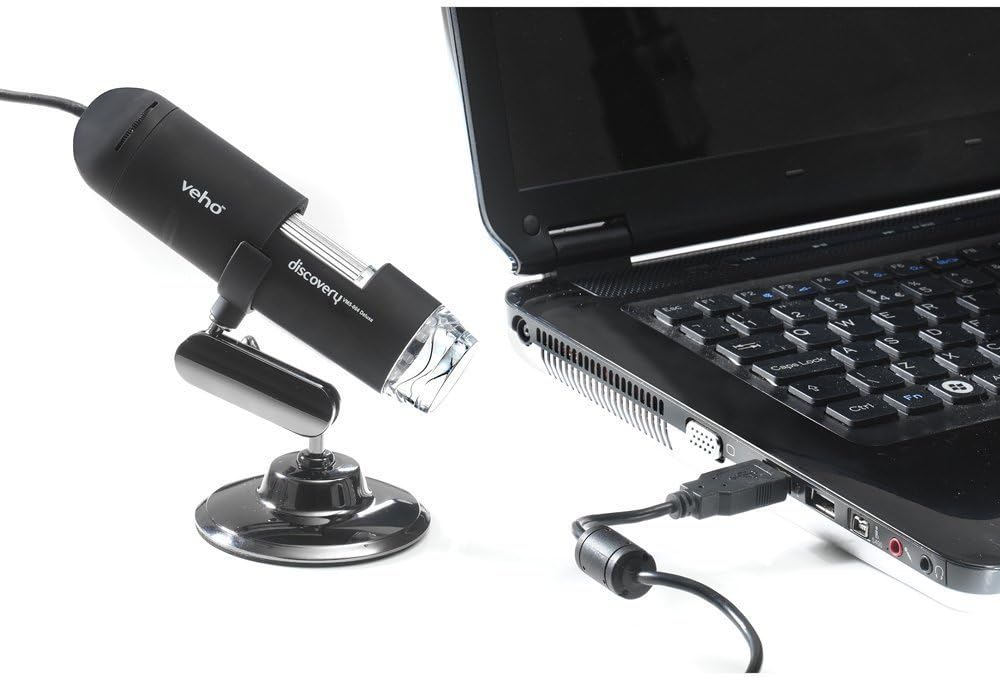
Figure 5.1: The microscope securely mounted on its flexi alloy stand.
5.2 ווייכווארג ינסטאַלירונג
The Veho VMS-004 requires driver and software installation for full functionality on your computer (PC or Mac compatible).
- Insert the provided software CD into your computer's CD/DVD drive. If your computer does not have a CD drive, please visit the official Veho support website to download the necessary drivers and software.
- Follow the on-screen instructions to install the drivers and the accompanying application.
- ריסטאַרט אייער קאָמפּיוטער אויב געבעטן נאָך די ינסטאַלירונג.
5.3 פֿאַרבינדן דעם מיקראָסקאָפּ
Once the software is installed, connect the microscope to your computer.
- Plug the USB cable of the microscope into an available USB port on your computer.
- The computer should automatically detect the device.
- Launch the installed microscope application. You should see a live feed from the microscope's camera.

Figure 5.2: The USB microscope connected to a laptop, ready for use.
6. אַפּערייטינג ינסטרוקטיאָנס
6.1 Placing the Object
Position the object you wish to observe directly beneath the microscope lens. Adjust the flexible stand to bring the lens close to the object.

Figure 6.1: The microscope positioned over a coin for observation.
6.2 אַדזשאַסטירן פאַרגרעסערונג און פאָקוס
The microscope offers up to 400x digital magnification. To achieve a clear image:
- Adjust the distance between the microscope lens and the object using the flexible stand.
- Rotate the focus wheel on the microscope body until the image on your computer screen is sharp and clear.
- באַמערקונג: The effective magnification changes with the distance from the object and the focus setting.
6.3 LED Illumination Control
The microscope features built-in LEDs to illuminate your subject. To adjust the brightness:
- Locate the LED illumination control (a small wheel or dial) on the microscope cable or body.
- Rotate the control to increase or decrease the LED brightness as needed for optimal viewing.
6.4 כאַפּן בילדער און ווידעאָס
The included software allows you to capture still images and record videos.
- Still Image: Press the snapshot button on the microscope body or click the capture button within the software interface.
- ווידעא רעקאָרדינג: Use the record function within the software application to start and stop video capture.
- קאַפּטשערד files are typically saved to a default folder on your computer, which can usually be configured within the software settings.
6.5 Measurement Software
The accompanying software includes measurement capabilities. Refer to the software's help documentation for detailed instructions on how to calibrate and use the measurement tools. For accurate measurements, it is recommended to use a known reference scale in your image.
7. וישאַלט
- רייניקונג די לענס: ניצט אַ ווייכע, לינט-פֿרייע שטאָף ספּעציעל דיזיינד פֿאַר אָפּטישע לענסעס. ניצט נישט קיין שרײַבנדיקע רייניגער אָדער סאָלווענטן.
- רייניקונג דעם גוף: ווישט אָפּ דעם מיקראָסקאָפּ קערפּער און שטעלט עס מיט אַ טרוקענעם אָדער אַ ביסל פֿײַכטןamp, וויי ך טוך .
- סטאָרידזש: ווען נישט אין באַנוץ, זאָל מען דעם מיקראָסקאָפּ האַלטן אין אַ ריינער, טרוקענער און שטויב-פֿרײַער סביבה.
- ווייכווארג דערהייַנטיקונגען: Periodically check the Veho official website for software and driver updates to ensure compatibility and optimal performance.
8. טראָובלעשאָאָטינג
| פּראָבלעם | מעגלעך סיבה | לייזונג |
|---|---|---|
| No image on screen / Device not detected |
|
|
| בילד איז פארשוואומען אדער נישט אין פאָקוס |
|
|
| בילד איז צו טונקל אָדער צו ליכטיק |
|
|
| Magnification does not appear to be 400x |
|
|
9. ספּעסאַפאַקיישאַנז
| מאָדעל נומער | VMS-004D |
| פאַרגרעסערונג | Up to x400 (digital) |
| לענס | 2.0 מעגאַפּיקסעל קמאָס |
| Illumination | On/Off LEDs (adjustable brightness) |
| האָוסינג | Tacton Rubber Touch |
| שטיין | Flexi Alloy Stand |
| קאַנעקטיוויטי | וסב |
| קאַמפּאַטאַבילאַטי | פּיסי און מעק קאַמפּאַטאַבאַל |
| פּראָדוקט דימענשאַנז | 13.46 X 10.92 X 22.35 סענטימעטער |
| פּונקט וואָג | 159 ג |
| Voltage | 5 Volts (USB powered) |
| ליכט מקור טיפּ | האַלאָגען |
| פאַקטיש ווינקל פון View | 30 דיגריז |
10. וואָראַנטי & שטיצן
For warranty information, technical support, or service inquiries, please refer to the warranty card included with your product or visit the official Veho webזייטל. האַלט דיין קויפן באַווייַז פֿאַר וואָראַנטי קליימז.
Veho Official Webפּלאַץ: www.veho-world.com