
1. הקדמה
This manual provides instructions for the safe and efficient operation of your Intermatic TN111CL Lamp & Appliance Timer. Please read these instructions thoroughly before using the device and retain them for future reference. The TN111CL timer is designed to automatically turn lamps and appliances ON and OFF at preset times, offering convenience and energy management.
2. זיכערקייַט אינסטרוקציעס
- בלויז דרינענדיק נוצן: This timer is intended for indoor use in dry locations. Do not expose to rain or moisture.
- עלעקטריקאַל שאַץ: Do not exceed the electrical ratings of the timer. Refer to the 'Specifications' section for details. Overloading the timer can cause overheating and fire.
- גראָונדינג: Ensure the timer is plugged into a properly grounded outlet.
- קינדער: האַלטן אויס פון דערגרייכן פון קינדער. דאָס איז נישט אַ צאַצקע.
- רייניקונג: Unplug the timer from the wall outlet before cleaning. Use a dry cloth; do not use liquid cleaners.
- ריפּערז: Do not attempt to repair or disassemble the timer. Refer all servicing to qualified service personnel.
3. פּראָדוקט איבערview
The Intermatic TN111CL is a mechanical timer featuring an easy-set dial for scheduling ON/OFF operations. It is designed for use with various lamps and small appliances.
שליסל פֿעיִקייטן:
- 2 ON/OFF settings per 24-hour period.
- גרינג-שטעלן דיאַל פֿאַר פּשוט פּראָגראַממינג.
- Minimum ON/OFF time: 1/2 hour.
- Maximum ON/OFF time: 23 1/2 hours.
פּראָדוקט דיאַגראַמע:
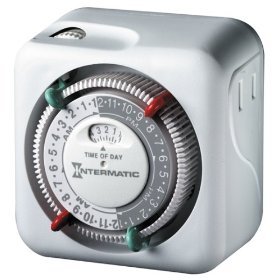
פיגורע 1: פראָנט view of the Intermatic TN111CL Lamp & Appliance Timer, showing the central dial and outlet.
4. סעטאַפּ
- Plug In the Timer: Insert the timer into a standard 125V AC wall outlet.
- שטעלן די איצטיקע צייט: Rotate the entire dial clockwise until the current time aligns with the arrow indicator on the timer's face. The dial is marked in 15-minute increments. Ensure you distinguish between AM and PM hours (e.g., 3 PM is 15:00 on a 24-hour clock).
- Plug In Appliance: צאַפּן די לamp or appliance you wish to control into the outlet on the side of the timer. Ensure the appliance's power switch is in the ON position.
5. אַפּערייטינג ינסטרוקטיאָנס
The TN111CL timer uses a series of pins around the dial to set ON and OFF times.
- Identify Pins: The dial has segments that can be pushed inwards or pulled outwards. Each segment represents 15 minutes.
- שטעלן אן צייט: To set a period when the appliance should be ON, push the corresponding segments (pins) inwards. For example, if you want the appliance ON from 6:00 PM to 10:00 PM, push in all the pins between the 18:00 and 22:00 marks on the dial.
- אויסשטעלן צייט: To set a period when the appliance should be OFF, pull the corresponding segments (pins) outwards. These are the default positions for the pins.
- מאַנואַל אָווועררייד: The timer typically has a manual override switch (often a small slider or button) that allows you to turn the connected appliance ON or OFF independently of the timer settings. Refer to the markings on your specific unit for its location and function (e.g., 'Timer ON', 'Timer OFF', 'Always ON').
The timer will cycle through the programmed ON/OFF settings daily. The minimum ON or OFF duration is 30 minutes (two 15-minute segments).
6. וישאַלט
- רייניקונג: To clean the timer, unplug it from the wall outlet. Wipe the exterior with a soft, dry cloth. Do not use abrasive cleaners, solvents, or immerse the unit in water.
- סטאָרידזש: If storing the timer for an extended period, unplug it and keep it in a cool, dry place away from direct sunlight and extreme temperatures.
- דורכקוק: Periodically inspect the timer and its cord for any signs of damage, such as frayed wires or cracks. If damage is found, discontinue use and replace the unit.
7. טראָובלעשאָאָטינג
- Appliance does not turn ON/OFF at programmed times:
- Ensure the timer is plugged firmly into a working outlet.
- Verify the appliance plugged into the timer is switched to the ON position.
- Check that the current time is correctly set on the dial.
- Confirm that the ON/OFF pins are correctly pushed in (ON) or pulled out (OFF) for the desired times.
- Check the manual override switch position.
- Timer makes a ticking sound:
- This is normal for mechanical timers and indicates the internal clock mechanism is operating.
- Appliance remains ON or OFF constantly:
- Check the manual override switch. It may be set to 'Always ON' or 'Always OFF'.
- Re-verify the pin settings for your desired ON/OFF schedule.
8. ספּעסאַפאַקיישאַנז
| באַשרייַבונג | ווערט |
|---|---|
| מאָדעל נומער | TN111CL |
| Voltage | 125 וואלטס אַק |
| אָפטקייַט | 60 הז |
| Resistive Load (R) | 15 Amps, 1750 וואטס |
| Tungsten Load (T) | 1750 וואטס |
| Inductive Load (H) | 1750 וואטס |
| Motor Load (TV-5) | 1/3 הפּ |
| נומער פון אן/אויס סעטינגס | 2 per 24-hour period |
| מינימום אן/אויס צייט | 1/2 שעה |
| Maximum ON/OFF Time | 23 1/2 שעה |
9. וואָראַנטי און שטיצן
וואָראַנטי:
This Intermatic TN111CL Lamp & Appliance Timer comes with a לעבן וואָראַנטיביטע באַהאַלטן אייער קויפן באַווייַז פֿאַר וואָראַנטי קליימז.
קונה שטיצן:
For technical assistance, troubleshooting beyond this manual, or warranty inquiries, please contact Intermatic customer support directly. Refer to the official Intermatic webזייטל אדער פּראָדוקט פּאַקאַדזשינג פֿאַר די מערסט אַקטועל קאָנטאַקט אינפֿאָרמאַציע.