
1. הקדמה
This manual provides essential information for the installation, operation, and maintenance of your Legrand Bticino LT Terraneo Sprint 2-Wire Black/White Video Intercom, Model 344342. This video intercom system is designed for reliable communication and access control, offering a clear black and white video display and a handset for audio communication. Please read this manual thoroughly before installation and use to ensure proper function and safety.
2. זיכערקייַט אינפֿאָרמאַציע
- שטענדיק אָפּשטעקן די מאַכט איידער איר דורכפירן קיין ינסטאַלירונג אָדער וישאַלט.
- די אינסטאַלאַציע זאָל דורכגעפירט ווערן דורך קוואַליפֿיצירטע פּערסאָנעל אין לויט מיט די לאָקאַלע עלעקטרישע קאָודן.
- שטעלט נישט אויס דעם אַפּאַראַט צו פייכטקייט, רעגן, אדער עקסטרעמע טעמפּעראַטורן.
- ויסמיידן פּלייסינג די אַפּאַראַט לעבן היץ קוואלן אָדער אין דירעקט זונשייַן.
- Use only original accessories and spare parts provided or approved by Legrand.
- פרובירט נישט צו עפענען אדער פאררעכטן דעם איינהייט אליין. לאָזט איבער אלע סערוויסינג צו קוואַליפֿיצירטע סערוויס פּערסאָנעל.
3. פּעקל אינהאַלט
באַשטעטיקן אַז אַלע זאכן זענען פאַראַן אין פּעקל:
- Legrand Bticino LT Terraneo Sprint Indoor Video Intercom Unit (Model 344342)
- האַנטסעט מיט אַ געוויקלטן שנור
- Mounting bracket/plate
- מאַונטינג סקרוז און וואַנט פּלאַגז
- באַניצער מאַנואַל (דעם דאָקומענט)
- Connection terminals (if not pre-installed)
4. פּראָדוקט איבערview
The Legrand Bticino LT Terraneo Sprint video intercom features a compact design with essential controls for convenient use. The unit includes a black and white display for clear visitor identification and a traditional handset for private conversations.
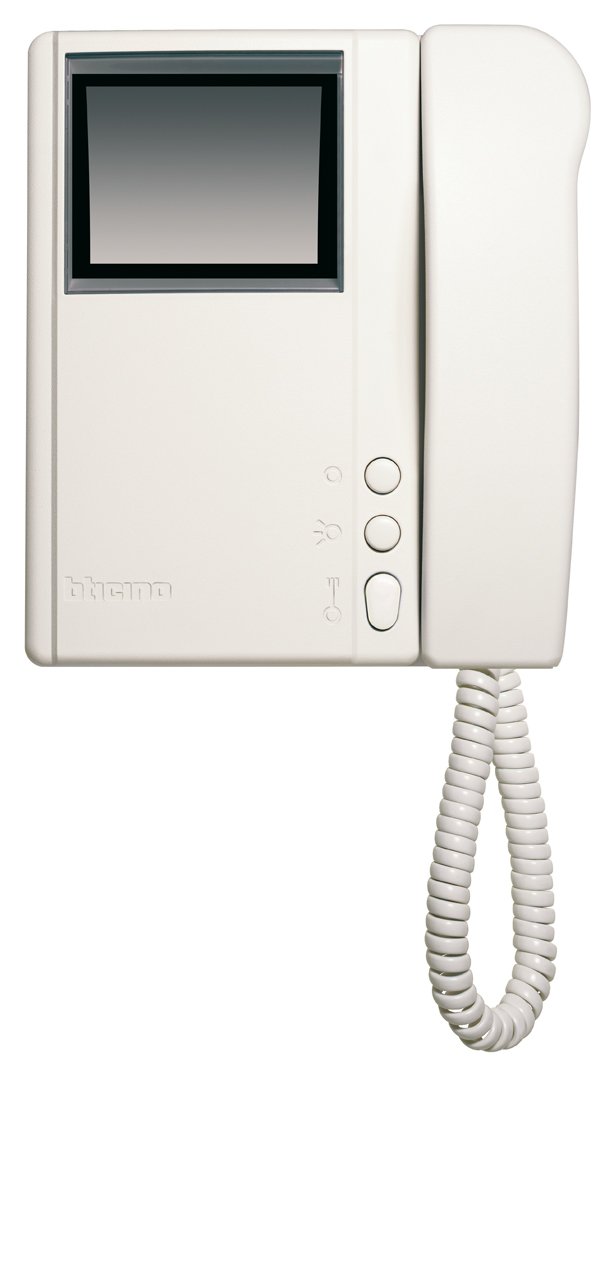
פיגורע 4.1: פראָנט view of the Legrand Bticino LT Terraneo Sprint Video Intercom Unit.
4.1. הויפּט קאַמפּאָונאַנץ
- ווידעא ווייַז: Black and white screen for viewing visitors.
- כאַנדסעט: For audio communication with the outdoor unit.
- טיר מעלדונג קנעפּל: Activates the electric lock to open the door.
- ענטפֿערן/רוף קנעפּל: הייבט אן אדער ענדיגט א רוף.
- מאָניטאָר קנעפּל: Activates the camera on the outdoor unit to view דער אַרייַנגאַנג.
- באַנד קאָנטראָל: Adjusts the ringtone and communication volume.
4.2. Product Details and 360-Degree View
Observe the detailed features and a complete 360-degree view of the video intercom unit to familiarize yourself with its design and connections.
ווידעא 4.1: דעטאַלירט איבערview of the Legrand Bticino LT Terraneo Sprint Video Intercom. This video demonstrates the product's features and components.
Video 4.2: 360-degree view of the Legrand Bticino LT Terraneo Sprint Video Intercom. This video provides a comprehensive visual inspection of the unit from all angles.
5. סעטאַפּ און ייַנמאָנטירונג
The Legrand Bticino LT Terraneo Sprint video intercom operates on a 2-wire system, simplifying installation. Ensure power is disconnected before beginning.
5.1. Mounting the Indoor Unit
- Choose a suitable location indoors, away from direct sunlight, heat sources, and moisture. The ideal height is typically 150-160 cm from the floor.
- Secure the mounting bracket to the wall using the provided screws and wall plugs. Ensure it is level.
- Connect the 2-wire bus cable and any other necessary connections (e.g., floor call, auxiliary services) to the terminals on the back of the indoor unit. Refer to the wiring diagram specific to your system.
- Carefully attach the indoor unit to the mounting bracket, ensuring it clicks securely into place.
- Connect the coiled cord from the handset to the designated port on the main unit.
5.2. ערשטע אויפשטעל
Once all connections are made and the unit is securely mounted, restore power to the system. The unit should power on, and the display may show a startup sequence. If the system does not power on, check all connections and the power supply.
6. אַפּערייטינג ינסטרוקטיאָנס
6.1. ענטפֿערן אַ רוף
When a visitor presses the call button on the outdoor unit, the indoor unit will ring, and the video display will activate, showing the visitor. To answer the call, lift the handset or press the 'Answer' button (if available).
6.2. עפענען די טיר
During a call or while monitoring, press the 'Door Release' button to activate the electric lock and allow the visitor entry.
6.3. מאָניטאָרינג די אַרייַנגאַנג
צו view the entrance area without an incoming call, press the 'Monitor' button. The video display will activate, showing the view from the outdoor unit's camera. The monitoring duration may be limited.
6.4. אַדזשאַסטינג באַנד
Use the volume control knob or buttons on the unit to adjust the ringtone volume and the audio level during a conversation.
7. וישאַלט
7.1. רייניקונג
To clean the unit, gently wipe the surfaces with a soft, dry cloth. For stubborn marks, a slightly damp cloth with mild soap can be used, followed by a dry cloth. Do not use abrasive cleaners, solvents, or chemical sprays, as these can damage the unit's finish and electronic components.
7.2. רעגולער טשעקס
Periodically check the coiled cord of the handset for any signs of wear or damage. Ensure all buttons respond correctly. If any issues arise, refer to the troubleshooting section or contact technical support.
8. טראָובלעשאָאָטינג
If you encounter problems with your video intercom, consult the following table before contacting technical support.
| פּראָבלעם | מעגלעך סיבה | לייזונג |
|---|---|---|
| No power to the indoor unit. | Power supply disconnected or faulty. | Check the main power supply and all connections. Ensure the circuit breaker is on. |
| No video on display. | Outdoor unit camera issue or wiring problem. | Check the wiring between the indoor and outdoor units. Ensure the outdoor unit camera is clean and unobstructed. |
| No audio during conversation. | Handset not properly connected or volume too low. | Ensure the handset cord is securely plugged in. Adjust the volume control. |
| טיר אויסלעשער ארבעט נישט. | Wiring to electric lock faulty or lock mechanism issue. | Verify the wiring to the electric lock. Check the lock mechanism for any obstructions or damage. |
9. ספּעסאַפאַקיישאַנז
| שטריך | דעטאַל |
|---|---|
| סאָרט | לעגראנד |
| מאָדעל נומער | 344342 |
| פּראָדוקט טיפּ | 2-Wire Black/White Video Intercom |
| דימענשאַנז (פּאַקקאַגינג) | 8 X 8 X 8 סענטימעטער |
| פּונקט וואָג | 4.54 ג |
| באַטעריז אַרייַנגערעכנט | ניין |
| באַטעריז פארלאנגט | ניין |
| ASIN | B001ZWERK6 |
| ערשטער בנימצא טאָג | 24 אפריל 2013 |
10. וואָראַנטי און שטיצן
For warranty information, please refer to the warranty card included with your product or visit the official Legrand website. For technical support, service, or to purchase spare parts, please contact your local Legrand distributor or authorized service center. Keep your purchase receipt as proof of purchase for warranty claims.