
KLH KL-300i
KLH AUDIO KL-300i Nostalgia 5-n-1 System
Model: KL-300i
הקדמה
א דאנק פארן קויפןasing the KLH AUDIO KL-300i Nostalgia 5-n-1 System. This integrated audio system combines classic and modern audio playback capabilities, including a turntable, CD player, cassette player, AM/FM radio, and an iPod dock. This manual provides essential information for setting up, operating, and maintaining your system to ensure optimal performance and longevity.
זיכערקייַט אינפֿאָרמאַציע
ביטע ליינט אלע זיכערהייט אינסטרוקציעס קערפול איידער איר ניצט דעם פראדוקט. האלט דעם מאנואל פאר שפעטערדיגע רעפערענץ.
- מאַכט מקור: פֿאַרבינדט דעם אַפּאַראַט נאָר צו אַן AC מאַכט אַוטלעט פון דער ספּעציפֿישער וואָלומעןtage.
- ווענטילאַטיאָן: זיכער מאַכן אַז עס איז דאָ גענוג ווענטילאַציע. נישט פֿאַרשטאָפּן די ווענטילאַציע עפענונגען.
- וואַסער און נעץ: שטעלט נישט אויס דעם אַפּאַראַט צו רעגן אָדער פייכטקייט. שטעלט נישט קיין זאכן אָנגעפילט מיט פליסיקייטן, ווי וואַזעס, אויף דעם אַפּאַראַט.
- היץ: שטעלט נישט דעם אַפּאַראַט לעבן היץ־קוואַלן ווי ראַדיאַטאָרן, היץ־רעגיסטערס, אויוון, אדער אַנדערע אַפּאַראַטן (אַרייַנגערעכנט ampליפיערס) וואָס פּראָדוצירן היץ.
- רייניקונג: נעמט ארויס דעם אַפּאַראַט פֿון דער וואַנט־ווענטיל איידער איר רייניקט. ניצט נאָר אַ טרוקענעם שטאָף.
- סערוויס: דו זאלסט נישט פּרווון צו דינען דעם פּראָדוקט זיך. קאָנטאַקט אַלע קוואַלאַפייד סערוויס פּערסאַנעל.
פּעקל אינהאַלט
באַשטעטיקן אַז אַלע זאכן וואָס זענען ליסטעד אונטן זענען אַרייַנגערעכנט אין דעם פּעקל:
- KLH AUDIO KL-300i Main Unit
- ווייַט קאָנטראָל
- אַגזיליערי אַרייַנשרייַב קאַבלע
- AM/FM Antenna Wire
- ינסטרוקטיאָן מאַנואַל (דעם דאָקומענט)
פּראָדוקט איבערview
Familiarize yourself with the various components and controls of your KLH AUDIO KL-300i system.
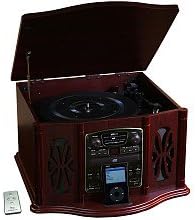
This image displays the KLH AUDIO KL-300i Nostalgia 5-n-1 System. The unit features a dark wood finish. The top lid is open, revealing a turntable. Below the turntable, the front panel includes controls for the CD player, AM/FM radio tuner, and an iPod dock. A small remote control is visible to the left of the main unit.
פראָנט פּאַנעל קאָנטראָלס:
- מאַכט קנעפּל: טורנס די אַפּאַראַט אויף אָדער אַוועק.
- פונקציע סעלעקטאָר: Switches between Phono, CD, Radio, iPod, and Aux modes.
- באַנד קנעפּל: אַדזשאַסטירט דעם הויפּט באַנד לעוועל.
- סי-די שפּילער קאָנטראָלס: שפּילן/פּויזע, אָפּשטעלן, שפּרינגען פאָרויס/צוריק.
- ראַדיאָ טונער: AM/FM band selector, Tuning knob.
- iPod Dock: Connector for iPod devices.
- Aux-In Jack: 3.5 מ״מ אַרײַנגאַנג פֿאַר עקסטערנע אַודיאָ דעוויסעס.
- כעדפאָון דזשאַק: 3.5 מ״מ אויסגאַנג פֿאַר פּריוואַט צוהערן.
Top פּאַנעל:
- טערנטייבאַל: For playing vinyl records.
- דעקל: באַשיצט דעם דריי־טיש ווען נישט אין באַנוץ.
זייַט טאַפליע:
- קאַסעט דעק: For playing audio cassette tapes.
סעטאַפּ
Follow these steps for initial setup of your audio system.
- אָרט: Place the unit on a stable, flat surface away from direct sunlight, heat sources, and excessive dust or moisture. Ensure there is adequate space around the unit for ventilation.
- פאַרבינדן אַנטענע: For optimal AM/FM radio reception, connect the supplied antenna wire to the antenna terminal on the rear of the unit. Extend the wire fully for better reception.
- מאַכט קשר: צאַפּן די אַק מאַכט שנור אין אַ נאָרמאַל וואַנט ווענטיל.
- ערשט מאַכט אויף: Press the Power button on the front panel to turn on the unit.
אַפּערייטינג ינסטראַקשאַנז
אַלגעמיינע אָפּעראַציע:
- מאַכט אויף / אַוועק: דרוק די מאַכט קנעפּל צו קער די אַפּאַראַט אויף אָדער אַוועק.
- פונקציע סעלעקציע: Use the Function Selector knob or buttons to choose your desired audio source (Phono, CD, Radio, iPod, Aux).
- באַנד אַדזשאַסטמאַנט: דריי דעם וואָלומען קנעפּל צו פאַרגרעסערן אָדער פאַרמינערן דעם געזונט לעוועל.
טערנטייבאַל אָפּעראַציע:
- Lift the lid of the unit.
- שטעלן אַ וויינאַל רעקאָרד אויף די טערנטייבאַל טאַץ.
- Select the appropriate speed (33 1/3, 45, or 78 RPM) using the speed selector switch. For 45 RPM records, place the included adapter on the spindle if needed.
- Gently lift the tonearm and position the stylus over the desired starting groove of the record.
- Lower the tonearm slowly onto the record. Playback will begin automatically.
- כדי אפצושטעלן די ווידערשפּיל, הייבט אויף דעם טאָנאַרם לײַכט און שטעלט אים צוריק אין זײַן רו.
CD Player אָפּעראַציע:
- Press the Function Selector to CD mode.
- Press the Eject button to open the CD tray.
- לייגט אַ סי-די מיט דער עטיקעט זײַט אַרויף אין דעם טאַץ.
- Press the Eject button again to close the tray. The CD will begin playing automatically or display the track count.
- Use the Play/Pause, Stop, and Skip buttons to control playback.
קאַסעטע שפּילער אָפּעראַציע:
- שטעקט אריין א קאסעטע טייפ אין דעם קאסעטע סלאט אויף דער זייט פון דעם איינהייט.
- דרוק דעם שפּיל קנעפּל צו אָנהייבן פּלייבאַק.
- Use the Fast Forward (FF) button to advance the tape quickly.
- To stop playback, press the Stop/Eject button. Pressing it halfway will eject the tape.
AM/FM ראַדיאָ אָפּעראַציע:
- Press the Function Selector to Radio mode.
- Select either AM or FM band using the band selector switch.
- Rotate the Tuning knob to search for radio stations.
- Adjust the antenna wire for best reception.
iPod Dock Operation:
- Press the Function Selector to iPod mode.
- Carefully place your compatible iPod device onto the iPod dock connector.
- Use your iPod's controls to select and play music. Audio will be routed through the KLH AUDIO system's speakers.
Aux-In Operation:
- Press the Function Selector to Aux mode.
- Connect an external audio device (e.g., MP3 player, smartphone) to the Aux-In jack on the front panel using the supplied 3.5mm auxiliary cable.
- Play audio from your external device. The sound will be played through the KLH AUDIO system's speakers.
רימאָוט קאָנטראָל באַניץ:
The remote control primarily operates the CD player functions (Play, Pause, Stop, Skip). Note that the remote cannot turn the unit on or off.
וישאַלט
Proper care will ensure the longevity of your system.
- רייניקונג די אַפּאַראַט: ווישט אָפּ די אויסערלעכע זייט פון דער אַפּאַראַט מיט אַ ווייכן, טרוקענעם שטאָף. ניצט נישט קיין שרײַבנדיקע רייניגער, וואַקסן אָדער סאָלווענטן.
- סטילוס זאָרגן: Handle the turntable stylus with extreme care. Clean the stylus periodically with a soft brush, brushing from back to front.
- סי-די/קאסעטע זאָרג: Keep CDs and cassette tapes clean and free of dust. Store them in their cases when not in use.
טראָובלעשאָאָטינג
If you experience issues with your system, refer to the following common problems and solutions.
| פּראָבלעם | מעגלעך סיבה | לייזונג |
|---|---|---|
| קיין מאַכט | עלעקטרישע שנור נישט זיכער אריינגעשטעקט. | קאָנטראָלירט די פֿאַרבינדונג פֿון דער עלעקטרישער שנור צום אַפּאַראַט און צום וואַנט־אַויטלעט. |
| קיין געזונט | Volume too low; Incorrect function selected; Headphones connected. | Increase volume; Select correct function; Disconnect headphones. |
| טערטייבאַל נישט ספּיננינג | Unit not powered on; Belt dislodged. | Ensure unit is on; Contact service if belt issue suspected. |
| נעבעך ראַדיאָ אָפּטראָג | די אַנטענע נישט אויסגעשטרעקט אָדער ריכטיק פּאַזיציאָנירט. | Extend and adjust the antenna wire for better signal. |
| סי-די שפּילט נישט | CD inserted incorrectly; CD is scratched or dirty. | Ensure CD is label-side up; Clean or replace CD. |
ספּעסאַפאַקיישאַנז
| שטריך | באַשרייַבונג |
|---|---|
| מאַכט מקור | אַק 120 וו ~ 60 הז |
| דימענשאַנז (ב x ד x ה) | Approx. 17" x 17" x 10.5" (43.2 cm x 43.2 cm x 26.7 cm) |
| טערנטייבאַל ספּידז | 33 1/3, 45, 78 רפּם |
| ראַדיאָ פרעקווענסי ראַנגע | AM: 530-1710 kHz, FM: 88-108 MHz |
| קאָמפּאַטיביליטי פון קאָמפּאַקטדיסק | קאָמפּאַקטדיסק, סי-ר / רוו |
| iPod Dock | Compatible with older generation iPods (30-pin connector) |
וואָראַנטי און שטיצן
This product is covered by a limited manufacturer's warranty. For specific warranty terms and conditions, please refer to the warranty card included with your purchase or contact KLH customer support. If you require technical assistance or have questions not covered in this manual, please contact KLH customer service through their official webוועבזייטל אדער די קאָנטאַקט אינפֿאָרמאַציע וואָס איז צוגעשטעלט מיט דיין פּראָדוקט.
Ask a question about this manual
Ask about setup, troubleshooting, compatibility, parts, safety, or missing instructions. Manuals+ will review the question and use this page’s manual context to help answer it.