
1. הקדמה
Thank you for choosing the TFA Dostmann Digital Weather Station 35.1065. This device provides accurate indoor temperature, humidity, time, date, and a weather trend forecast. Please read this manual carefully before using the device to ensure proper operation and to prevent damage.
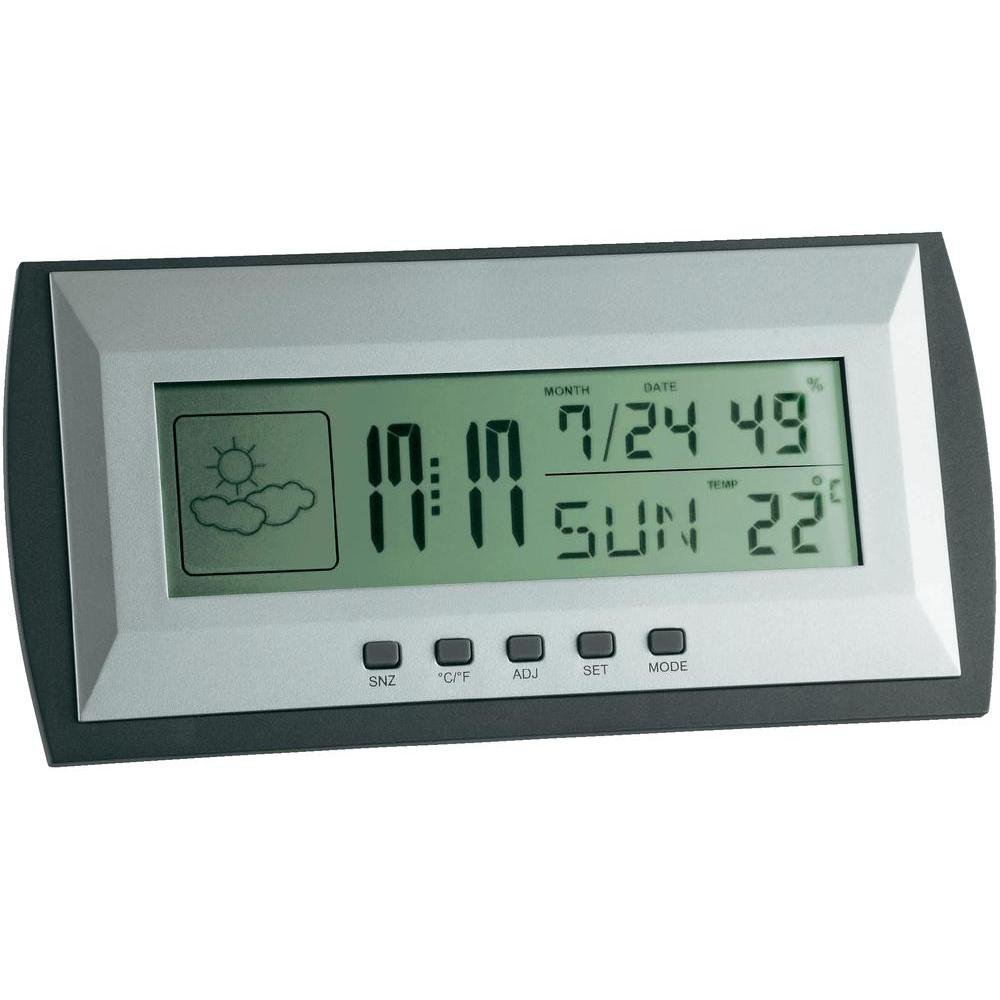
Figure 1: TFA Dostmann Digital Weather Station 35.1065 on a wooden desk. This image shows the weather station displaying time, date, and weather information in a typical home or office setting.
2. זיכערקייַט אינפֿאָרמאַציע
- האַלטן דעם מאַנואַל פֿאַר צוקונפֿט רעפֿערענץ.
- דו זאלסט נישט ויסשטעלן די מיטל צו עקסטרעם טעמפּעראַטורעס, ווייבריישאַנז אָדער שאַקס.
- ויסמייַדן דירעקט זונשייַן און נעץ.
- דו זאלסט נישט ייַנטונקען די מיטל אין וואַסער.
- Do not attempt to repair or modify the device yourself. Contact qualified personnel for service.
- פּאָטער פון געוויינט באַטעריז לויט די היגע רעגיאַליישאַנז.
3. סעטאַפּ
3.1 פּעקל אינהאַלט
זיכער מאַכן אַז אַלע זאכן זענען פאַראַן:
- TFA Dostmann Digital Weather Station 35.1065
- 2 רענטגענ אַאַ באַטעריז
- באַניצער מאַנואַל (דעם דאָקומענט)
3.2 באַטאַרייע ייַנמאָנטירונג
- Locate the battery compartment cover on the back of the weather station.
- רוק די דעקל עפענען.
- Insert two (2) AA batteries, observing the correct polarity (+ and - markings).
- פאַרמאַכן די באַטאַרייע אָפּטייל דעקן סיקיורלי.
דער אַפּאַראַט וועט זיך אויטאָמאַטיש אנצינדן און ווייַזן די ערשטע רעזולטאַטן.
3.3 ערשטע סעטינגס (צייט, דאטום, טעמפעראטור איינהייט)
Upon first power-on or after battery replacement, you may need to set the time, date, and preferred temperature unit.
- דריקן און האַלטן די שטעלן button for a few seconds to enter setting mode. The digit to be set will flash.
- ניצן די ADJ button to adjust the flashing value (e.g., hour, minute, year, month, day).
- דרוק די שטעלן button again to confirm the setting and move to the next parameter.
- Repeat steps 2 and 3 until all desired settings (time, date) are configured.
- צו בייטן צווישן צעלזיוס (°C) און פאַהרענהייט (°F), דריק די ° C / ° F קנעפּל.
4. אפערירן די וועטער סטאנציע
4.1 ווייַז איבערview
די LCD דיספּלעי ווײַזט פֿאַרשידענע אינפֿאָרמאַציע:
- צייט: Current time in 12-hour or 24-hour format.
- טאָג: Current month, day, and day of the week.
- טעמפּעראַטור: Indoor temperature, displayed in °C or °F.
- הומידיטי: Indoor humidity percentage.
- Weather Forecast Icon: Indicates a trend forecast (e.g., sunny, cloudy, rainy). This is a prediction based on atmospheric pressure changes and may not always reflect actual weather.
4.2 קנעפּל פאַנגקשאַנז
- SNZ (Snooze): Activates the snooze function for the alarm.
- °C/°F: טוישט צווישן צעלזיוס און פאַהרענהייט טעמפּעראַטור אַרויסווייַזונג.
- ADJ (אַדזשאַסטירן): געניצט צו סטרויערן ווערטן בעת סעטטינג מאָדע.
- שטעלן: Enters and confirms settings.
- DIRECTIONS: Switches between different display modes (e.g., time, alarm time).
4.3 באַשטעטיקן די שרעק
- דרוק די מאָדע button repeatedly until the alarm time is displayed.
- דריקן און האַלטן די שטעלן קנעפּל. די אַלאַרם שעה וועט בלינקען.
- ניצן די ADJ קנעפּל צו שטעלן די געוואונטשענע אַלאַרם שעה.
- דרוק שטעלן צו באַשטעטיקן און אריבערגיין צו מינוטן.
- ניצן ADJ צו שטעלן די געוואונטשענע אַלאַרם מינוטן.
- דרוק שטעלן צו באַשטעטיקן און אַרויסגאַנג שרעק באַשטעטיקן.
- צו אַקטיווירן/דעאַקטיווירן דעם אַלאַרם, דריק די ADJ קנעפּל בשעת די אַלאַרם צייט ווערט געוויזן. אן אַלאַרם בילדל וועט דערשייַנען/פאַרשווינדן.
5. וישאַלט
5.1 רייניקונג
ריין די מיטל מיט אַ ווייך, דamp cloth. Do not use abrasive cleaners or solvents. Ensure no water enters the device.
5.2 באַטערי פאַרבייַט
When the display becomes dim or the device stops functioning, replace the batteries. Follow the steps in Section 3.2. Always replace both batteries at the same time with new AA batteries.
5.3 סטאָרידזש
If the device will not be used for an extended period, remove the batteries to prevent leakage and damage. Store in a cool, dry place.
6. טראָובלעשאָאָטינג
| פּראָבלעם | מעגלעך סיבה | לייזונג |
|---|---|---|
| קיין דיספּלעי אדער טונקעל דיספּלעי. | באַטעריעס זענען נידעריק אָדער נישט ריכטיק אינסטאַלירט. | פאַרבייַטן באַטעריז מיט נייַ אָנעס, ינשורינג ריכטיק פּאָולעראַטי. |
| אומרעכטע צייט/דאטום. | Time/date not set correctly. | Refer to Section 3.3 to set the time and date. |
| נישט פּינקטלעכע טעמפּעראַטור/פֿײַכטקייט מעסטונגען. | Device placed near heat sources, vents, or in direct sunlight. | Relocate the weather station to a stable indoor environment away from extreme temperature fluctuations. Allow time for readings to stabilize. |
| Weather forecast icon seems incorrect. | Weather forecast is a trend prediction based on atmospheric pressure, not a real-time forecast. | Understand that the icon indicates a general trend over the next 12-24 hours, not current conditions. |
7. ספּעסאַפאַקיישאַנז

Figure 2: TFA Dostmann Digital Weather Station 35.1065 with dimensions. This image provides a detailed view of the device, including its width (18 cm), height (9 cm), and depth (3.81 cm).
- סאָרט: טפא דאסטמאן
- מאָדעל: 35.1065
- מאַכט מקור: Battery-powered (2 x AA batteries, included)
- מאַטעריאַל: פּלאַסטיק
- ספּעציעלע פֿעיִקייטן: Trend forecast
- ווייַז טיפּ: לקד
- נומער דימענשאַנז (ד x וו x ה): 3.8 סענטימעטער X 18 סענטימעטער X 9 סענטימעטער
- נומער וואָג: 164 גראַמז
- אַרייַנגערעכנט קאַמפּאָונאַנץ: Weather station, batteries, user manual
- רעקאַמענדיד נוצן: היים אָפיס
- ספּעציפיש ניצט: דאַטע, הומידיטי, טעמפּעראַטור, צייט
- לאַנד פון אָריגין: כינע
8. וואָראַנטי און שטיצן
For warranty information, please refer to the documentation provided at the time of purchase or visit the official TFA Dostmann website. For technical support or further assistance, please contact TFA Dostmann customer service through their official channels.
Official TFA Dostmann Webפּלאַץ: www.tfaaa-dostmann.de