
1. הקדמה
This manual provides essential information for the safe and efficient operation of your Sharp Aquos LC42D64U 42-Inch 1080p LCD HDTV. Please read these instructions thoroughly before using your television and retain them for future reference. The Sharp Aquos D64 series offers a slim design, Full HD 1080p resolution, and advanced features for an enhanced viewינג דערפאַרונג.
2. וויכטיק סאַפעטי אינפֿאָרמאַציע
שטענדיק פֿאָלגן די גרונטלעכע זיכערהייט מיטלען ווען איר ניצט דעם טעלעוויזיע צו רעדוצירן דעם ריזיקאָ פֿון פֿײַער, עלעקטרישן קלאַפּ און שאָדן.
- מאַכט מקור: פֿאַרבינדט דעם טעלעוויזאָר נאָר צו דער מאַכט־צושטעל וואָס איז אָנגעצייכנט אויף דער עטיקעט.
- ווענטילאַטיאָן: זיכער מאַכן אַז די ווענטילאַציע איז ריכטיק. נישט פאַרשפּאַרן די ווענטילאַציע עפענונגען.
- וואַסער און נעץ: שטעלט נישט אויס דעם טעלעוויזאר צו רעגן אדער פייכטקייט. לייגט נישט קיין אביעקטן פול מיט פליסיקייטן אויפן טעלעוויזאר.
- רייניקונג: נעמט ארויס דעם טעלעוויזאר פון דער וואנט-אויסשטעל איידער איר רייניגט. ניצט א ווייכן, טרוקענעם שטאָף.
- סערוויס: דו זאלסט נישט פּרווון צו דינען דעם פּראָדוקט זיך. קאָנטאַקט אַלע קוואַלאַפייד סערוויס פּערסאַנעל.
- מאָונטינג: If wall-mounting, ensure the mount is compatible and installed by qualified personnel.
- קינדער: היט אויף קינדער צו פאַרהיטן זיי פון קריכן אויף אָדער שפּילן מיטן טעלעוויזאָר.
3. וואָס איז אין דער קעסטל
באַשטעטיקן אַז אַלע קאָמפּאָנענטן זענען פאַראַן איידער איר גייט ווייטער מיט דער סעטאַפּ.
- Sharp Aquos LC42D64U 42-Inch LCD HDTV
- ווייַט קאָנטראָל
- טיש שטיין
- מאַכט שנור
- באַניצער מאַנואַל (דעם דאָקומענט)
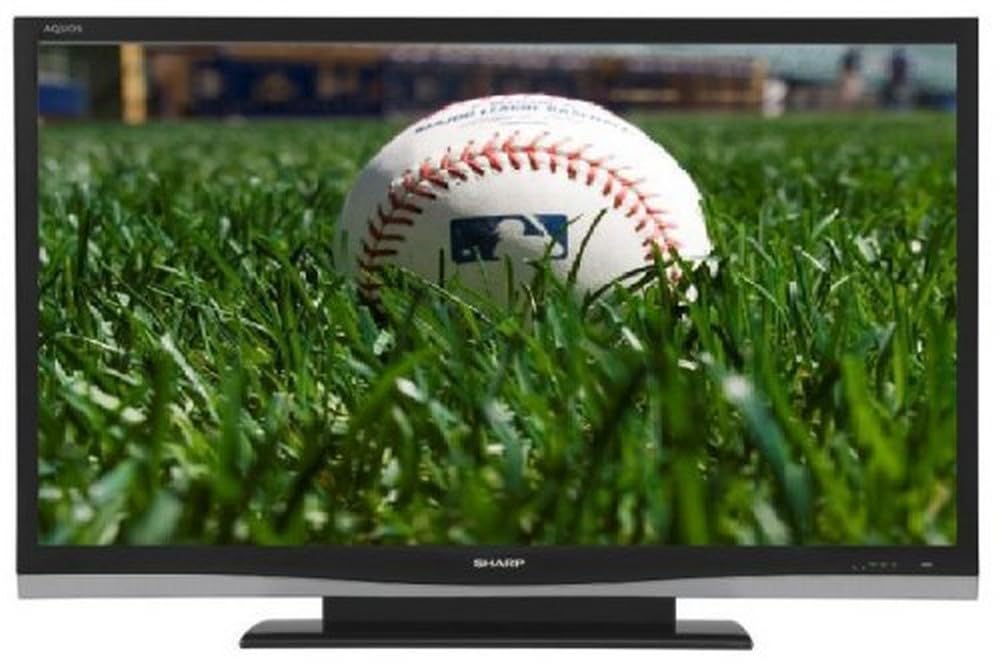
בילד: פראָנט view of the Sharp Aquos LC42D64U 42-Inch LCD HDTV with its included table stand.
4. סעטאַפּ
4.1 אנשטעלן דעם טיש־שטאנד
If you are not wall-mounting the television, attach the included table stand. Refer to the separate assembly guide for detailed instructions on securing the stand to the TV. Ensure all screws are tightened securely.
4.2 קאַנעקטינג פונדרויסנדיק דעוויסעס
Connect your external devices (e.g., cable box, Blu-ray player, game console) to the appropriate input terminals on the rear or side of the TV.
- הדמי: For high-definition digital video and audio. The TV features three HDMI 1.3 inputs (two rear, one side).
- Component Video (Y, Pb, Pr): For high-definition analog video. Two inputs are available.
- Composite Video (A/V): For standard-definition analog video and audio. One side and one rear input.
- S- ווידעא: For standard-definition video. One side and one rear input.
- PC Input (D-Sub 15-pin): פֿאַרבינדט אַ קאָמפּיוטער צו נוצן ווי אַ מאָניטאָר.
- RF Antenna Inputs: Two inputs for connecting an antenna or cable TV.
- עטהערנעט פּאָרט: For network connectivity (DLNA).
4.3 מאַכט קאַנעקשאַן
After connecting all desired devices, plug the power cord into the TV's power inlet and then into a wall outlet. The TV will enter standby mode.
5. אַפּערייטינג ינסטרוקטיאָנס
5.1 Initial Power On and Channel Setup
- דרוק די מאַכט קנעפּל אויף דער ווײַטקאָנטראָל אָדער דעם טעלעוויזאָר צו עס אנצינדן.
- The first time you power on, the TV will guide you through the initial setup process, including language selection and channel scanning.
- אויסקלייבן אייער בילכער שפּראַך (ענגליש, שפּאַניש, אדער פֿראַנצייזיש).
- Perform an "Easy Setup" or "Channel Setup" scan to detect available digital (ATSC, QAM) and analog (NTSC) channels.
5.2 גרונטלעכע ווײַטקאָנטראָל פֿונקציעס
- מאַכט: Turns the TV on or off (standby).
- איינגאבע: Cycles through available input sources (HDMI, Component, PC, etc.).
- CH +/-: ענדערונגען טשאַנאַלז.
- VOL +/-: אַדדזשוסץ באַנד.
- מעניו: גייט אריין אין דעם מעניו אויף דעם עקראַן פֿאַר סעטינגס אַדזשאַסטמאַנץ.
- פייַל קנעפּלעך: נאַוויגירן דורך מעניו אָפּציעס.
- אַרייַן: קאַנפערמז סאַלעקשאַנז.
- EXIT/RETURN: Exits menus or returns to the previous screen.
5.3 מעניו נאַוויגאַציע און סעטטינגס
דרוק די MENU button to access various settings categories:
- בילד: Adjust brightness, contrast, color, tint, sharpness, and backlight. The OPC function automatically adjusts brightness based on room conditions.
- אַודיאָ: Control volume, bass, treble, balance, and select audio modes.
- קאַנאַל: Rescan channels, add/delete channels, and set up favorite channels.
- סעטאַפּ: General settings like language, time, sleep timer, and parental controls (V-Chip).
- אַוואַנסירטע פֿעיִקייטן: Access settings for DLNA, Picture-in-Picture, and AQUOS LINK.
6. אַוואַנסירטע פֿעיִקייטן
6.1 AQUOS LINK (HDMI-CEC)
AQUOS LINK allows convenient control of compatible Sharp devices connected via HDMI using just your AQUOS TV remote. Ensure connected devices also support HDMI-CEC (Consumer Electronics Control) and are enabled in their respective settings.
6.2 DLNA Compatibility
The TV is DLNA-compatible, enabling interoperability with other DLNA-certified electronics, computers, and mobile devices. Connect the TV to your home network via the Ethernet port to access and share digital content (photos, videos, music) from compatible devices on your network.
6.3 בילד-אין-בילד (PIP)
The Picture-in-Picture function allows simultaneous viewing of a TV program and a video or PC source. Consult the on-screen menu for PIP activation and source selection.
6.4 V-Chip System
The V-Chip system allows you to block TV and movie programs based on their rating, providing parental control over objectionable content. Access V-Chip settings through the TV's setup menu.
7. וישאַלט
7.1 רייניקן דעם עקראַן
ווישט אָפּ דעם עקראַן מיט אַ ווייכן, לינט-פֿרײַעם שטאָף. פֿאַר שווערע פֿלעקן, ווישט לײַכט.ampווישט דעם שטאָף מיט וואַסער אָדער אַ ספּעציעלן עקראַן רייניגער. דו זאלסט נישט ניצט שטרענגע כעמיקאַלן, אַברייסיוו רייניגער, אָדער שפּריצט פליסיקייטן גלייך אויפן עקראַן.
7.2 רייניקונג די קאַבינעט
Wipe the TV cabinet with a soft, dry cloth. Avoid using solvents or abrasive materials.
7.3 אַלגעמיינע קער
- נעמט ארויס דעם טעלעוויזאר בעת בליץ-שטורעמס אדער ווען מען ניצט עס נישט פאר לאנגע צייטן.
- האַלט דעם טעלעוויזאָר אַוועק פון דירעקטער זונשייַן, היץ קוועלער און צו פיל שטויב.
- Ensure adequate space around the TV for proper ventilation.
8. טראָובלעשאָאָטינג
איידער איר קאָנטאַקטירט קונה שטיצע, פּרוּווט די פאלגענדע לייזונגען פֿאַר געוויינטלעכע פּראָבלעמען:
| פּראָבלעם | מעגלעך לייזונג |
|---|---|
| קיין מאַכט | קאָנטראָלירט צי דער עלעקטרישער שנור איז גוט איינגעשלאָסן אין דער טעלעוויזיע און אין דער וואַנט־אַויטלעט. מאַכט זיכער אַז די אַויטלעט האָט עלעקטרישקייט. |
| קיין בילד נישט, אבער סאונד איז דא | באַשטעטיקן אַז די ריכטיקע אַרייַנגאַנג מקור איז אויסגעקליבן. קאָנטראָלירט קאַבל קאַנעקשאַנז צו פונדרויסנדיק דעוויסעס. |
| קיין קלאַנג, אָבער בילד איז דאָ | Check the volume level and mute setting. Ensure audio cables are correctly connected. |
| ווייַט קאָנטראָל נישט ארבעטן | טוישן די באַטעריעס. זיכער מאַכן אַז עס זענען נישטאָ קיין שטערונגען צווישן דעם ווײַטקאָנטראָל און דעם טעלעוויזיע'ס IR סענסאָר. |
| "Hotel Mode" issue (as per customer review) | If the TV is stuck in a limited functionality mode, contact Sharp customer support for assistance in disabling "Hotel Mode." This typically requires a specific service menu sequence. |
9. ספּעסאַפאַקיישאַנז
| שטריך | דעטאַל |
|---|---|
| מאָדעל נומער | LC42D64U |
| פאַרשטעלן גרייס | 42 אינטשעס |
| ווייַז טעכנאָלאָגיע | לקד |
| האַכלאָטע | 1080p (פול HD) |
| קאַנטראַסט פאַרהעלטעניש | 10,000:1 Dynamic |
| ענטפער צייט | 4 מיליסעקאַנדז |
| HDMI פּאָרץ | 3 (2 דערציען, 1 זייַט) |
| Component Video Inputs | 2 |
| קאָמפּאָסיטע ווידעא ינפּוץ | 3 (1 זייַט, 2 דערציען) |
| S-Video Inputs | 2 (1 זייַט, 1 דערציען) |
| פּיסי אַרייַנשרייַב | 1 (D-Sub 15-pin) |
| עטהערנעט פּאָרט | יא |
| טונער טיפּ | ATSC, QAM, NTSC |
| פּאַרענטאַל קאָנטראָל | V-טשיפּ |
| וואָג | 70.2 פונט (אומגעפער) |
| מאָדעל יאָר | 2008 |
10. וואָראַנטי און שטיצן
10.1 לימיטעד וואָראַנטי
This Sharp Aquos LC42D64U television comes with a 1 Year Parts and 1 Year Labor Warranty from the date of original purchase. This warranty covers manufacturing defects in materials and workmanship under normal use. It does not cover damage caused by misuse, accident, modification, or unauthorized repair.
ביטע האַלטן דיין דערווייַז פון קויפן פֿאַר וואָראַנטי קליימז.
10.2 קונה שטיצן
For technical assistance, troubleshooting beyond this manual, or warranty service, please contact Sharp Customer Support. Refer to the contact information provided with your product documentation or visit the official Sharp webזייטל פֿאַר די מערסט אַקטועלע שטיצע דעטאַלן.
When contacting support, please have your model number (LC42D64U) and serial number ready.