
אַקוועאָן 100106080
Aqueon QuietFlow 10 LED PRO Aquarium Power Filter User Manual
מאָדעל: 100106080
For Aquariums Up to 20 Gallons
הקדמה
The Aqueon QuietFlow 10 LED PRO Aquarium Power Filter is designed to provide comprehensive filtration for your freshwater or saltwater aquarium, ensuring clean, clear, and healthy water for your aquatic inhabitants. This filter incorporates five stages of filtration: mechanical, chemical, biological, and a specialty filter pad, along with an innovative LED indicator for cartridge replacement.
Its self-priming internal pump design ensures quiet operation, eliminates leaks, and automatically restarts after power interruptions or cleaning, providing reliable performance.
זיכערקייַט אינפֿאָרמאַציע
- Always unplug the filter from the power outlet before performing any maintenance, cleaning, or when placing hands in the aquarium water.
- Ensure the filter is fully submerged in water up to the recommended level before plugging it in to prevent damage to the pump.
- ניצט נישט דעם פילטער אויב דער עלעקטרישער שנור אדער שטעקער איז געשעדיגט.
- דער פּראָדוקט איז בדעה בלויז פֿאַר דרינענדיק נוצן.
- האַלטן אויס פון דערגרייכן פון קינדער.
- Ensure a drip loop is formed with the power cord to prevent water from traveling along the cord and reaching the electrical outlet.
פּעקל אינהאַלט
באַשטעטיקן אַז אַלע קאָמפּאָנענטן זענען פאַראַן איידער איר הייבט אָן די אינסטאַלאַציע:
- Aqueon QuietFlow 10 LED PRO Aquarium Power Filter Unit
- Medium Aqueon Replacement Filter Cartridge (1 included)
- Size 10 Specialty Filter Pad (1 included)
- Intake Tube Assembly
- פילטער קאָווער
סעטאַפּ אינסטרוקציעס
Follow these steps to properly set up your Aqueon QuietFlow 10 LED PRO Power Filter:
- אָפּלייגן קאַמפּאָונאַנץ: קערפאַלי באַזייַטיקן אַלע טיילן פון די פּאַקקאַגינג.
- צוזאַמענשטעלן די ינטייק רער: Attach the intake tube to the bottom of the filter pump. Ensure it is securely fastened.
- אינסטאַלירן פילטער קאַרטרידזש: Insert the Medium Aqueon Replacement Filter Cartridge into the designated slot within the filter housing. Ensure the "FRONT" label on the cartridge faces forward.
- Install Specialty Filter Pad: Place the Size 10 Specialty Filter Pad into its slot, typically behind the main filter cartridge.
- Position Filter on Aquarium: Hang the filter unit on the back rim of your aquarium. Ensure the intake tube is fully submerged in the water and the filter housing is level.
- צוגרייטן דעם פילטער: Before plugging in, pour aquarium water into the filter housing until it is full. This primes the pump and prevents it from running dry.
- פאַרבינדן צו מאַכט: Plug the filter into a grounded electrical outlet. The filter should begin operating automatically.
- Install Filter Cover: Once the filter is running and water is circulating, place the filter cover onto the housing.

Figure 1: Aqueon QuietFlow 10 LED PRO Filter packaging and assembled unit.
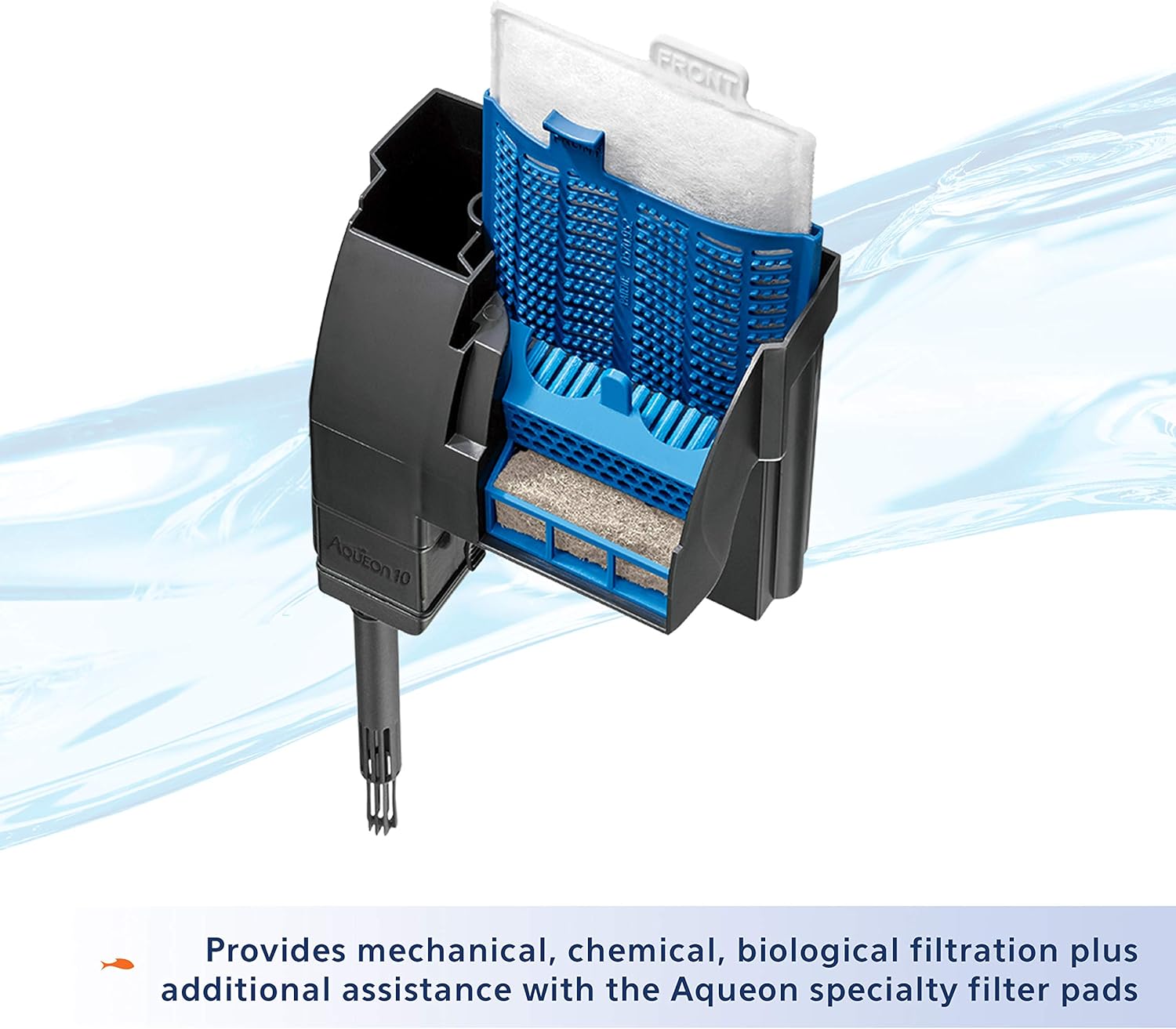
פיגורע 2: אינערלעכער view illustrating the placement of the filter cartridge and bio-holster.
אפערירן דעם פילטער
The Aqueon QuietFlow 10 LED PRO filter is designed for continuous operation. Once properly set up and plugged in, it will automatically begin filtering your aquarium water.
- זיך-פריינג: The internal pump design allows the filter to self-prime, meaning it will automatically restart after power interruptions or if it is turned off and on again.
- LED ינדיקאַטאָר: The filter features an LED indicator light that flashes when the filter cartridge becomes clogged and water flow is restricted. This signals that it's time to replace the cartridge.

Figure 3: The QuietFlow filter in operation, demonstrating water flow.

Figure 4: The LED indicator light, which flashes when the filter cartridge needs replacement.
וישאַלט
Regular maintenance is crucial for the optimal performance and longevity of your Aqueon QuietFlow filter and the health of your aquarium.
פילטער קאַרטראַדזשאַז פאַרבייַט
The filter cartridge should be replaced approximately every 4 weeks, or when the LED indicator light begins to flash, signaling reduced water flow due to clogging.
- Unplug Filter: Always unplug the filter from the power outlet before handling.
- אַראָפּנעמען דעקל: פֿאָרזיכטיק אַראָפּנעמען דעם פֿילטער דעקל.
- אַראָפּנעמען אַלטע קאַרטרידזש: Grasp the tab on the filter cartridge and gently pull it upwards to remove it. Dispose of the old cartridge.
- אינסטאַלירן אַ נייע קאַרטרידזש: Insert a new Medium Aqueon Replacement Filter Cartridge into the slot. Ensure it is seated properly.
- Do NOT Clean Bio-Holster: עס איז וויכטיק נישט to clean the Bio-Holster (the blue plastic frame holding the cartridge) when replacing the cartridge, as it contains beneficial biological bacteria essential for your aquarium's ecosystem.
- Replace Cover and Restart: Replace the filter cover and plug the filter back into the power outlet. The filter will self-prime and resume operation.

Figure 5: Aqueon Medium Replacement Filter Cartridges.

Figure 6: Reminder to replace cartridges every 4 weeks.
Specialty Filter Pads
Aqueon Specialty Filter Pads can be used in conjunction with the main filter cartridge to address specific water quality issues, such as absorbing excess ammonia, pollutants, or phosphates. Replace these pads as needed based on water test results or visual observation of water clarity.

פיגורע 7: עקסamples of Aqueon Specialty Filter Pads for enhanced filtration.
ימפּעללער רייניקונג
If the filter's flow rate significantly decreases or the pump becomes noisy, the impeller may need cleaning. Unplug the filter, remove the intake tube, and carefully remove the impeller from its housing. Clean the impeller and its chamber with a small brush to remove any debris or mineral buildup. Reassemble and restart the filter.
טראָובלעשאָאָטינג
| פּראָבלעם | מעגלעך סיבה | לייזונג |
|---|---|---|
| Filter not starting or no water flow. | נישט איינגעשטאכן; מאַכט אויסtage; not primed; clogged impeller. | Check power connection; ensure power is restored; prime filter by filling with water; clean impeller. |
| LED indicator flashing. | Filter cartridge is clogged. | פאַרבייַטן די פילטער פּאַטראָן. |
| רידוסט וואַסער לויפן. | Clogged filter cartridge; dirty impeller; debris in intake tube. | Replace cartridge; clean impeller; clear intake tube. |
| יבעריק ראַש. | Impeller needs cleaning; filter not fully primed; air trapped in filter. | Clean impeller; ensure filter is fully primed; gently shake filter to release air bubbles. |
| Water leaking from filter. | Improperly seated components; cracked housing. | Check all connections and ensure components are properly seated; inspect housing for damage. |
ספּעסאַפאַקיישאַנז
- מאָדעל: QuietFlow 10 LED PRO Aquarium Power Filter
- נומער מאָדעל נומער: 100106080
- Aquarium Size Capacity: אַרויף צו 20 גאלאנען
- פילטריישאַן סtagעס: 5 (Mechanical, Chemical, Biological, Specialty Pad)
- פילטער קאַרטרידזש טיפּ: Medium Aqueon Replacement Cartridge
- Specialty Filter Pad Type: Size 10 Aqueon Specialty Filter Pads
- דימענשאַנז (LxWxH): בעערעך 6.4 X 6.3 X 3.8 אינטשעס
- וואָג: אומגעפער 1.2 פונט
- מאַטעריאַל: פּלאַסטיק
- מאַכט: נאָרמאַל הויזגעזינד עלעקטריקאַל ווענטיל
וואָראַנטי אינפֿאָרמאַציע
The Aqueon QuietFlow 10 LED PRO Aquarium Power Filter comes with a לימיטעד ליפעטימע וואָראַנטי. For specific details regarding warranty coverage, terms, and conditions, please refer to the official Aqueon website or contact Aqueon customer support.
שטיצן און קאָנטאַקט
For further assistance, product inquiries, or to purchase replacement parts and cartridges, please visit the official Aqueon webפּלאַץ אָדער קאָנטאַקט זייער קונה סערוויס אָפּטיילונג.
- אַקוועאָן Webפּלאַץ: www.aqueon.com
- קונה סערוויס: Refer to the Aqueon website for contact information (phone, email, or support forms).
Ask a question about this manual
Ask about setup, troubleshooting, compatibility, parts, safety, or missing instructions. Manuals+ will review the question and use this page’s manual context to help answer it.