
1. הקדמה
This manual provides detailed instructions for the installation, operation, maintenance, and troubleshooting of your Antec TPQ-1000 TruePower Quattro 1000W Power Supply. Please read this manual thoroughly before installation and use to ensure proper functionality and safety.
The Antec TPQ-1000 is a high-performance power supply designed for demanding computer systems, featuring 1000 watts of continuous power, 80PLUS certification for efficiency, and a modular cable design for improved cable management.
2. זיכערקייַט אינפֿאָרמאַציע
ווארענונג: Improper installation or use can lead to equipment damage, electric shock, or serious injury. Always follow these safety guidelines:
- זיכער מאַכן אַז די מאַכט צושטעל איז דיסקאַנעקטיד פון די AC אַוטלעט איידער ינסטאַלירונג אָדער האַנדלינג.
- עפֿנט נישט די מאַכט־צושטעל casinז. הויך באַנדtages are present inside, even when disconnected. There are no user-serviceable parts.
- Install the power supply in a well-ventilated area. Do not block any ventilation openings.
- Use only the modular cables provided with the power supply.
- זיכער מאַכן אַז אַלע קייבלס זענען זיכער פארבונדן איידער איר צינדט אָן די סיסטעם.
- דאָס פּראָדוקט איז דיזיינד פֿאַר נוצן מיט פּערזענלעכע קאָמפּיוטערס. ניצט עס נישט פֿאַר קיין אַנדער צוועק.
3. פּעקל אינהאַלט
באַשטעטיקן אַז דיין פּעקל כּולל די פאלגענדע זאכן:
- Antec TPQ-1000 TruePower Quattro 1000W Power Supply Unit
- Modular Cable Set (including ATX 20+4 pin, EPS12V 8-pin, PCI-E 6+2 pin, SATA, Molex)
- אַק מאַכט שנור
- מאַונטינג סקרוז
- באַניצער מאַנואַל (דעם דאָקומענט)
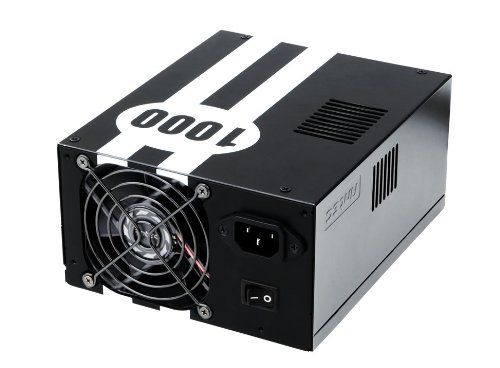
Image: The Antec TPQ-1000 TruePower Quattro 1000W Power Supply unit, typically shown with its modular cables. This image illustrates the main power supply unit and its various connectors.
4. סעטאַפּ און ייַנמאָנטירונג
4.1 פאַר-ינסטאַללאַטיאָן טשעקליסט
- Ensure your computer case supports ATX power supplies.
- זאַמלען די נויטיקע מכשירים: אַ פיליפּס קאָפּ שרויפנציער.
- Unplug your computer from the wall outlet and discharge any residual power by pressing the power button.
- אַראָפּנעמען די זייט פּאַנעל פון דיין קאָמפּיוטער קעסטל.
4.2 Installing the Power Supply
- Carefully place the Antec TPQ-1000 into the power supply mounting bay of your computer case. Ensure the fan is oriented correctly for optimal airflow (usually facing down if there's a bottom vent, or facing into the case if top-mounted).
- באַפֿעסטיקן די מאַכט צושטעל צו דער קעסטל מיט די צוגעשטעלטע מאַונטינג שרויפֿן.
4.3 פֿאַרבינדן מאָדולאַרע קאַבלען
Connect only the necessary modular cables to the power supply and your components. This reduces cable clutter and improves airflow.
- 20+4 Pin ATX Motherboard Power: Connect the main ATX cable to the corresponding port on your motherboard.
- 4+4 Pin EPS12V CPU Power: Connect this cable to the CPU power connector on your motherboard. Modern motherboards typically use an 8-pin connector.
- 6+2 Pin PCI-E Power: For graphics cards. The TPQ-1000 provides multiple PCI-E connectors. Connect as many as required by your graphics card(s).
- SATA מאַכט: Connect to SATA devices such as hard drives, SSDs, and optical drives.
- Molex Power: Connect to older peripherals or case fans that use Molex connectors.
Ensure all connections are firm and properly seated. Route cables neatly to avoid obstructing airflow.
4.4 ערשט מאַכט אויף
- Once all components are connected, replace the computer case side panel.
- פאַרבינדן די אַק מאַכט שנור צו די מאַכט צושטעלן און דעמאָלט צו אַ וואַנט ווענטיל.
- Flip the power switch on the back of the power supply to the "ON" position (usually marked with "I").
- דריק דעם פּאַוער קנעפּל אויף אייער קאָמפּיוטער קעסטל צו אָנהייבן די סיסטעם.
5. אַפּערייטינג ינסטרוקטיאָנס
The Antec TPQ-1000 TruePower Quattro is designed for continuous and stable operation once properly installed. It features:
- 80PLUS Certification: This indicates high power efficiency, reducing wasted energy and heat generation.
- וניווערסאַל אַרייַנשרייַב: Automatically adjusts for 100V to 240V power grids, making it suitable for global use.
- Active Power Factor Correction (PFC): Improves power efficiency and reduces electrical waste.
- Multiple 12V Rails: Provides stable power delivery to critical components.
No specific user interaction is required during normal operation beyond ensuring adequate ventilation and a stable power source.
6. וישאַלט
To ensure the longevity and optimal performance of your power supply, consider the following maintenance tips:
- שטויב רייניקונג: Periodically (e.g., every 6-12 months), disconnect the power supply from the AC outlet and use compressed air to gently clean dust from the fan grille and ventilation openings. Do not open the power supply casing.
- ווענטילאַטיאָן: Ensure that the power supply's fan and ventilation openings are not obstructed by cables or other components within the PC case. Maintain good airflow within the entire system.
- קאַבלע פאַרוואַלטונג: Keep cables tidy to prevent them from interfering with airflow or fan operation.
7. טראָובלעשאָאָטינג
If you encounter issues with your Antec TPQ-1000 power supply, refer to the following common troubleshooting steps:
- סיסטעם טוט זיך נישט אן:
- קאָנטראָלירט צי דער AC מאַכט שנור איז זיכער פארבונדן צו ביידע די מאַכט צושטעל און די וואַנט אַוטלעט.
- Ensure the power switch on the back of the power supply is in the "ON" (I) position.
- Verify that the 20+4 pin ATX and 4+4 pin EPS12V CPU power cables are correctly and firmly connected to the motherboard.
- פּרובירט די וואַנט אַוטלעט מיט אַן אַנדער דעווייס צו באַשטעטיקן אַז עס האָט שטראָם.
- System Powers On but Shuts Down Immediately:
- This could indicate a short circuit or an overloaded component. Disconnect all non-essential components (e.g., extra drives, graphics card if integrated graphics are available) and try again.
- Ensure all modular cables are correctly seated at both the power supply and component ends.
- System Instability or Random Restarts:
- Ensure adequate ventilation within the PC case to prevent overheating of components, including the PSU.
- Verify that your system's power requirements do not exceed the 1000W capacity of the power supply.
- קוק פֿאַר פרייַ קאַבלע קאַנעקשאַנז.
If issues persist after performing these steps, contact Antec customer support or a qualified technician.
8. ספּעסאַפאַקיישאַנז
| שטריך | באַשרייַבונג |
|---|---|
| מאָדעל נומער | TPQ-1000 |
| רעזולטאַט וואָסtage | 1000 וואטס |
| פאָרם פאַקטאָר | ATX12V |
| עפעקטיווקייט סערטיפיקאציע | 80PLUS Certified |
| אַרייַנשרייַב וואָלtage | 100V - 240V (Universal Input) |
| מאַכט פאַקטאָר קערעקשאַן | אַקטיוו פּפק |
| דימענסיעס (L X W X H) | 7.1 X 5.9 X 3.4 אינטשעס |
| פּונקט וואָג | 8.3 פונט |
| קאָאָלינג אופֿן | לופט |
| קאַנעקטער טייפּס | PCI-E, PCI-Express |
9. וואָראַנטי און שטיצן
Antec products are manufactured to the highest quality standards. This product is covered by Antec's limited warranty. For specific warranty terms and conditions, please refer to the warranty card included with your product or visit the official Antec webפּלאַץ.
For technical support, troubleshooting assistance, or warranty claims, please contact Antec Customer Service:
- Webפּלאַץ: www.antec.com/support (עקסampדער לינק, דער פאקטישער לינק קען זיין אנדערש)
- בליצפּאָסט: Refer to the Antec webוועבזייטל פֿאַר רעגיאָנאַלע קאָנטאַקט אינפֿאָרמאַציע.
- טעלעפֿאָן: Refer to the Antec webוועבזייטל פֿאַר רעגיאָנאַלע קאָנטאַקט אינפֿאָרמאַציע.
Please have your product model number (TPQ-1000) and purchase date available when contacting support.