
1. הקדמה
This manual provides detailed instructions for the installation, operation, and maintenance of the Lutron MA-ALFQ35 Maestro Companion Fan and Light Control. This device is designed to work in conjunction with a compatible Lutron Maestro Multi-Location Fan and Light Control (MA-LFQ3 or MA-LFQM) to provide multi-location control of your ceiling fan speed and light levels.
2. וויכטיק סאַפעטי אינפֿאָרמאַציע
ווארענונג: ריזיקירן פון עלעקטריק קלאַפּ.
- שטענדיק אויסשליסן די עלעקטריע ביים קרייז ברעיקער אדער פיוז באקס איידער איר אינסטאלירט אדער סערוויסט דעם אפאראט.
- Do not use this device with any fan or light control other than specified Lutron Maestro models.
- Installation must be performed by a qualified electrician or in accordance with all local and national electrical codes.
- דו זאלסט נישט יקסיד די מאַקסימום וואַסערtage ratings for connected loads.
- דער פּראָדוקט איז בלויז פֿאַר דרינענדיק נוצן.
3. פּראָדוקט איבערview
The Lutron MA-ALFQ35 is a companion control unit that extends the functionality of a primary Maestro Multi-Location Fan and Light Control. It allows you to adjust both the fan speed and light intensity from additional locations within a room or area. This unit does not function independently and must be paired with a compatible Maestro master control.
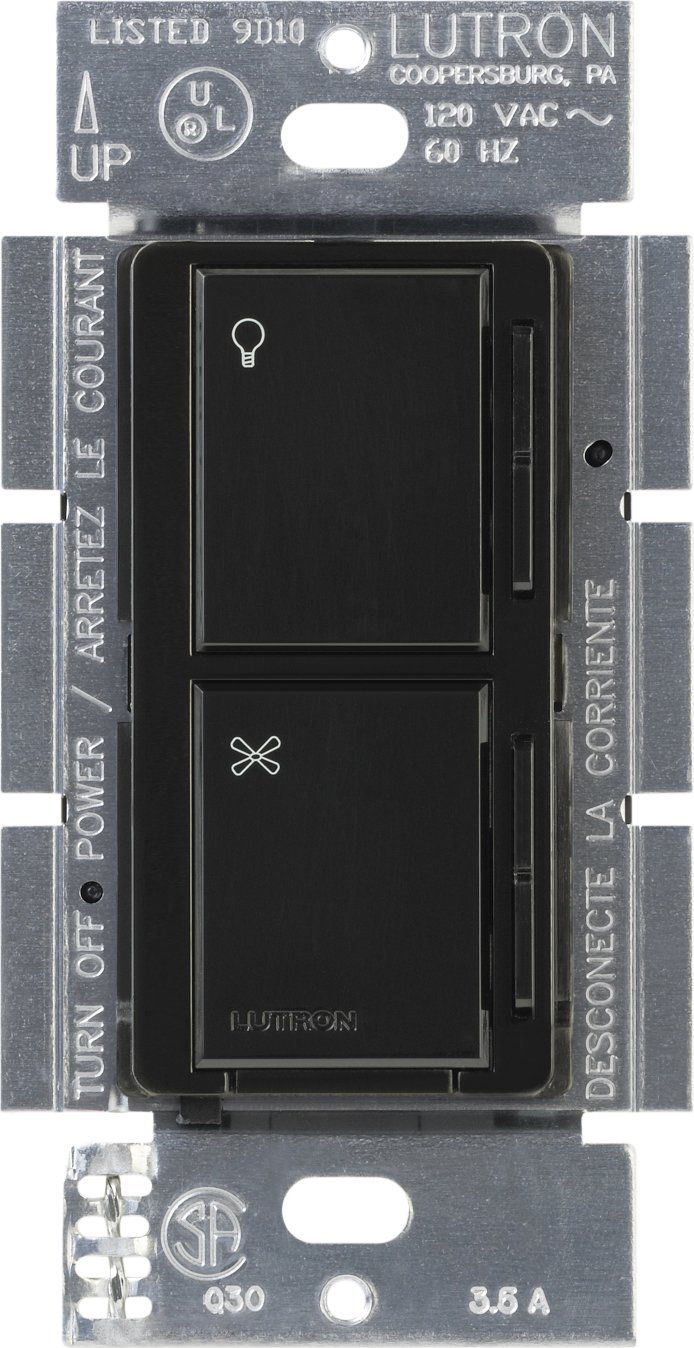
בילד 1: פראָנט view of the Lutron MA-ALFQ35 Maestro Companion Fan and Light Control. This black wall-mounted unit features separate touch controls for light (top) and fan (bottom), with a small Lutron logo at the base.
שליסל פֿעיִקייטן אַרייַננעמען:
- Multi-location control for fan speed and light level.
- Adjusts fan speed and light level from up to three locations (when used with additional companion controls).
- Sets and recalls 7 distinct light levels and fan speeds.
- Touch control method for intuitive adjustments.
4. קאַמפּאַטאַבילאַטי
This companion control unit is designed to operate exclusively with specific Lutron Maestro Multi-Location Fan and Light Controls. It is not a standalone device and will not function without a compatible master unit.
Compatible Master Control Models:
- Lutron MA-LFQ3
- Lutron MA-LFQM
Ensure you have one of these master units installed before attempting to install the MA-ALFQ35 companion control.
5. אינסטאַלאַציע (סעטאַפּ)
Installation of the MA-ALFQ35 companion control requires basic electrical wiring knowledge. If you are unsure about any steps, consult a qualified electrician.
5.1 איידער איר אָנהייבן
- קער אַוועק מאַכט: Locate the circuit breaker or fuse box that controls the power to the fan and light fixture. Turn off the power completely to prevent electric shock. Verify power is off using a voltagE tester.
- אידענטיפיצירן וויירינג: Carefully remove the existing wall plate and switch. Identify the wiring in the wall box. This companion control typically requires a neutral wire, a hot wire, and a traveler wire connected to the master control. Refer to the wiring diagram provided with your בעל Maestro Multi-Location Fan and Light Control for specific connections.
- צוגרייטן ווירעס: Strip insulation from wires if necessary, ensuring approximately 1/2 inch (12 mm) of bare wire is exposed.
5.2 Wiring the Companion Control
The MA-ALFQ35 companion control connects to the master control unit via traveler wires. The exact wiring configuration will depend on your specific setup (e.g., 3-way or 4-way control). Always follow the wiring instructions provided with the בעל Lutron Maestro Multi-Location Fan and Light Control (MA-LFQ3 or MA-LFQM).
- Connect the appropriate wires from the wall box to the terminals on the MA-ALFQ35.
- ענשור אַז אַלע דראָט קאַנעקשאַנז זענען זיכער.
5.3 Mounting and Finishing
- Mount the Control: Carefully push the wired MA-ALFQ35 into the wall box. Secure it with the provided mounting screws.
- אינסטאַלירן וואַנטפּלאַטע: Attach a coordinating Claro wallplate (sold separately) over the companion control.
- ומקערן מאַכט: צינדט צוריק אן די מאַכט ביים קרייז ברעיקער אדער פיוז קעסטל.
- טעסט פאַנגקשאַנאַליטי: Test both the fan and light controls from all locations to ensure proper operation.
6. אָפּעראַציע
The Lutron MA-ALFQ35 companion control provides intuitive touch-based operation for your ceiling fan and lights.
6.1 ליכט קאָנטראָל
- קער אויף / אַוועק: Tap the top section of the control (light icon) to turn the lights on or off.
- סטרויערן ברייטנאַס: Press and hold the top section to dim or brighten the lights. Release when the desired brightness is reached. The control supports 7 distinct light levels.
- צוריקרופן פּריסעט: A quick tap will often recall the last set brightness level.
6.2 פאַן ספּיד קאָנטראָל
- קער אויף / אַוועק: Tap the bottom section of the control (fan icon) to turn the fan on or off.
- סטרויערן גיכקייַט: Press and hold the bottom section to increase or decrease the fan speed. Release when the desired speed is reached. The control supports 7 distinct fan speeds.
- צוריקרופן פּריסעט: A quick tap will often recall the last set fan speed.
7. וישאַלט
The Lutron MA-ALFQ35 requires minimal maintenance.
- רייניקונג: To clean the surface of the control, wipe with a soft, damp שטאָף. ניצט נישט קיין שרײַבנדיקע רייניגער, סאָלווענטן, אדער כעמישע שפּריץ, ווײַל די קענען שאַטן די ענדיקונג אדער אינעווייניקסטע קאָמפּאָנענטן.
- קיין באַניצער-סערוויסאַבלע פּאַרץ: There are no user-serviceable parts inside this unit. Do not attempt to open or repair the control.
8. טראָובלעשאָאָטינג
If your Lutron MA-ALFQ35 companion control is not functioning as expected, consider the following:
- קיין מאַכט: Ensure the circuit breaker or fuse supplying power to the fan and light circuit is in the ON position.
- נישט ענטפערנדיק: Verify that the master Maestro Multi-Location Fan and Light Control (MA-LFQ3 or MA-LFQM) is properly installed and functioning. The companion unit relies on the master unit for operation.
- פאַלש וויירינג: Double-check all wiring connections, especially the traveler wires between the companion and master units. Refer to the master unit's installation guide for correct wiring diagrams. Ensure all connections are secure.
- Incompatible Master Unit: Confirm that the master control unit is one of the specified compatible Lutron Maestro models (MA-LFQ3 or MA-LFQM). This companion control will not work with other types of fan or light controls.
- ליסע קאַנעקשאַנז: Turn off power at the breaker and re-check all wire connections in the wall box for tightness.
If problems persist after checking these points, contact Lutron customer support or a qualified electrician.
9. ספּעסאַפאַקיישאַנז
| מאָדעל | MA-ALFQ35-BL |
| סאָרט | לוטראָן |
| אָפּעראַציע מאָדע | אנצינדן אויסלעשן |
| קאָנטראָל מעטאָד | ריר |
| נומער פון שטעלעס | 7 (for both fan speed and light level) |
| וואָסtage | 300 Watts (when used with compatible master) |
| קאַמפּאַטאַבאַל דעוויסעס | MA-LFQ3, MA-LFQM |
| מאַונטינג טיפּ | צאַפּן בארג |
| פּונקט וואָג | 0.3 פונט |
| קאָליר | שוואַרץ |
10. וואָראַנטי און שטיצן
10.1 וואָראַנטי אינפֿאָרמאַציע
The Lutron MA-ALFQ35 Maestro Companion Fan and Light Control comes with a 1-יאָר לימיטעד וואָראַנטי on materials and manufacture. Please retain your proof of purchase for warranty claims. This warranty covers defects in materials and workmanship under normal use.
10.2 קונה שטיצן
For technical assistance, troubleshooting beyond this manual, or warranty inquiries, please contact Lutron customer support. Visit the official Lutron webזייטל פֿאַר קאָנטאַקט אינפֿאָרמאַציע און נאָך רעסורסן.