
1. הקדמה
The Technoline WS 7208 is a versatile weather station designed to provide accurate local weather information. It features a clear display for weather forecasts, temperature trends, and a radio alarm clock. This device monitors both indoor and outdoor temperatures, including minimum and maximum values, and supports up to three external transmitters. The package includes one TX16 external transmitter.
שליסל פֿעיִקייטן אַרייַננעמען:
- Weather forecast and trend display
- Radio alarm clock function
- Internal and external temperature display with min/max memory
- Support for up to 3 external transmitters (one TX16 included)
- Wall-mountable or table-top placement
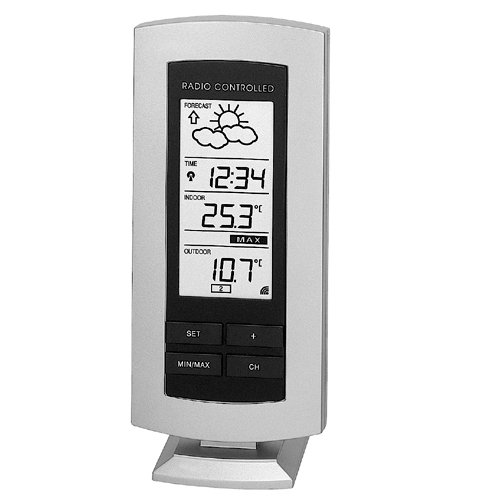
Figure 1: The Technoline WS 7208 Weather Station main unit. This image shows the front display and overall design of the weather station.
2. פּעקל אינהאַלט
ביטע קאָנטראָלירט דעם אינהאַלט פֿון דער פּאַקעט קערפֿול. אויב עס פֿעלן אָדער זענען געשעדיגט, קאָנטאַקטירט אייער הענדלער.
- Technoline WS 7208 Weather Station (Main Unit)
- TX16 External Transmitter
- ינסטרוקטיאָן מאַנואַל (דעם דאָקומענט)
3. סעטאַפּ
3.1. באַטאַרייע ייַנמאָנטירונג
Both the main weather station unit and the external transmitter require batteries for operation.
- הויפּט אַפּאַראַט: Open the battery compartment on the back of the main unit. Insert 2 x AA (LR06, stylus) 1.5 V batteries, ensuring correct polarity (+/-). Close the compartment.
- External Transmitter (TX16): Open the battery compartment on the back of the transmitter. Insert 2 x AA (LR06, stylus) 1.5 V batteries, ensuring correct polarity (+/-). Close the compartment.
וויכטיק: Always replace all batteries at the same time. Do not mix old and new batteries, or different types of batteries.
3.2. סענסאָר פּלייסמאַנט
Proper placement of the external transmitter is crucial for accurate outdoor temperature readings.
- Place the external transmitter in a shaded, dry location, protected from direct sunlight and rain.
- Ensure the transmitter is within the operational range of the main unit, which is up to 100 meters in an open field. Walls, metal structures, and electronic devices can reduce this range.
- The main unit can be placed on a table or mounted on a wall. Choose a location that allows for easy viewינג פון די אַרויסווייַזן.
4. אַפּערייטינג ינסטרוקטיאָנס
4.1. ערשטע סינקראָניזאַציע
After battery installation, the main unit will automatically search for the external transmitter. This process may take a few minutes. Ensure both units are close to each other during initial setup.
- The indoor temperature is displayed immediately.
- Once synchronized, the outdoor temperature will appear on the display.
- The main unit receives data from the external transmitter approximately every 5 minutes.
4.2. ווייַז אינפֿאָרמאַציע
The display provides various pieces of information:
- דרינענדיק טעמפּעראַטור: געמאסטן דורך דער הויפּט איינהייט.
- דרויסנדיק טעמפּעראַטור: Received from the external transmitter.
- מינימום / מאַקס טעמפּעראַטור: The station automatically records the minimum and maximum indoor and outdoor temperatures. Consult the specific buttons on your device (e.g., "MIN/MAX" button) to view and reset these values.
- וועטער פאָרעקאַסט: Indicated by graphical icons (e.g., sun, clouds, rain) and a trend arrow. This forecast is based on atmospheric pressure changes.
- Radio Alarm Clock: The time is automatically set via radio signal. Refer to the device's buttons for setting alarms and other time-related functions.
4.3. Temperature Measurement Details
The device offers precise temperature measurements:
- ינערלעך טעמפּעראַטור קייט: 0°C צו 60°C
- External Temperature Range: -29.9°C צו +69.9°C
- מעאַסורעמענט אַקיעראַסי: ±0.1°C
- Room Temperature Test Interval: יעדער 10 סעקונדעס
5. וישאַלט
- באַטערי פאַרבייַט: When the battery indicator appears on the display, replace the batteries in both the main unit and the external transmitter as described in Section 3.1.
- רייניקונג: Clean the device and transmitter with a soft, damp שטאָף. דו זאלסט נישט נוצן אַברייסיוו קלינערז אָדער סאָלוואַנץ.
- סטאָרידזש: אויב דער אַפּאַראַט וועט נישט ווערן גענוצט פֿאַר אַ לענגערע צייט, נעמט אַרויס די באַטעריעס כּדי צו פֿאַרמייַדן ליקאַדזש.
6. טראָובלעשאָאָטינג
| פּראָבלעם | מעגלעך סיבה | לייזונג |
|---|---|---|
| No outdoor temperature display (shows "----") |
|
|
| ומפּינקטלעך וועטער פאָרויסזאָגן |
|
|
| ווייַז איז טונקל אָדער ליידיק | Low batteries in the main unit. | פאַרבייַטן באַטעריעס אין דער הויפּט אַפּאַראַט. |
7. ספּעסאַפאַקיישאַנז
| שטריך | דעטאַל |
|---|---|
| מאָדעל | WS 7208 |
| הויפּט אַפּאַראַט גרייס (L x B x H) | 73 X 26 X 169 מם |
| External Transmitter Dimensions (L x W x H) | 59 X 22 X 65 מם |
| אינערלעכע טעמפּעראַטור קייט | 0°C צו 60°C |
| External Temperature Range | -29.9°C צו +69.9°C |
| Temperature Measurement Error Margin | ±0.1°C |
| הומידיטי ראַנגע | 1% to 99% (Error Margin ±1%) |
| Room Temperature Test Interval | יעדער 10 סעקונדעס |
| External Transmitter Data Reception | יעדער 5 מינוט |
| טראַנסמיסיע ראַנגע | אַרויף צו 100 עם (עפענען פעלד) |
| הויפּט אַפּאַראַט מאַכט צושטעלן | 2 x AA (LR06, stylus) 1.5 V batteries |
| External Transmitter Power Supply | 2 x AA (LR06, stylus) 1.5 V batteries |
| פּלייסמאַנט אָפּציעס | Wall-mounted or table-top |
8. וואָראַנטי און שטיצן
This Technoline WS 7208 Weather Station comes with a 2 יאָר וואָראַנטי פֿון דעם קויף־דאַטום. ביטע באַהאַלטן אייער קויף־באַווייַז פֿאַר גאַראַנטיע־קליימז.
For technical support, troubleshooting assistance, or warranty inquiries, please contact your retailer or the Technoline customer service department. Contact information can typically be found on the product packaging or the manufacturer's official webפּלאַץ.