
1. הקדמה
This manual provides detailed instructions for the setup, operation, and maintenance of your Bushnell Onix 200 Portable GPS Navigator. The Onix 200 is designed for outdoor use, offering navigation capabilities with satellite and aerial photos on a 2.7-inch sunlight-readable LCD screen. It features a rugged, waterproof design (IPX7) and 32 MB of internal memory for storing navigational data.
2. פּראָדוקט איבערview
2.1 שליסל פֿעיִקייטן
- Navigation with satellite and aerial photos.
- Rugged rubber armor and IPX7 waterproof rating.
- Sunlight-readable 2.7-inch LCD screen.
- באַניצער פּראָfiles for customized activity settings.
- Night-mode screen viewינג אָפּציע.
- 32 MB internal memory.
- וסב קאַנעקטיוויטי.
2.2 קאַמפּאָונאַנץ
The Bushnell Onix 200 package typically includes:
- Bushnell Onix 200 GPS Unit
- האַנטגעלענק בארג
- וסב קאַבלע (פֿאַר דאַטן אַריבערפירן און טשאַרדזשינג)
- באַניצער מאַנואַל (דעם דאָקומענט)
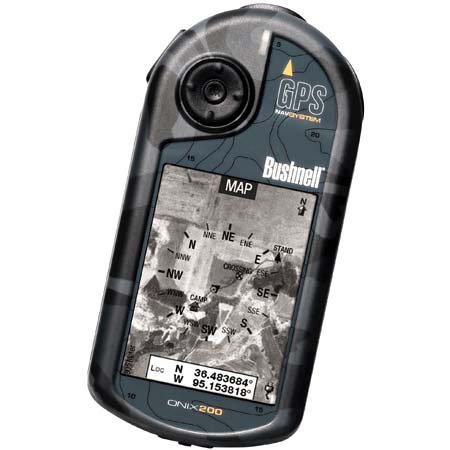
Figure 1: Bushnell Onix 200 handheld GPS unit, showing its rugged design and screen.
3. סעטאַפּ
3.1 באַטאַרייע ייַנמאָנטירונג
The Bushnell Onix 200 does not include batteries. It requires standard AA batteries (not included). To install:
- געפינט דעם דעקל פונעם באַטעריע־אָפּטייל אויף דער הינטערשטער זייט פונעם אַפּאַראַט.
- עפֿנט דעם דעקל דורך אים צו שלעפּן אָדער צו עפֿענען לויט די מאַרקירונגען.
- Insert the required number of AA batteries, ensuring correct polarity (+/-).
- פֿאַרמאַכט זיכער דעם דעקל פֿון דער באַטעריע־אָפּטיילונג כּדי צו האַלטן די וואַסערפּרוף פֿאַרזיגלונג.
3.2 ערשטע איינשטראָם און גרונטלעכע סעטטינגס
- דריק און האלט דעם מאַכט קנעפּל ביז דער עקראַן באַלויכטנט זיך.
- Upon first use, the device may prompt you to set basic preferences such as language, time zone, and measurement units. Follow the on-screen instructions.
- Allow the device to acquire a GPS signal. This may take several minutes, especially during the first use or after a long period of inactivity. Ensure you are in an open area with a clear view פון הימל.
3.3 קאַנעקטינג צו אַ קאָמפּיוטער
Use the provided USB cable to connect the Onix 200 to your computer for data transfer, map updates, or firmware updates. The device is compatible with Windows operating systems.
4. אַפּערייטינג ינסטרוקטיאָנס
4.1 Navigation with Satellite/Aerial Photos
The Onix 200 allows you to overlay navigation information directly onto satellite or aerial photographs. This feature provides enhanced situational awareness, especially in unfamiliar terrain.
- Access the map view פון די הויפּט מעניו.
- Select the desired map type (e.g., satellite, aerial, USGS map) from the display options.
- Use the touch screen or voice controls to pan, zoom, and interact with the map.
- Your current position will be indicated on the map, along with any loaded waypoints or routes.
4.2 באַניצער פּראָfiles
The "User Profiles" feature allows you to customize the device's settings and menu options based on your activity (e.g., hiking, fishing, hunting). This streamlines access to relevant functions.
- גיי צו "פּראָ"files" section in the main menu.
- אויסקלייַבן אַ יגזיסטינג פּראָfile אָדער שאַפֿן אַ נייַע.
- Customize settings such as display preferences, data fields, and shortcut menus for that specific activity.
- Activate the desired profile before starting your activity.
4.3 נאַכט מאָדע
For low-light conditions, activate the night-mode screen viewing option. This adjusts the display's backlight and color scheme to reduce eye strain and improve visibility in the dark.
- Access display settings from the main menu.
- Toggle the "Night Mode" option to ON.
4.4 קאָנטראָל מעטהאָדס
The Onix 200 supports both touch screen and voice control for interacting with the device. Refer to the on-screen prompts and the device's internal help system for specific voice commands.
5. וישאַלט
5.1 רייניקונג די מיטל
- ווישן די פאַרשטעלן און יקסטיריער מיט אַ ווייך, דamp, לינט-פֿרייַ שטאָף.
- Do not use abrasive cleaners, solvents, or aerosol sprays, as these can damage the device's finish and screen.
- Ensure all ports are dry before connecting cables.
5.2 Waterproofing Care (IPX7)
The Onix 200 is waterproof to IPX7 standards, meaning it can withstand immersion in water up to 1 meter for 30 minutes. To maintain this rating:
- Ensure the battery compartment cover and any port covers are securely closed before exposure to water.
- Do not intentionally submerge the device beyond its rated depth or duration.
- If the device gets wet, dry it thoroughly before opening any compartments or connecting to power.
5.3 סטאָרידזש
Store the device in a cool, dry place away from direct sunlight and extreme temperatures when not in use. Remove batteries if storing for extended periods to prevent leakage.
6. טראָובלעשאָאָטינג
6.1 קיין מאַכט
- Check if batteries are correctly installed and fully charged.
- פאַרבייַטן אַלט באַטעריז מיט נייַע.
- זייט זיכער אז דער מאַכט קנעפּל איז גענוג געדריקט און געהאלטן.
6.2 GPS Signal Loss or Inaccuracy
- זייט זיכער אז איר זענט אין אן אפענעם ארט מיט א קלארן view of the sky, away from tall buildings, dense foliage, or strong electromagnetic interference.
- Allow the device more time to acquire a signal.
- Perform a soft reset (refer to the device's internal menu for this option, if available).
6.3 עקראַן רעאַגירט נישט
- זיכער מאַכן אַז דער עקראַן איז ריין און טרוקן.
- If the touch screen is resistive, apply firm but gentle pressure.
- ריסטאַרט די מיטל.
6.4 Device Not Connecting to Computer
- Verify the USB cable is securely connected to both the device and the computer.
- פּרוּווט אַ אַנדערש וסב פּאָרט אויף דיין קאָמפּיוטער.
- Ensure necessary drivers are installed on your Windows operating system.
For further assistance, please refer to the official Bushnell support resources.
7. ספּעסאַפאַקיישאַנז
| שטריך | באַשרייַבונג |
|---|---|
| סאָרט | בושנעלל |
| מאָדעל נאָמען | אָניקס 200 |
| מאָדעל נומער | 36-2000 |
| פאַרשטעלן גרייס | 2.7 אינטשעס |
| האַכלאָטע | 160 X 240 |
| ווייַז טיפּ | לקד |
| ריר סקרין טיפּ | קעגנשטעליק |
| זכּרון סטאָרידזש קאַפּאַסיטי | 32 מב |
| קאַנעקטיוויטי טעכנאָלאָגיע | וסב |
| מאַפּע טיפּ | סאַטעליט |
| שטיצט סאַטעליט נאַוויגאַציע סיסטעם | גפּס |
| ספּעציעלע שטריך | וואָטערפּרוף (IPX7) |
| קאָנטראָל מעטאָד | ריר, קול |
| אָפּערייטינג סיסטעם | Windows (for PC connection) |
| דימענשאַנז (ב x ה x ד) | 1.1 X 8.0 X 2.2 אינטשעס |
| פּונקט וואָג | 15.2 אונסעס |
| באַטעריז אַרייַנגערעכנט | No (Requires AA) |
| UPC | 029757362001 |
8. וואָראַנטי און שטיצן
For detailed warranty information, product registration, and technical support, please visit the official Bushnell webפּלאַץ אָדער קאָנטאַקט זייער קונה סערוויס אָפּטיילונג.
איר קענט געפֿינען מער אינפֿאָרמאַציע און שטיצע רעסורסן בײַ דער בושנעל קראָם אויף עמעזאן.