
1. הקדמה
This manual provides instructions for the safe and efficient use of your Ergotron Neo-Flex Single Monitor Stand (Model 33-310-060). This desktop stand is designed to support a single monitor up to 27 inches and 16 pounds, compatible with VESA patterns 75x75mm and 100x100mm. It offers ergonomic adjustments including height, pan, tilt, and rotation to enhance your computing experience.
2. פּעקל אינהאַלט
ביטע באַשטעטיקן אַז אַלע קאָמפּאָנענטן זענען פאַראַן איידער איר הייבט אָן צו פֿאַרזאַמלען:
- מאָניטאָר שטיין באַזע
- Adjustable Column with Pivot
- וועסאַ מאָונטינג פּלאַטע
- Attachment Hardware (screws, washers, Allen wrench)

Image: All components included with the Neo-Flex Single Monitor Stand.
3. זיכערקייַט אינפֿאָרמאַציע
- Ensure the monitor weight and size are within the specified limits (up to 27 inches, 16 lbs).
- נישט צו שטארק אנציען די שרויפן בעתן צוזאמענשטעלן.
- שטעלן די שטיין אויף אַ סטאַביל, גלייַך ייבערפלאַך.
- האַלטן קינדער און פּעץ אַוועק פון די פֿאַרזאַמלונג געגנט.
4. אַסעמבלי און סעטאַפּ
4.1 Attaching the Column to the Base
- Place the monitor stand base on a flat, stable surface.
- Align the adjustable column with the designated holes on the base.
- Secure the column to the base using the provided screws and Allen wrench. Ensure it is tightened firmly but do not overtighten.
4.2 Attaching the VESA Plate to Your Monitor
- Carefully lay your monitor face down on a soft, clean surface to prevent scratches.
- Align the VESA mounting plate with the VESA holes on the back of your monitor (75x75mm or 100x100mm).
- Use the appropriate screws from the hardware kit to attach the VESA plate securely to the monitor.
4.3 Mounting the Monitor to the Stand
- With the VESA plate attached to your monitor, carefully lift the monitor.
- Slide the VESA plate (with monitor) onto the pivot on the adjustable column. Ensure it clicks securely into place.
- Tighten any hand screws or locking mechanisms on the pivot to secure the monitor.

בילד: הינטערשטע view of the stand's VESA mounting plate, ready for monitor attachment.
5. אַפּערייטינג ינסטרוקטיאָנס
The Neo-Flex stand allows for easy, fingertip adjustments to optimize your viewאין טרייסט.
5.1 הייך אַדזשאַסטמאַנט
- To raise or lower the monitor, gently lift or push down on the monitor. The stand allows for 5 inches (13 cm) of vertical travel without levers or knobs.
5.2 Tilt and Pan Adjustment
- טילט די מאָניטאָר דזשענטלי פאָרויס אָדער צוריק צו דערגרייכן דיין געוואלט viewing angle (up to 30 degrees tilt).
- Swivel the monitor left or right up to 270 degrees for easy screen sharing or collaboration.
5.3 ראָוטיישאַן
- Rotate the monitor 360 degrees to switch between landscape and portrait viewינג מאָדעס.
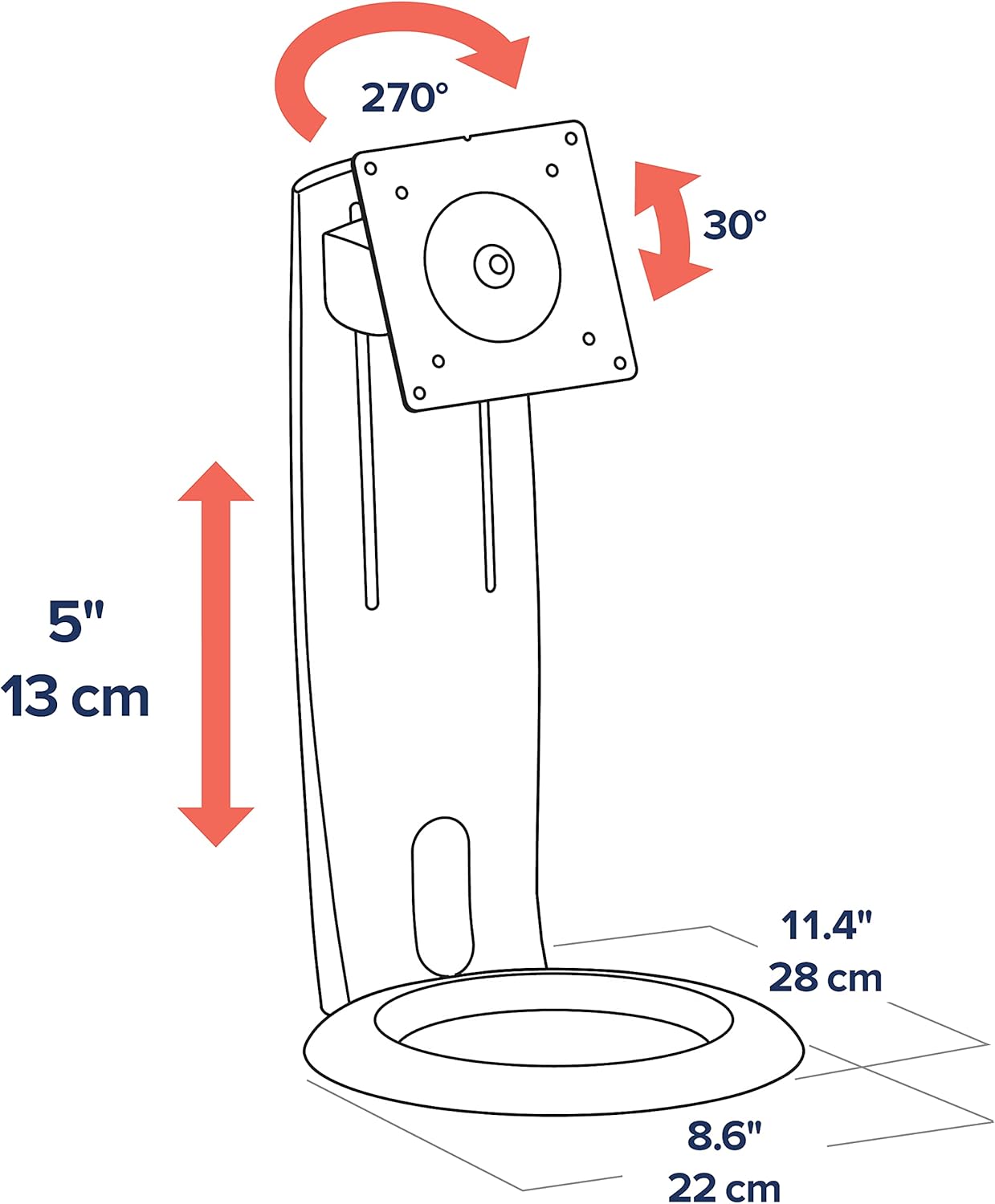
Image: Diagram showing the adjustable height (5 inches/13 cm), tilt (30 degrees), and pan (270 degrees) capabilities.

בילד: פראָנט view of the Ergotron Neo-Flex stand with a monitor, demonstrating its compact design.
6. קאַבלע מאַנאַגעמענט
The stand features integrated cable routing to keep your workspace tidy. Route monitor cables through the designated channels on the column to keep them out of sight and prevent clutter.
7. וישאַלט
- קאָנטראָלירט רעגולער אַלע שרויפן און פֿאַרבינדונגען צו זיכער מאַכן אַז זיי בלייבן פֿעסט.
- ריין די שטיין מיט אַ ווייך, דamp שטאָף. ויסמיידן אַברייסיוו קלינערז.
- Do not apply lubricants to the moving parts unless specifically instructed by Ergotron support.
8. טראָובלעשאָאָטינג
8.1 Monitor is not stable or wobbles
- Ensure all assembly screws, especially those connecting the column to the base and the VESA plate to the monitor, are securely tightened.
- Verify that the monitor's weight is within the specified load capacity (6 to 16 lbs).
- Ensure the stand is placed on a flat, stable, and sturdy surface.
8.2 Adjustments are too stiff or too loose
- The stand is designed for fingertip adjustments. If movements are too stiff, check for any overtightened screws. If too loose, ensure all connections are firm.
- Refer to the original product documentation or contact Ergotron support for specific adjustment mechanisms if needed.
9. ספּעסאַפאַקיישאַנז
| שטריך | דעטאַל |
|---|---|
| מאָדעל נומער | 33-310-060 |
| שטיצט פאַרשטעלן גרייס | אַרויף צו 27 אינטשעס |
| מאַסע קאַפּאַציטעט | 6 צו 16 פונט |
| VESA קאַמפּאַטאַבילאַטי | 75 קס 75 מם, 100 קס 100 מם |
| הייך אַדזשאַסטמאַנט | 5 אינטשעס (13 סענטימעטער) |
| טילט | Forward/Back (approx. 30 degrees) |
| פּאַן | 270 גראַד (לינקס/רעכטס) |
| ראָוטיישאַן | 360 degrees (portrait/landscape) |
| מאַטעריאַל | Plastic (with metal components) |
| קאָליר | שוואַרץ |
| פּראָדוקט דימענשאַנז | 18.25 X 9.13 X 5.88 אינטשעס |
| פּונקט וואָג | 4.4 פונט |
10. וואָראַנטי און שטיצן
Ergotron products are built to last and come with a 3-year warranty. For technical support, troubleshooting assistance, or warranty claims, please visit the official Ergotron webזייטל אדער קאנטאקט זייער קאסטומער סערוויס גלייך. האלט אייער קויף קוויטל פאר גאראנטיע באשטעטיקונג.