
1. הקדמה
א דאנק פארן קויפןasing the GPX CDP6806DT Personal CD Player. This manual provides important safety instructions, operational guidelines, and maintenance procedures to ensure optimal performance and longevity of your device. Please read this manual thoroughly before using the product and retain it for future reference.
2. זיכערקייַט אינפֿאָרמאַציע
וויכטיק סאַפעטי אינסטרוקציעס
- דו זאלסט נישט ויסשטעלן די אַפּאַראַט צו וואַסער אָדער נעץ.
- פֿאַרמײַדט צו שטעלן דעם אַפּאַראַט לעבן היץ־קוואַלן ווי ראַדיאַטאָרן, היץ־רעגיסטערס, אויוון, צי אַנדערע אַפּאַראַטן (אַרײַנגערעכנט ampליפיערס) וואָס פּראָדוצירן היץ.
- Do not attempt to disassemble or modify the unit. Refer all servicing to qualified service personnel.
- Use only the specified batteries (2 x AA batteries). Ensure correct polarity when inserting batteries.
- אַראָפּנעמען באַטעריז אויב די אַפּאַראַט וועט נישט זיין געוויינט פֿאַר אַ לאַנג צייַט.
- Avoid listening at high volume levels for prolonged periods to prevent hearing damage.
- ריין די אַפּאַראַט בלויז מיט אַ טרוקן שטאָף.
3. פּעקל אינהאַלט
Carefully unpack your GPX CDP6806DT Personal CD Player and ensure all items are present:
- GPX CDP6806DT Personal CD Player
- באַניצער מאַנואַל (דעם דאָקומענט)
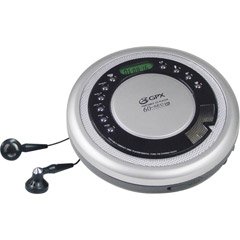
Figure 1: GPX CDP6806DT Personal CD Player. This image illustrates the compact design and general appearance of the device.
4. קאָנטראָלס און פֿעיִקייטן
Familiarize yourself with the controls and features of your GPX CDP6806DT for optimal use.
- LCD ווייַז: 6-digit display for track number, time, and FM frequency.
- PLAY/PAUSE (►/−): Press to start or pause CD playback.
- שטאָפּ (■): Press to stop CD playback.
- SKIP/SEARCH (◀◀/▶▶): Press to skip tracks. Hold to search within a track.
- באַנד (+/-): אַדזשאַסץ די אַודיאָ רעזולטאַט מדרגה.
- MODE/PROG: Selects playback mode (Repeat, Random) or programs CD tracks.
- FM TUNER (ON/OFF/BAND): Switches to FM radio mode, turns FM on/off, or changes FM band.
- PRESET (+/-): Navigates saved FM radio presets.
- סי-די קאמפארטמענט: Area for inserting audio CDs.
- באַטערי אָפּטייל: Located on the bottom, holds 2 AA batteries.
- כעדפאָון דזשאַק (3.5 מם): פֿאַרבינדט קאָפּהערער פֿאַר פּריוואַט צוהערן.
Figure 2: GPX CDP6806DT Controls Layout. This image provides a visual reference for the location of various buttons and ports on the device.
5. סעטאַפּ
5.1 באַטאַרייע ייַנמאָנטירונג
The GPX CDP6806DT requires two (2) AA batteries (not included) for portable operation.
- געפינען די באַטאַרייע אָפּטייל אויף די דנאָ פון די אַפּאַראַט.
- רוק די באַטאַרייע אָפּטייל דעקן עפענען.
- אַרײַנשטעלן צוויי AA באַטעריעס, און זיכער מאַכן אַז די ריכטיקע פּאָלאַריטעט (+ און -) איז אָנגעוויזן אין דעם אָפּטייל.
- פאַרמאַכן די באַטאַרייע אָפּטייל דעקן סיקיורלי.
5.2 קאַנעקטינג כעדפאָונז
For private listening, connect your 3.5mm stereo headphones (not included) to the headphone jack located on the side of the unit.
6. אַפּערייטינג ינסטרוקטיאָנס
6.1 סי פּלייבאַק
The unit supports CD and CD-R/RW disc formats.
- Open the CD compartment lid by gently pressing the OPEN button (if present, or lifting the lid).
- לייגט אַ סי-די מיט דער עטיקעט זײַט אַרויף אויף דער צענטראַלער שפּינדל.
- פֿאַרמאַכט דעם דעקל פֿון סי-די אָפּטייל פֿעסט ביז עס קליקט.
- דרוק די שפּילן/פּויזע (►/−) button to begin playback. The track number and elapsed time will appear on the LCD display.
- דריקן אויף צו פּויזע פּלייבאַק שפּילן/פּויזע (►/−). דרוק ווידער צו נעמענ זיכ ווידער.
- צו האַלטן פּלייבאַק דריקן די שטאָפּ (■) קנעפּל.
- צו האָפּקען צו דער ווייַטער שפּור, דריקן SKIP/SEARCH (▶▶).
- To go back to the beginning of the current track, press SKIP/SEARCH (◀◀) once. Press twice to go to the previous track.
- To search rapidly forward or backward within a track, hold down SKIP/SEARCH (▶▶) or (◀◀) ריספּעקטיוולי.
- סטרויערן די באַנד ניצן די באַנד (+/-) קאָנטראָלס.
6.2 FM ראַדיאָ אָפּעראַציע
The unit features a digital FM tuner with station presets.
- רוק די עפעם טונער switch to the ON position or press the BAND קנעפּל צו אַרייַן FM מאָדע.
- דרוק די SKIP/SEARCH (▶▶) or (◀◀) קנעפּלעך צו מאַנועל סטענען צו אַ געוואונטשענע אָפטקייט.
- To auto-scan and save stations, hold down the שפּילן/פּויזע (►/−) button (or refer to specific instructions for auto-scan if available on the device).
- צו צוריקרופן די געראטעוועטע פריסעטס, ניצט די PRESET (+/-) קנעפּלעך.
6.3 CD Programming (24-Track)
איר קענט פּראָגראַמירן ביז 24 טראַקס צו שפּילן אין אַ ספּעציפֿישער סדר.
- מיט די סי-די אפגעשטעלט, דריק די MODE/PROG button. "PROG" will flash on the display.
- ניצן די SKIP/SEARCH (▶▶) or (◀◀) קנעפּלעך צו אויסקלײַבן דעם ערשטן ליד וואָס איר ווילט פּראָגראַמירן.
- דרוק MODE/PROG again to confirm the selection. The display will show the program number and the next available program slot.
- איבערחזרן טריט 2 און 3 צו לייגן ביז 24 טרעקס צו אייער פראגראם.
- After programming all desired tracks, press שפּילן/פּויזע (►/−) צו אָנהייבן פּראָגראַמירטע ווידערשפּיל.
- צו אויסמעקן די פּראָגראַם, דריק די שטאָפּ (■) קנעפּל צוויי מאָל.
6.4 Anti-Skip Protection (ASP)
The GPX CDP6806DT features a 60-second Anti-Skip Protection system. This system buffers audio data to minimize interruptions caused by minor shocks or vibrations during CD playback. The ASP activates automatically when a CD is playing.
7. וישאַלט
7.1 רייניקונג די אַפּאַראַט
- ווישט די אויסערליכע זייט פון דער איינהייט מיט א ווייכן, טרוקענעם שטאָף.
- ניצט נישט קיין אברייסיוו רייניגער, וואקס, אדער סאָלווענטן.
- If the CD lens needs cleaning, use a specialized CD lens cleaner disc or a soft, lint-free cloth designed for optical lenses.
7.2 באַטערי קער
- Remove batteries if the unit is not used for an extended period to prevent leakage.
- דו זאלסט נישט מישן אַלט און נייַ באַטעריז, אָדער פאַרשידענע טייפּס פון באַטעריז.
- אָפּזאָגן געוויינט באַטעריז ריספּאַנסאַבלי לויט די היגע רעגיאַליישאַנז.
8. טראָובלעשאָאָטינג
If you experience issues with your GPX CDP6806DT, please consult the following table for common problems and solutions.
| פּראָבלעם | מעגלעך סיבה / לייזונג |
|---|---|
| דער אַפּאַראַט טוט נישט מאַכט אויף. | Check if batteries are inserted correctly with proper polarity. Ensure batteries are fresh and not depleted. |
| קיין קלאַנג פֿון די כעדפאָונז. | Ensure headphones are fully plugged into the headphone jack. Increase the volume level. Test with another pair of headphones. |
| CD skips or playback is interrupted. | Ensure the CD is clean and free of scratches or smudges. Clean the CD with a soft, lint-free cloth. Ensure the unit is on a stable surface or held steadily during use. |
| די סי-די שפילט נישט. | Ensure the CD is inserted correctly with the label side up. Close the CD compartment lid completely. Check if the CD is a supported format (CD, CD-R/RW). |
| די FM ראַדיאָ אָפּנאַם איז שוואַך. | Extend the headphone cable as it acts as the antenna. Try moving to a different location. |
9. ספּעסאַפאַקיישאַנז
- סאָרט: גפּקס
- מאָדעל: CDP6806DT
- שטיצט דיסק פֿאָרמאַטירונגען: קאָמפּאַקטדיסק, סי-ר / רוו
- אַנטי-סקיפּ שוץ: 60 סעקונדעס
- ווייַז: 6-ציפֿער לקד
- ראַדיאָ: Digital FM Tuner with Presets
- CD Programming: 24-שפּור
- מאַכט מקור: 2 קס אַאַ באַטעריז (ניט אַרייַנגערעכנט)
- קאַנעקטיוויטי: 3.5mm Headphone Jack (Auxiliary)
10. וואָראַנטי און שטיצן
For detailed warranty information, please refer to the warranty card included with your original product packaging. For technical support, service inquiries, or to purchase replacement parts, please visit the official GPX website or contact their customer service department using the contact information provided in your product documentation.
ביטע האַלטן דיין דערווייַז פון קויפן פֿאַר וואָראַנטי קליימז.