
1. הקדמה
This manual provides comprehensive instructions for the safe and efficient use of your Logisys PS480D 480W ATX Power Supply. Please read this manual thoroughly before installation and operation to ensure proper functionality and to prevent damage to the unit or other components.

Figure 1: Logisys PS480D 480W ATX Power Supply, front view with cables bundled.
2. זיכערקייַט אינפֿאָרמאַציע
ווארענונג: מאַכט סאַפּלייז אַנטהאַלטן הויך וואָלומעןtagקאָמפּאָנענטן. עפֿנט נישט די מאַכט צושטעל.asinז. עס זענען נישטאָ קיין באַניצער-סערוויסאַבאַל טיילן אינעווייניק.
- זיכער מאַכן אַז די מאַכט צושטעל איז דיסקאַנעקטיד פון די AC אַוטלעט איידער ינסטאַלירונג אָדער וישאַלט.
- Always ground yourself to prevent electrostatic discharge (ESD) when handling internal computer components.
- Do not operate the power supply in wet or damp באדינגונגען.
- פאַרזיכערן געהעריק ווענאַליישאַן אַרום די מאַכט צושטעלן צו פאַרמייַדן אָוווערכיטינג.
- ניצט נאָר די צוגעשטעלטע מאַכט קייבאַלז און קאַנעקטאָרס.
3. פּראָדוקט פֿעיִקייטן
The Logisys PS480D is a 480W ATX power supply designed for personal computers. Key features include:
- הויך עפעקטיווקייַט
- Low Noise & Ripple
- איבער וואָלtagE פּראַטעקשאַן
- קורץ קרייַז פּראַטעקשאַן
- Built-in EMI Filter
- Insulation Resistance 100MΩ min.
- Complies with FCC part 15J class B 115VAC operation and CISPR 22 230 VAC operation.
- Meets UL 1950, CSA 22.2 LEVEL 3 Requirement.
- 100% Burn-in test / Vibration test / Hi-pot test / Leakage current test.
- MTBF above 100,000 hours at 25 °C.

Figure 2: Rear panel of the power supply with fan, AC inlet, and power switch.
4. סעטאַפּ און ייַנמאָנטירונג
Follow these steps to install the Logisys PS480D power supply into your computer system.
- צוגרייטונג: Ensure your computer is completely powered off and unplugged from the wall outlet. Open your computer case according to its manufacturer's instructions.
- אַראָפּנעמען אַלטע מאַכט צושטעלן (אויב אָנווענדלעך): Disconnect all cables from the old power supply to the motherboard, drives, and other components. Unscrew and remove the old power supply from the case.
- Install New Power Supply: Carefully place the Logisys PS480D into the power supply bay of your computer case. Secure it with screws.
- פאַרבינדן הויפּט מאַכט: Connect the 20+4 pin ATX mainboard connector to your motherboard. If your motherboard uses a 20-pin connector, detach the 4-pin section. If it uses a 24-pin connector, connect both sections.
- פאַרבינדן CPU מאַכט: Connect the 4-pin +12V power connector to the corresponding port on your motherboard.
- פאַרבינדן פּעריפעראַל מאַכט:
- Use the 4-pin standard drive connectors for HDDs and CD/DVD-ROM drives.
- Use the 4-pin 3.5" FDD or ZIP connectors for floppy disk drives or similar devices.
- Use the Serial ATA (SATA) connectors for SATA hard drives and SSDs.
- קאַבלע פאַרוואַלטונג: Route cables neatly to ensure proper airflow within the case.
- שליסן פאַל: אַמאָל אַלע קאַנעקשאַנז זענען זיכער, פאַרמאַכן דיין קאָמפּיוטער קעסטל.
- קאָננעקט AC מאַכט: Plug the AC power cord into the power supply's AC inlet and then into a wall outlet.
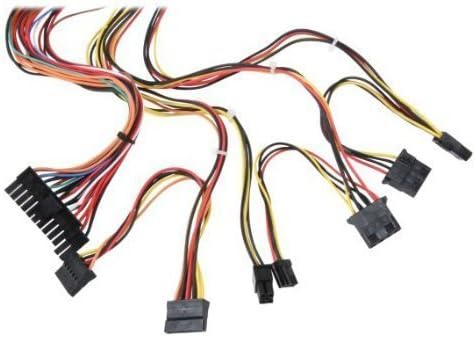
פיגורע 3: איבערview of power supply connectors.

Figure 4: Power supply dimensions and included AC power cord.
5. אַפּערייטינג ינסטרוקטיאָנס
After successful installation, you can power on your computer.
- Ensure the power switch on the rear of the power supply (Figure 2) is in the "ON" (I) position.
- דריק דעם פּאַוער קנעפּל אויף אייער קאָמפּיוטער קעסטל.
- The power supply will provide stable power to your system components.
- To power off, shut down your operating system normally. For complete power disconnection, switch the power supply to the "OFF" (O) position and unplug the AC cord.
6. וישאַלט
Regular maintenance helps ensure the longevity and optimal performance of your power supply.
- רייניקונג: Periodically clean dust from the power supply's fan and vents using compressed air. Ensure the power supply is unplugged before cleaning.
- לופט לויפן: Ensure that the computer case has adequate airflow and that the power supply's fan is not obstructed.
- קאַבלע אָרנטלעכקייַט: Periodically check all power cables for secure connections and signs of wear or damage.
7. טראָובלעשאָאָטינג
אויב איר טרעפט פּראָבלעמען מיט אייער מאַכט צושטעל, זעט די פאלגענדע געוויינטלעכע טראָובלעשווטינג טריט:
- קיין מאַכט:
- קאָנטראָלירט צי דער AC מאַכט שנור איז זיכער אַרייַנגעשטעקט אין ביידע די מאַכט צושטעל און די וואַנט אַוטלעט.
- Ensure the power switch on the rear of the power supply is in the "ON" (I) position.
- באַשטעטיקן אַז די וואַנט אַוטלעט אַרבעט דורך אַרײַנשטעקן אַן אַנדער דעוויס.
- Check all internal power connections (20/24-pin ATX, 4-pin +12V, peripheral connectors) are firmly seated.
- סיסטעם אינסטאביליטעט/רענדאם אפשטעלונגען:
- This could indicate an overloaded or failing power supply. Ensure your system's power requirements do not exceed the PS480D's 480W capacity.
- קאָנטראָלירט פֿאַר געהעריקע ווענטילאַציע און זיכערט זיך אַז דער מאַכט-צושטעלער ווענטילאַטאָר דרייט זיך. איבערהיצונג קען פאַראורזאַכן אומסטאַביליטעט.
- ומגעוויינטלעך ראַש:
- A loud fan noise might indicate dust buildup or a failing fan bearing. Clean the fan as described in the Maintenance section.
If problems persist after attempting these steps, contact Logisys customer support or a qualified technician.
8. ספּעסאַפאַקיישאַנז
| שטריך | באַשרייַבונג |
|---|---|
| סאָרט | Logisys |
| מאָדעל נומער | PS480D |
| רעזולטאַט וואָסtage | 480 וואטס |
| פאָרם פאַקטאָר | אַטקס |
| דימענשאַנז (LxWxH) | 6" L x 5.5" W x 3.25" H (15.24 x 13.97 x 8.25 ס״מ) |
| פּונקט וואָג | 2.06 פונט (0.93 קג) |
| מאַינבאָאַרד קאַנעקטער | 1x 20+4 Pin ATX |
| קפּו מאַכט קאַנעקטער | 1x 4 Pin +12V |
| Standard Drive Connectors | 4x 4 Pin (Molex) |
| FDD/ZIP Connectors | 1x 4 Pin 3.5" |
| סיריאַל אַטאַ קאַנעקטערז | 1x SATA |
| קאָאָלינג אופֿן | לופט |
| פּראַטעקשאַנז | איבער וואָלtagE פּראַטעקשאַן, קורץ קרייַז פּראַטעקשאַן |
| סערטיפיקאַטיאָנס | FCC part 15J class B, CISPR 22, UL 1950, CSA 22.2 LEVEL 3 |
9. וואָראַנטי און שטיצן
For warranty information, technical support, or service inquiries, please refer to the official Logisys webזייטל אדער קאנטאקט זייער קאסטומער סערוויס דעפארטמענט. האלט אייער קויף קוויטל אלס באווייז פון קויפן.