
1. פּראָדוקט איבערview
The iConcepts Wireless Optical Mouse and Keyboard Combo 62150N provides a convenient and efficient input solution for your personal computer. This combo features wireless radio frequency technology for a clutter-free workspace, an optical mouse for precise tracking, and a keyboard with multimedia hotkeys and spill-resistant design.
שליסל פֿעיִקייטן:
- New wireless radio frequency technology for reliable connection.
- 11 internet and multimedia hot keys for quick access to common functions.
- New optical sensor technology in the mouse, eliminating the need for a mouse ball.
- Precise and accurate cursor control.
- Spill-resistant keyboard design for enhanced durability.
- Compatible with Windows 98SE, 2000, ME, NT, XP, and Vista operating systems.
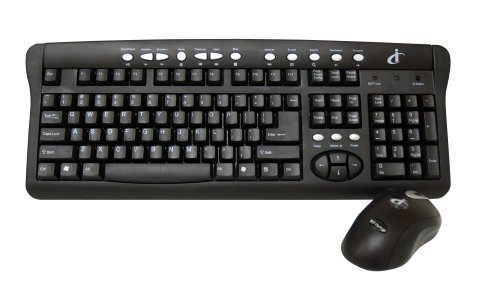
פיגורע 1: iConcepts Wireless Keyboard and Optical Mouse Combo 62150N. This image displays the full product, including the wireless keyboard with 11 one-touch internet and multimedia function keys, and the wireless optical 4D mouse. The USB receiver is also indicated.
2. סעטאַפּ אינסטרוקציעס
2.1. באַטאַרייע ייַנמאָנטירונג
The keyboard and mouse require batteries for operation. Please follow the steps below:
- פֿאַר די קלאַוויאַטור: Locate the battery compartment on the underside of the keyboard. Open the cover and insert two (2) AA batteries, ensuring correct polarity (+/-). Close the battery compartment cover securely.
- פֿאַר דער מויז: Locate the battery compartment on the underside of the mouse. Open the cover and insert two (2) AA batteries, ensuring correct polarity (+/-). Close the battery compartment cover securely.
Note: A total of four (4) AA batteries are required for the combo. Ensure batteries are fresh for optimal performance.
2.2. פֿאַרבינדן דעם USB ריסיווער
The wireless combo uses a single USB receiver to connect both the keyboard and mouse to your computer.
- געפֿינען אַן בנימצא וסב פּאָרט אויף דיין קאָמפּיוטער.
- שטעקט אריין דעם USB ריסיווער פעסט אין דעם USB פּאָרט.
- אייער אָפּערירן סיסטעם זאָל אויטאָמאַטיש דעטעקטירן און אינסטאַלירן די נייטיקע דרייווערס. דער פּראָצעס קען נעמען אַ פּאָר מינוט.
- אַמאָל די דרייווערס זענען אינסטאַלירט, זאָל די קלאַוויאַטור און מויז זיין גרייט פֿאַר באַנוץ.
Note: For best wireless performance, ensure the USB receiver is not obstructed and is placed within a reasonable range of the keyboard and mouse.
2.3. סיסטעם רעקווירעמענץ
- Operating System: Windows 98SE, 2000, ME, NT, XP, or Vista.
- פֿאַראַן USB פּאָרט.
3. אַפּערייטינג ינסטרוקטיאָנס
3.1. קלאַוויאַטור פאַנגקשאַנז
The keyboard operates like a standard QWERTY keyboard. In addition, it features dedicated hotkeys for enhanced functionality.
- נאָרמאַלע שליסלען: Use for typing text, numbers, and symbols.
- פונקציע קנעפּלעך (F1-F12): Perform specific tasks depending on the application.
- 11 Internet & Multimedia Hot Keys: These keys provide one-touch access to common internet and multimedia functions such as volume control, play/pause, stop, next/previous track, web browser, email, and more. Refer to the icons on the keys for their specific functions.
3.2. מויז פונקציעס
The optical mouse provides precise cursor control without a mouse ball.
- לינקס קנעפּל: ערשטיקע קליק פונקציע (למשל, אויסקלייבן זאכן, עפענען לינקס).
- רעכט קנעפּל: צווייטע קליק פונקציע (למשל, עפענען קאנטעקסט מעניוס).
- סקראָל ראָד: סקראָלן ווערטיקאַל דורך דאָקומענטן און web pages. The mouse also supports 4D vertical and horizontal scroll, tune scroll, and zoom control.
- אָפּטישע טראַקינג: The mouse uses an optical sensor for movement detection, providing smooth and accurate cursor movement on most surfaces.
4. וישאַלט
4.1. רייניקונג
To maintain the performance and appearance of your wireless combo:
- Wipe the surfaces of the keyboard and mouse with a soft, damp שטאָף.
- ויסמיידן ניצן שטרענגע כעמיקאַלן, אַברייסיוו רייניגער, אָדער סאָלוואַנץ.
- The keyboard features a spill-resistant design, but it is not waterproof. In case of spills, immediately disconnect the device and allow it to dry completely before reuse.
4.2. באַטערי פאַרבייַט
When the keyboard or mouse performance degrades (e.g., lag, unresponsiveness), it may be time to replace the batteries.
- פֿאָלגט די באַטעריע אינסטאַלאַציע טריט וואָס זענען אויסגעשריבן אין סעקציע 2.1.
- פּאָטער פון געוויינט באַטעריז לויט די היגע רעגיאַליישאַנז.
5. טראָובלעשאָאָטינג
If you encounter issues with your iConcepts Wireless Optical Mouse and Keyboard Combo, refer to the following common solutions:
| פּראָבלעם | מעגלעך סיבה | לייזונג |
|---|---|---|
| די קלאַוויאַטור אָדער מויז רעאַגירט נישט. | נידעריק אָדער טויט באַטעריז. | Replace batteries in the keyboard and/or mouse. |
| די קלאַוויאַטור אָדער מויז רעאַגירט נישט. | דער USB ריסיווער נישט ריכטיק פארבונדן. | זיכער מאַכן אַז דער USB ריסיווער איז פעסט אַרײַנגעשטעקט אין אַ פֿונקציאָנירנדיקן USB פּאָרט. פּרוּווט אַן אַנדער USB פּאָרט. |
| פאַרהאַלטונג אָדער ינטערמיטאַנט פֿאַרבינדונג. | Interference or distance from receiver. | Move the keyboard and mouse closer to the USB receiver. Ensure no large metal objects are between the devices and the receiver. Avoid placing the receiver near other wireless devices. |
| Cursor movement is erratic. | Mouse sensor obstructed or dirty. | Clean the optical sensor on the underside of the mouse with a soft, dry cloth. Ensure you are using the mouse on a suitable surface. |
| Hotkeys are not working. | Driver issue or application incompatibility. | Ensure your operating system is up to date. Some hotkeys may require specific software or may not be fully supported by all applications. |
6. ספּעסאַפאַקיישאַנז
| סאָרט | iConcepts |
| מאָדעל נומער | 62150N |
| קאַנעקטיוויטי טעכנאָלאָגיע | Radio Frequency, USB |
| קאָליר | שוואַרץ |
| ספּעציעלע פֿעיִקייטן | Wireless RF Connectivity, Optical Tracking, Extra Multimedia Hot Keys, Spill Resistant Keyboard |
| קאַמפּאַטאַבאַל דעוויסעס | פערזענלעכע קאָמפּיוטער |
| באַוועגונג דעטעקשאַן טעכנאָלאָגיע | אָפּטיש |
| אַפּערייטינג סיסטעם קאַמפּאַטאַבילאַטי | Windows 98SE, 2000, ME, NT, XP, Vista |
| Number of Keys (Keyboard) | Standard QWERTY layout with 11 multimedia hotkeys |
| מאַכט מקור | באַטאַרייע פּאַוערד |
| באַטעריז פארלאנגט | 4 AA batteries (2 for keyboard, 2 for mouse) |
| פּונקט וואָג | 2.95 פונט (אומגעפער 1.34 ק"ג) |
7. וואָראַנטי און שטיצן
For information regarding warranty coverage, technical support, or service inquiries, please refer to the documentation included with your purchase or contact iConcepts customer support directly.
ביטע האַלטן דיין דערווייַז פון קויפן פֿאַר וואָראַנטי קליימז.