
1. הקדמה און איבערview
The Netgear FS605-300PES is a 5-port 10/100 Mbps Fast Ethernet switch designed to expand your network connectivity. This unmanaged switch provides a simple and efficient way to connect up to five Ethernet-enabled devices to your network, such as computers, printers, and gaming consoles. It features automatic speed detection for 10 Mbps or 100 Mbps devices and Auto-Uplink (Auto MDI-X) functionality, which automatically adjusts for straight-through or crossover cables. The FS605 operates silently due to its fanless design and includes front-panel LED indicators for quick status monitoring.
2. פּעקל אינהאַלט
באַשטעטיקן אַז דיין פּעקל כּולל די פאלגענדע זאכן:
- Netgear FS605 Fast Ethernet Switch
- מאַכט אַדאַפּטער
- ינסטאַללאַטיאָן גייד
- וואָראַנטי פאַרשרייבונג קאַרד
- שטיצן אינפֿאָרמאַציע קאָרט
3. פּראָדוקט פֿעיִקייטן
- 5 Fast Ethernet Ports: Provides five 10/100 Mbps RJ-45 ports for network expansion.
- Auto-Uplink (Auto MDI-X): Automatically detects and adjusts for straight-through or crossover Ethernet cables on all ports.
- Full-Duplex Communication: Supports full-duplex mode for maximum data throughput.
- Flow Control (IEEE 802.3x): Ensures reliable data transmission by preventing packet loss during network congestion.
- קראָם-און-פאָרווערד אַרכיטעקטור: Improves network integrity by checking for errors before forwarding data.
- פאָכערלעסס פּלאַן: אַרבעט שטיל, פּאַסיק פֿאַר שטילע סביבות.
- LED ינדיקאַטאָרס: Front-panel LEDs display power, link status, and activity for each port.
- סאָליד פּלאַן: Small footprint for flexible placement.
4. סעטאַפּ
Follow these steps to set up your Netgear FS605 switch:
- פאַרבינדן די מאַכט אַדאַפּטער: Plug the included power adapter into the DC power input port on the rear of the switch. Connect the other end of the adapter to a standard electrical outlet. The Power LED on the front panel should illuminate.
- פֿאַרבינד זיך צו דיין נעץ: Connect an Ethernet cable from your router or modem to any of the five RJ-45 ports on the switch. The corresponding Link/Activity LED for that port will light up.
- פאַרבינדן דיווייסאַז: Connect your network devices (e.g., computer, laptop, printer, gaming console) to the remaining RJ-45 ports on the switch using standard Category 5 (or higher) Ethernet cables. The Link/Activity LED for each connected device's port will illuminate, indicating a successful connection.
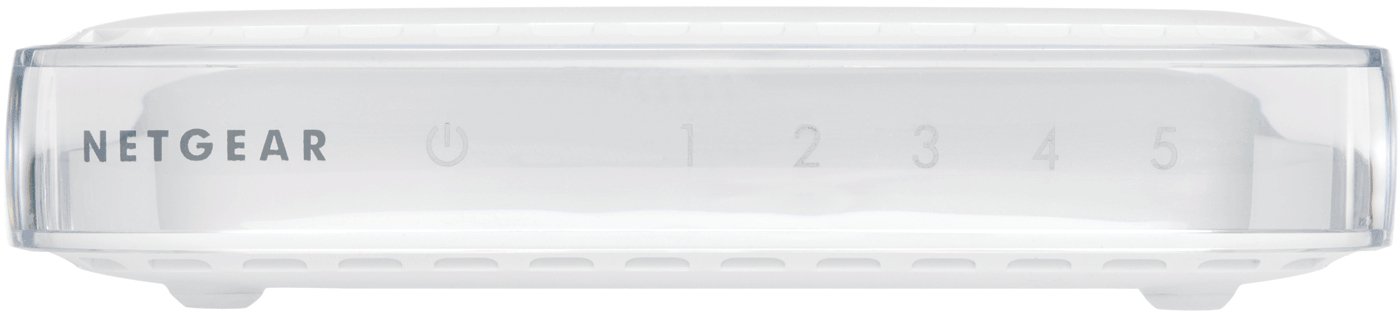
פיגורע 1: פראָנט view of the Netgear FS605-300PES switch, displaying the power indicator and five port status LEDs.

פיגורע 2: דערציען view of the Netgear FS605-300PES switch, illustrating the power input and the five Ethernet ports.
The switch is plug-and-play and does not require any software configuration.
5. אַפּערייטינג ינסטרוקטיאָנס
Once connected, the Netgear FS605 switch operates automatically. It functions as an unmanaged device, requiring no user intervention for basic network traffic management.
געפירט ינדיקאַטאָרס
- Power LED: לייכט זיך ווען דער קנעפּל איז אנגעצינדן.
- Link/Activity LEDs (1-5): Each port has a corresponding LED.
- שטאַרק גרין: ווײַזט אָן אַ גילטיקע נעץ פֿאַרבינדונג בײַ 100 Mbps.
- האַרט בורשטין: ווײַזט אָן אַ גילטיקע נעץ פֿאַרבינדונג בײַ 10 Mbps.
- פלאַשינג: Indicates network activity (data transmission or reception) on that port.
- אויסגעלאשן: No link detected or device is not connected.
6. וישאַלט
The Netgear FS605 switch requires minimal maintenance:
- רייניקונג: האַלט דעם אַפּאַראַט ריין און פֿרײַ פֿון שטויב. ניצט אַ ווייכן, טרוקענעם שטאָף פֿאַר רייניקונג. ניצט נישט פֿליסיגע אָדער אַעראָזאָל רייניגער.
- ווענטילאַטיאָן: Although fanless, ensure the switch is placed in a location with adequate airflow to prevent overheating. Do not block ventilation openings.
- סוויווע: Operate the switch within the specified temperature and humidity ranges (refer to Specifications section). Avoid direct sunlight, heat sources, and excessive moisture.
7. טראָובלעשאָאָטינג
If you encounter issues with your Netgear FS605 switch, refer to the following troubleshooting tips:
- קיין מאַכט: If the Power LED is off, ensure the power adapter is securely connected to both the switch and a working electrical outlet. Try a different outlet if necessary.
- קיין לינק/אַקטיוויטעט LED: If a Link/Activity LED does not illuminate for a connected device:
- Verify that the Ethernet cable is securely plugged into both the switch port and the device's network port.
- פּרוּווט אַן אַנדער עטערנעט קאַבל.
- זיכער מאַכן אַז די פֿאַרבונדענע דעוויס איז אנגעצינדן און אַז זײַן נעץ אַדאַפּטער פֿונקציאָנירט ריכטיק.
- פּרוּווט קאַנעקטינג די מיטל צו אַ אַנדערש פּאָרט אויף די באַשטימען.
- לאַנגזאַמע נעץ גיכקייט: If network performance is slower than expected:
- Check the Link/Activity LED color. Green indicates 100 Mbps, Amber indicates 10 Mbps. Ensure your devices and cables support 100 Mbps if desired.
- Ensure all connected devices are functioning optimally.
- Avoid using excessively long or damaged Ethernet cables. The maximum recommended cable length is 100 meters.
- ינטערמיטאַנט קאַנעקטיוויטי: If the switch occasionally stops functioning or loses connection, try restarting the device by unplugging and re-plugging the power adapter. If the issue persists, ensure the switch is not placed in an area prone to electromagnetic interference.
8. טעכניש ספּעסאַפאַקיישאַנז
| שטריך | באַשרייַבונג |
|---|---|
| מאָדעל | FS605-300PES |
| נומער פון פּאָרץ | 5 x 10/100 Mbps RJ-45 |
| דאַטאַ אַריבערפירן קורס | 100 מבפּס (שנעל עטהערנעט) |
| פּראָטאָקאָלס | IEEE 802.3i 10BASE-T, IEEE 802.3u 100BASE-TX, IEEE 802.3x Flow Control |
| באַשטימען מעטאַד | קראָם-און-פאָרויס |
| MAC אַדרעס טיש גרייס | 1024 איינסן |
| באַפער זכּרון | 128 קב |
| לייטאַנס | < 20 microseconds (for 64-byte frame, 100 Mbps to 100 Mbps) |
| מאַכט קאַנסאַמשאַן | 7.5 וו מאַקסימום |
| דימענסיעס (L X W X H) | 116.57 מם רענטגענ 89.75 מם רענטגענ 34.42 מם |
| וואָג | 0.13 ק"ג (130 גראַם) |
| אַפּערייטינג טעמפּעראַטור | 0°C צו 40°C (32°F צו 104°F) |
| סטאָרידזש טעמפּעראַטור | -20°C צו 70°C (-4°F צו 158°F) |
| אַפּערייטינג הומידיטי | 90% ניט-קאַנדענסינג |
| ראַש מדרגה | 0 dB (fanless) |
| מאַקס קאַבלע לענג | 100 מעטער (328 פֿיס) |
| ילעקטראָומאַגנעטיק העסקעם | CE mark, FCC Part 15 Class B, EN 55022 Class B, C-Tick, EN 55024 |
| סיסטעם קאַמפּאַטאַבילאַטי | Windows®, Mac® OS, NetWare®, Linux® |
9. וואָראַנטי און שטיצן
The Netgear FS605-300PES switch comes with a 3-יאָר פאַבריקאַנט ס וואָראַנטי. Please refer to the Warranty Registration Card included in your package for detailed terms and conditions.
For technical support, product registration, and additional resources, please refer to the Support Information Card provided with your product or visit the official Netgear support website. Keep your product's model number (FS605-300PES) and serial number handy when contacting support.