
הקדמה
This manual provides detailed instructions for the installation, operation, and maintenance of your Russound SDB4.1 Speaker Selector. The SDB4.1 is designed to distribute audio from up to two amplifiers to four pairs of speakers, featuring individual volume controls and impedance matching for optimal performance.
וויכטיק סאַפעטי אינפֿאָרמאַציע
- לייענען אַלע ינסטראַקשאַנז איידער אַפּערייטינג די מיטל.
- דו זאלסט נישט ויסשטעלן דעם אַפּפּליאַנסע צו רעגן אָדער נעץ.
- פאַרזיכערן געהעריק ווענטאַליישאַן אַרום די אַפּאַראַט.
- טרענט אפ די עלעקטריציטעט איידער איר מאכט קיין קאנעקשאנס אדער קארעקטורן.
- אָפּשיקן אַלע סערוויסעס צו קוואַלאַפייד סערוויס פּערסאַנעל.
פּעקל אינהאַלט
באַשטעטיקן אַז אַלע זאכן זענען פאַראַן:
- Russound SDB4.1 Speaker Selector
- ינסטרוקטיאָן מאַנואַל (דעם דאָקומענט)
- Printed room labels
פּראָדוקט איבערview
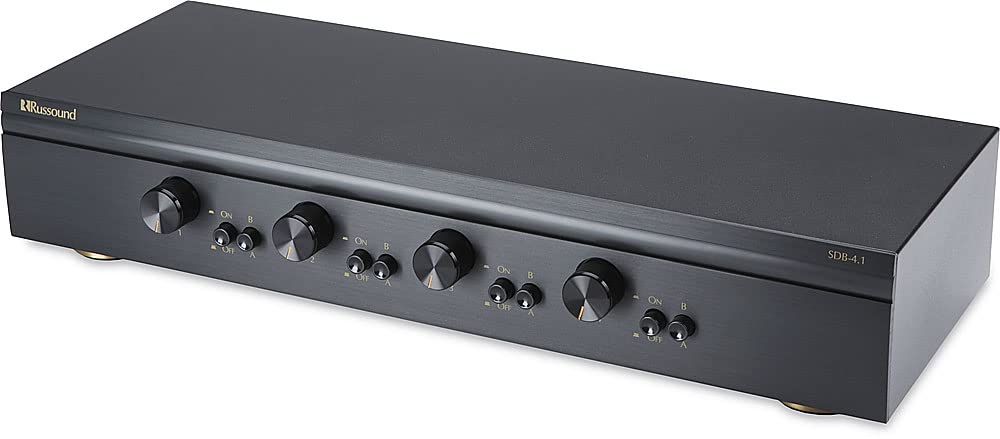
The Russound SDB4.1 is a high-quality speaker selector designed for multi-room audio distribution. It features dual amplifier inputs and supports up to four pairs of speakers, each with independent volume control. The unit incorporates autoformer-based impedance matching to maintain sound quality and protect your ampליפער.
דערציען פּאַנעל קאַנעקשאַנז
The rear panel of the SDB4.1 provides all necessary connections for amplifiers and speakers. It includes color-coded detachable snap connectors for easy wire termination.
- AMP א / AMP B Inputs: פאַרבינדן דיין amplifiers here. Each input supports Left (+) and (-), and Right (+) and (-) channels.
- SPEAKER 1-4 Outputs: Connect your speaker pairs here. Each output supports Left (+) and (-), and Right (+) and (-) channels.
סעטאַפּ
קסנומקס. פּלאַסעמענט
Place the SDB4.1 in a well-ventilated area, away from heat sources and direct sunlight. Ensure there is sufficient space around the unit for air circulation and cable management.
2. וויירינג קאַנעקשאַנז
איידער איר מאַכט קיין קאַנעקשאַנז, זיכער מאַכן אַז אייער amplifier(s) and the SDB4.1 are powered off and unplugged from the mains.
- פֿאַרבינדן רעדנערס: For each speaker pair, connect the speaker wires to the corresponding SPEAKER output terminals (SPEAKER 1, SPEAKER 2, etc.) on the SDB4.1. Ensure correct polarity (Left+, Left-, Right+, Right-). The detachable snap connectors are color-coded for ease of use.
- פאַרבינדן Ampליפיער(ס): Connect the speaker outputs from your amplifier(s) to the AMP א און / אָדער AMP B input terminals on the SDB4.1. If using a single amplifier, connect it to AMP A. If using two amplifiers, connect the first to AMP A and the second to AMP B. Maintain correct polarity.
3. Impedance Matching Settings
The SDB4.1 features selectable impedance matching to accommodate various speaker configurations (4-ohm or 8-ohm speakers) and protect your amplifier. The impedance matching setting is typically located inside the unit. It is crucial to verify and adjust this setting according to your speaker setup to prevent damage to your amplifier. Consult the internal diagrams or markings for the correct jumper or switch positions for 2X, 4X, or 8X impedance matching. The factory default setting may vary, so always confirm it before operation.
אָפּעראַציע
1. מאַכט אויף
אַמאָל אַלע קאַנעקשאַנז זענען זיכער, שטעקט עס אין און צינדט אָן אייער amplifier(s) and then the SDB4.1.
2. Selecting an Ampליפיער מקור
The SDB4.1 allows you to select between Amplifier A and Amplifier B for each speaker zone. Use the corresponding selector buttons on the front panel to choose the desired amplifier for each room.
3. Activating Speaker Zones
Each speaker zone has an individual button on the front panel. Press the button for the desired speaker zone to turn it on or off. Ensure the buttons are fully engaged when pressed.
4. אַדזשאַסטינג באַנד
Each speaker zone is equipped with a rotary volume control knob. Turn the knob clockwise to increase the volume and counter-clockwise to decrease it. The volume controls have twelve detent positions for precise adjustment.
וישאַלט
- רייניקונג: ניצט אַ ווייכע, טרוקענע שטאָף צו רייניקן די אויסערלעכע זייט פון דער אַפּאַראַט. ניצט נישט פליסיקע רייניקונגס-מיטל אדער אַעראָזאָל שפּריץ.
- ווענטילאַטיאָן: זיכער מאַכן אַז די ווענטילאַציע עפענונגען זענען נישט פארשטאפט.
- פֿאַרבינדונגען: קאָנטראָלירט פּעריִאָדיש אַלע וויירינג פֿאַרבינדונגען צו זיכער מאַכן אַז זיי זענען זיכער.
טראָובלעשאָאָטינג
| פּראָבלעם | מעגלעך סיבה | לייזונג |
|---|---|---|
| קיין געזונט פון ספּיקערז. |
|
|
| פארדרייט אדער שלעכטע קלאַנג קוואַליטעט. |
|
|
| Speaker zone button stuck. | מעטשאַניקאַל אַרויסגעבן. | Gently try to free the button. If it remains stuck, contact Russound customer support for assistance. |
ספּעסאַפאַקיישאַנז
| מאָדעל | SDB4.1 |
| Speaker Pairs Supported | 4 |
| Ampליפיער ינפּוץ | 2 (AMP A, AMP B) |
| מאַכט האַנדלינג | Up to 200W per channel RMS continuous |
| ימפּידאַנס מאַטטשינג | Selectable (accommodates 4- or 8-ohm speakers) |
| באַנד קאָנטראָלס | Individual per zone, 12 detent positions |
| דימענשאַנז (ב x ה x ד) | 18.43 x 4.76 x 9.65 inches (Product dimensions) |
| פּונקט וואָג | 8.82 פונט |
| קאָליר | שוואַרץ |
| קאַנעקשאַנז | Detachable snap connectors for bare speaker wire (L+ L- R+ R-) |
| פאַבריקאַנט | רוסאָונד |
באַמערקונג: די ספּעסאַפאַקיישאַנז קענען זיין געביטן אָן באַמערקן.
וואָראַנטי און שטיצן
For warranty information or technical support, please refer to the official Russound webזייטל אדער קאנטאקט זייער קאסטומער סערוויס דעפארטמענט. האלט אייער קויף קוויטל אלס באווייז פון קויפן פאר גאראנטיע קליימס.
Russound Contact Information:
- Webפּלאַץ: www.russound.com
- אָפּשיקן צו די website for current contact details and support resources.