
1. הקדמה
This manual provides instructions for the setup, operation, and maintenance of your Bose MediaMate Computer Speakers. These speakers are designed to enhance the audio experience for your computer, whether for music, movies, or gaming. The compact design and upward-angled sound projection optimize audio delivery for desktop use, occupying minimal desk space.
2. זיכערקייַט אינפֿאָרמאַציע
Please read and follow all safety instructions before using this product to prevent electric shock, fire, or injury. Keep this manual for future reference.
- שטעלט נישט אויס די רעדנערס צו וואַסער אָדער פייכטקייט.
- שטעלט נישט די רעדנערס לעבן היץ-קוואַלן ווי ראַדיאַטאָרן, היץ-רעגיסטערס, אויוון, אדער אַנדערע אַפּאַראַטן (אַרייַנגערעכנט ampליפיערס) וואָס פּראָדוצירן היץ.
- ניצן בלויז אַטאַטשמאַנץ / אַקסעסעריז ספּעסיפיעד דורך דער פאַבריקאַנט.
- אָפּשטויסן דעם אַפּאַראַט בעשאַס בליץ סטאָרמז אָדער ווען אַניוזד פֿאַר לאַנג פּיריאַדז.
- אָפּשיקן אַלע סערוויסעס צו קוואַלאַפייד סערוויס פּערסאַנעל. סערוויס איז פארלאנגט ווען דער אַפּאַראַט איז דאַמידזשד אין קיין וועג, אַזאַ ווי מאַכט צושטעלן שנור אָדער צאַפּן איז דאַמידזשד, פליסיק איז ספּילד אָדער אַבדזשעקץ זענען געפאלן אין די אַפּאַראַט, דער אַפּאַראַט איז יקספּאָוזד צו רעגן אָדער נעץ, אַרבעט נישט נאָרמאַלי , אָדער האט שוין דראַפּט.
3. פּעקל אינהאַלט
באַשטעטיקן אַז אַלע זאכן זענען פאַראַן אין דיין פּעקל:
- Bose MediaMate Computer Speakers (2 units)
- מאַכט אַדאַפּטער
- Audio Cable (3.5mm stereo jack)
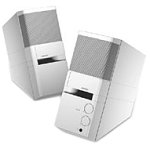
Image: The Bose MediaMate Computer Speakers in Gray. The image shows two compact speakers, one with visible volume and mix controls, and a headphone jack.
4. סעטאַפּ
Follow these steps to set up your Bose MediaMate Computer Speakers:
- אָרט: Place the speakers on a flat, stable surface on either side of your computer monitor. Ensure they are angled slightly upward towards your listening position for optimal sound.
- פאַרבינדן אַודיאָ קאַבל: Connect the 3.5mm audio cable from the back of the primary speaker (the one with controls) to the audio output jack on your computer.
- פאַרבינדן מאַכט: Plug the power adapter into the power input on the primary speaker, then plug the adapter into a wall outlet.
- מאַכט אויף: Turn on the speakers using the volume knob. The power indicator light should illuminate.
5. אַפּערייטינג ינסטרוקטיאָנס
Once set up, operating your MediaMate speakers is straightforward:
- באַנד קאָנטראָל: Use the large knob labeled "VOLUME" on the front of the primary speaker to adjust the overall sound level.
- מיש קאָנטראָל: The "MIX" knob allows you to blend audio from two different sources if you have a second device connected to the auxiliary input.
- כעדפאָון דזשאַק: For private listening, plug your headphones into the headphone jack located on the front of the primary speaker. This will mute the speakers.
- צוויי אינפּוץ: The speakers feature dual inputs, allowing you to connect and mix two audio sources simultaneously. For example, you can connect your computer and a portable music player.
6. וישאַלט
To ensure the longevity and optimal performance of your speakers:
- רייניקונג: Use a soft, dry cloth to clean the exterior surfaces of the speakers. Do not use liquid cleaners or aerosols.
- שטויב: Regularly dust the speaker grilles to prevent accumulation that could affect sound quality.
- סטאָרידזש: אויב איר לייגט די רעדנערס אויף פאר א לענגערע צייט, שטעלט זיי אפ פון עלעקטריציטעט און לייגט זיי אויף אין א קילן, טרוקענעם ארט.
7. טראָובלעשאָאָטינג
If you encounter issues with your Bose MediaMate speakers, refer to the following common problems and solutions:
| פּראָבלעם | מעגלעך סיבה | לייזונג |
|---|---|---|
| קיין געזונט |
|
|
| פאַרקרימט געזונט |
|
|
| נאָר איין רעדנער אַרבעט |
|
|
8. ספּעסאַפאַקיישאַנז
- סאָרט: באָסע
- מאָדעל: MediaMate
- קאַנעקטיוויטי: 3.5mm Audio Input, AC Power
- אַודיאָ רעזולטאַט: סטערעאָ
- רעדנער טיפּ: מולטימעדיאַ
- מאַטעריאַל: מעטאַל
- רעדנער גרייס: 6 Centimeters (Audio Driver)
- נומער וואָג: 3 פונט
- קאָליר: גרוי
9. וואָראַנטי און שטיצן
Bose MediaMate Computer Speakers come with a limited warranty. For specific warranty details and duration, please refer to the warranty card included with your product or visit the official Bose webפּלאַץ.
For technical support, product registration, or service inquiries, please contact Bose customer service:
- טעלעפֿאָן: 800-444-2673
- Webפּלאַץ: www.bose.com
Please have your product model number (MediaMate) and purchase date available when contacting support.