
1. הקדמה און איבערview
The Brother CTS-410-ES is a versatile 4-line executive phone system designed for efficient communication in office or home environments. It can function as a stand-alone unit or integrate into a larger system. Key features include a built-in caller ID, a 99-number call log, and a desktop data port for convenient access to line 4. This manual provides detailed instructions for setup, operation, maintenance, and troubleshooting to ensure optimal performance of your device.
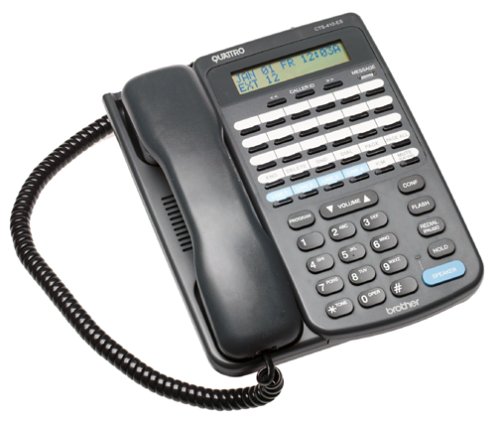
פראָנט view of the Brother CTS-410-ES 4-line executive phone system, showing the keypad, display, and line buttons.
2. זיכערקייַט אינפֿאָרמאַציע
Please read and follow these safety precautions to prevent damage to the unit and ensure your safety:
- דו זאלסט נישט ויסשטעלן די אַפּאַראַט צו וואַסער אָדער נעץ.
- ויסמיידן פּלייסינג די אַפּאַראַט לעבן היץ קוואלן אָדער דירעקט זונשייַן.
- ניצן בלויז די מאַכט אַדאַפּטער סאַפּלייד מיט די אַפּאַראַט.
- פרובירט נישט צו עפענען אדער פאררעכטן דעם איינהייט אליין. לאָזט איבער אלע סערוויסעס צו קוואַליפֿיצירטע פּערסאָנעל.
- Keep the unit away from strong electromagnetic fields.
3. פּעקל אינהאַלט
באַשטעטיקן אַז דיין פּעקל כּולל די פאלגענדע זאכן:
- Brother CTS-410-ES 4-Line Executive Phone System Unit
- אַק מאַכט אַדאַפּטער
- Telephone Line Cords (typically 4)
- Noise-Canceling Headset
- באַניצער מאַנואַל (דעם דאָקומענט)
4. סעטאַפּ
Follow these steps to set up your Brother CTS-410-ES phone system:
- פאַרבינדן מאַכט: Plug the AC power adapter into the power jack on the back of the phone unit, then plug the adapter into a standard electrical outlet.
- Connect Telephone Lines: Connect each telephone line cord from your wall jacks to the corresponding line jacks (Line 1, Line 2, Line 3, Line 4) on the back of the phone unit.
- פֿאַרבינדן כעדסעט: If using the included noise-canceling headset, plug it into the dedicated headset jack on the side or front of the phone unit.
- ערשט מאַכט אויף: The unit should power on automatically. The display will illuminate, and you may hear a brief self-test sequence.
5. אַפּערייטינג ינסטרוקטיאָנס
This section details the various functions and operations of your phone system.
5.1 גרונטלעכע רוף פונקציעס
- מאַכן אַ רוף: Lift the handset or press the SPEAKER button. Select an available line button (Line 1-4). Dial the desired number.
- ענטפֿערן אַ רוף: When the phone rings, lift the handset or press the SPEAKER button. The corresponding line button will flash.
- ענדיקן אַ רוף: Place the handset back in the cradle or press the SPEAKER button again if using the speakerphone.
- האַלטן: During a call, press the HOLD button to place the call on hold. Press the flashing line button to resume the call.
5.2 Caller ID and Call Log
- קאַללער שייַן: When a call comes in, the caller's name and number will appear on the display (if available from your service provider).
- רופן לאָג: The system stores up to 99 incoming calls. Use the navigation buttons (e.g., UP/DOWN arrows) to scroll through the call log.
- רופן פֿון רוף לאָג: Select an entry from the call log and press the DIAL or SPEAKER button to call back.
5.3 רעדנער און כעדסעט
- רעדנער טעלעפאן: Press the SPEAKER button to activate hands-free communication. Adjust volume using the volume controls.
- כעדסעט אָפּעראַציע: With the headset connected, press the HEADSET button (if available) or simply lift the handset to activate the headset for calls.
5.4 Intercom and Paging
- ינטערקאָם: If multiple CTS-410-ES units are connected, use the INTERCOM function to communicate between units. Refer to your system's specific intercom setup.
- בלעטער: Use the PAGING function to broadcast an announcement to other connected units.
5.5 Message Waiting Light and Data Port
- Message Waiting Light: A dedicated light will illuminate to indicate new messages (requires compatible voicemail service from your provider).
- Desktop Data Port: The data port provides quick access to Line 4, allowing you to connect a modem or other data device.
6. וישאַלט
Proper maintenance ensures the longevity and performance of your phone system.
- רייניקונג: Wipe the unit with a soft, dry cloth. Do not use liquid or aerosol cleaners.
- סטאָרידזש: If storing the unit for an extended period, disconnect it from power and telephone lines. Store in a cool, dry place.
- שנור מאַנאַגעמענט: Ensure all cords are free from kinks or damage. Replace damaged cords immediately.
7. טראָובלעשאָאָטינג
If you encounter issues with your phone system, try these common solutions:
| פּראָבלעם | מעגלעך לייזונג |
|---|---|
| קיין רעדל טאָן | Check all telephone line connections. Ensure the power adapter is securely plugged in. Test with a different phone line if possible. |
| קאַללער אידענטיפיקאַציע ווערט נישט געוויזן | Verify that Caller ID service is activated with your telephone service provider. Ensure the phone is connected to a compatible line. |
| Speakerphone audio is low or distorted | Adjust the speaker volume. Ensure the microphone is not obstructed. Move closer to the unit. |
| Message waiting light not working | Confirm that you have voicemail service with your provider and that it is properly configured. |
8. ספּעסאַפאַקיישאַנז
Technical specifications for the Brother CTS-410-ES phone system:
| שטריך | דעטאַל |
|---|---|
| סאָרט | ברודער |
| מאָדעל נומער | CTS-410-ES |
| טיפּ פון טעלעפאָן | קאָרדעד |
| נומער פון שורות | 4 |
| מאַכט מקור | קאָרדעד עלעקטריק |
| דיאַלער טיפּ | איין קיפּאַד |
| נומער דימענשאַנז (L X W X H) | 17.8 X 22.9 X 10.8 סענטימעטער |
| ענטפער סיסטעם טיפּ | דיגיטאַל |
| קאָנפֿערענץ רוף מעגלעכקייט | 4 וועג |
| מולטיליין אפעראציע | יא |
| רופער אידענטיפיקאציע | יא |
| רעקאָרדינג קאַפּאַציטעט | 20 Minutes (for answering system, if applicable) |
| יקספּאַנדאַבאַל | Yes, with other optional CTS410ES units |
| Call Log Memory | 99 נומערן |
| כעדסעט דזשאַק | יא |
| Desktop Data Port | Yes (for Line 4) |
9. וואָראַנטי און שטיצן
This Brother CTS-410-ES product comes with a 90-טאָג לימיטעד וואָראַנטי. For warranty claims or technical assistance, please contact Brother customer support. Keep your purchase receipt as proof of purchase.
For further support, visit the official Brother support webזייטל אדער באַראַטן זיך מיט אייער לאָקאַלן הענדלער.